




Android developers and software architects
Planning the initial architecture for a library-related Android app
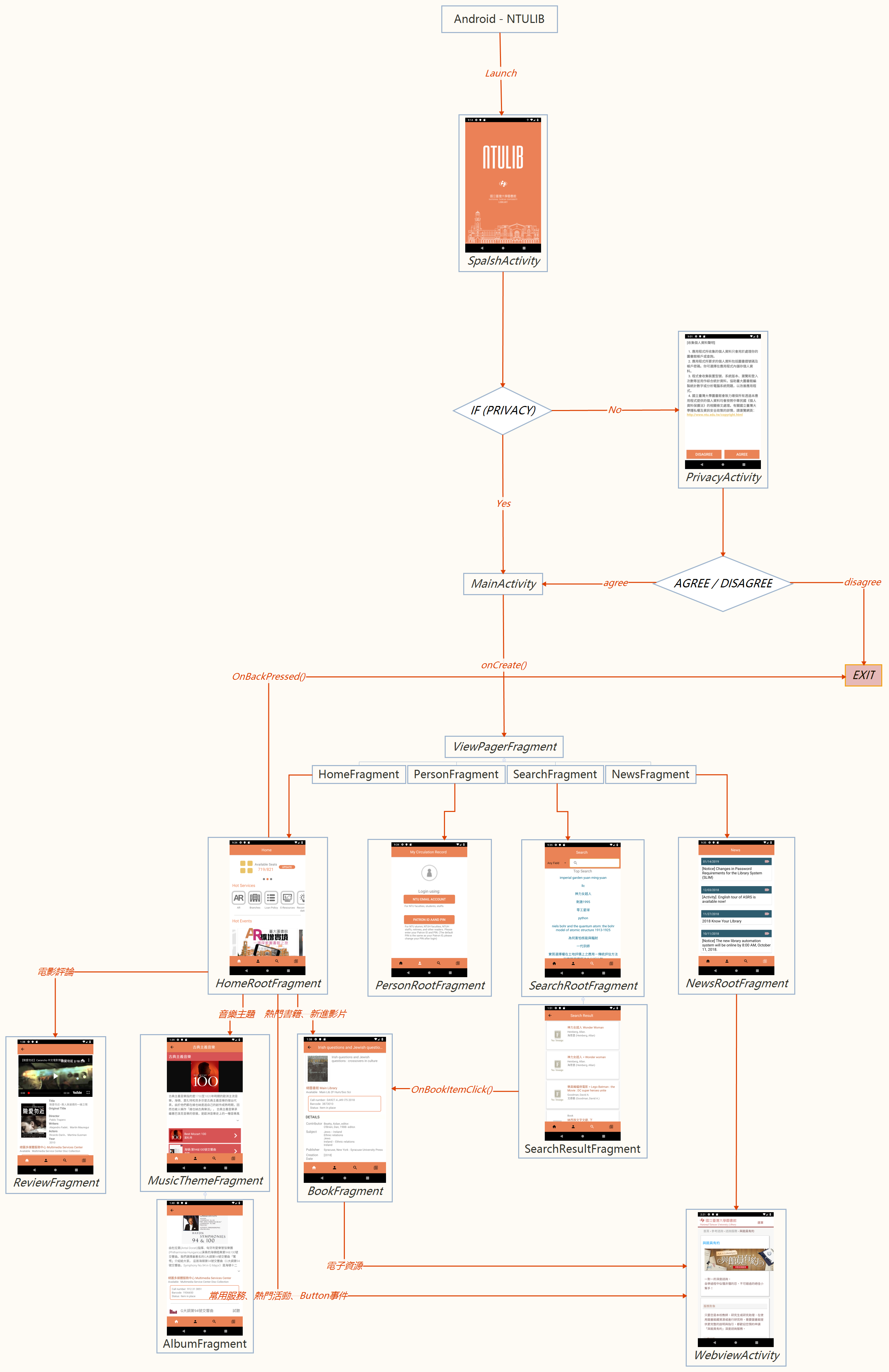
The Android - NTULIB mind map template provides a structural overview of an Android application for the NTU Library system, covering 22 nodes across key components such as activities, fragments, and navigation logic. It includes specific nodes like 'MainActivity', 'ViewPagerFragment' (with child fragments 'HomeFragment', 'PersonFragment', 'SearchFragment', 'NewsFragment'), and 'MusicThemeFragment' (with 'AlbumFragment'). This template serves as a cheat sheet for developers to visualize the app's architecture, including conditional flows like 'if (PRIVACY)' leading to 'PrivacyActivity' or 'exit', and a 'Agree / Disagree' decision point. The layout is organized as a hierarchical tree rooted at 'Android - NTULIB', making it ideal for Android developers planning or documenting library-related mobile apps.
Terms and ConditionsPlanning the initial architecture for a library-related Android app
Documenting an existing NTU Library app for onboarding new team members
Reviewing the navigation flow and fragment hierarchy during a code review
Open the template in Xmind to explore the tree structure starting from the root node to understand the activity and fragment hierarchy.
Double-click nodes to rename them according to your class names and add new branches to extend the architecture with additional features.
Save your customized architecture and export the mind map as an image or PDF to share the technical documentation with your team.
It is used to visualize the architecture of an Android app for NTU Library, including activities, fragments, and navigation flows like the ViewPager tabs and privacy consent.
It includes MainActivity, ViewPagerFragment (with Home, Person, Search, News fragments), PrivacyActivity, SpalshActivity, MusicThemeFragment, BookFragment, and more.
The 'if (PRIVACY)' node branches to 'PrivacyActivity' or 'exit', showing a conditional check for user privacy agreement.
Yes, you can open the .xmind file in Xmind and replace node names like 'MainActivity' or 'HomeFragment' with your own classes.
Yes, the 'SearchRootFragment' node contains a 'SearchResultFragment' child, representing search functionality.
Yes, it provides a clear hierarchical view of common Android components, useful for understanding app structure.
Share your mind map templates with creators around the world and start earning from your work.

