


'%3e%3cpath%20d='M6.42532%207.40439C6.16072%207.40439%205.94575%207.48708%205.78037%207.65244C5.615%207.80127%205.53231%208.01627%205.53231%208.2974V23.7018C5.53231%2023.9664%205.615%2024.1813%205.78037%2024.3467C5.94575%2024.5122%206.16072%2024.5947%206.42532%2024.5947H8.4842C8.76533%2024.5947%208.98032%2024.5203%209.12916%2024.3715C9.29452%2024.2062%209.3772%2023.9829%209.3772%2023.7018V8.2974C9.3772%208.01627%209.29452%207.80127%209.12916%207.65244C8.98032%207.48708%208.76533%207.40439%208.4842%207.40439H6.42532ZM3.42383%208.09895C3.42383%207.25556%203.67188%206.57753%204.168%206.06487C4.68064%205.55223%205.3504%205.2959%206.17727%205.2959H8.68264C9.52604%205.2959%2010.2041%205.55223%2010.7167%206.06487C11.2294%206.561%2011.4857%207.23075%2011.4857%208.07414V11.7702C11.6841%2011.7206%2011.8991%2011.6958%2012.1306%2011.6958H16.7197H16.9677L16.6949%2010.7532C16.5957%2010.4224%2016.5461%2010.1165%2016.5461%209.83535C16.5461%209.24001%2016.7197%208.72737%2017.0669%208.2974C17.4308%207.85089%2017.9353%207.54495%2018.5801%207.37958L20.9615%206.75943C21.2095%206.69329%2021.4825%206.66022%2021.7801%206.66022C22.425%206.66022%2022.9791%206.84212%2023.4421%207.20595C23.9217%207.56975%2024.2524%208.07414%2024.4343%208.7191L28.4529%2022.5358C28.5356%2022.8667%2028.5769%2023.1643%2028.5769%2023.429C28.5769%2024.0243%2028.3949%2024.5451%2028.0311%2024.9917C27.6839%2025.4382%2027.1877%2025.7442%2026.5428%2025.9094L24.1615%2026.5048C23.8306%2026.5875%2023.5413%2026.6288%2023.2932%2026.6288C22.6813%2026.6288%2022.1356%2026.4469%2021.6561%2026.0832C21.193%2025.7194%2020.8705%2025.2149%2020.6887%2024.5699L19.498%2020.4522V23.9002C19.498%2024.7437%2019.2417%2025.4216%2018.729%2025.9342C18.2329%2026.4469%2017.5714%2026.7032%2016.7445%2026.7032H12.1803C11.4692%2026.7032%2010.8904%2026.5296%2010.4439%2026.1824C9.98082%2026.5296%209.41028%2026.7032%208.73226%2026.7032H6.22688C5.38348%2026.7032%204.70546%2026.4469%204.1928%2025.9342C3.68015%2025.4382%203.42383%2024.7766%203.42383%2023.9498V8.09895ZM12.3787%2013.8043C12.1141%2013.8043%2011.8991%2013.887%2011.7337%2014.0523C11.5684%2014.2012%2011.4857%2014.4162%2011.4857%2014.6973V23.7018C11.4857%2023.9664%2011.5684%2024.1813%2011.7337%2024.3467C11.8991%2024.5122%2012.1141%2024.5947%2012.3787%2024.5947H16.4964C16.7777%2024.5947%2016.9925%2024.5203%2017.1413%2024.3715C17.3068%2024.2062%2017.3895%2023.9829%2017.3895%2023.7018V14.6973C17.3895%2014.4162%2017.3068%2014.2012%2017.1413%2014.0523C16.9925%2013.887%2016.7777%2013.8043%2016.4964%2013.8043H12.3787ZM19.3988%209.33924C18.9522%209.47153%2018.729%209.73614%2018.729%2010.133C18.729%2010.1992%2018.7455%2010.2984%2018.7786%2010.4307L22.673%2023.8506C22.8385%2024.2971%2023.1196%2024.5203%2023.5165%2024.5203C23.6322%2024.5203%2023.7233%2024.5122%2023.7893%2024.4955L25.7242%2023.9498C26.1708%2023.8176%2026.394%2023.553%2026.394%2023.156C26.394%2023.0899%2026.3773%2022.9907%2026.3444%2022.8584L22.4746%209.46327C22.4085%209.24828%2022.301%209.08291%2022.1522%208.96715C22.0199%208.83486%2021.8628%208.76871%2021.6809%208.76871C21.6148%208.76871%2021.5154%208.78524%2021.3833%208.81831L19.3988%209.33924Z'%20fill='%23FF9334'/%3e%3c/g%3e%3cdefs%3e%3cclipPath%20id='clip0_11502_53285'%3e%3crect%20width='32'%20height='32'%20fill='white'/%3e%3c/clipPath%3e%3c/defs%3e%3c/svg%3e)

Novelists and creative writers
Starting a new novel and need to outline the plot, characters, and structure.
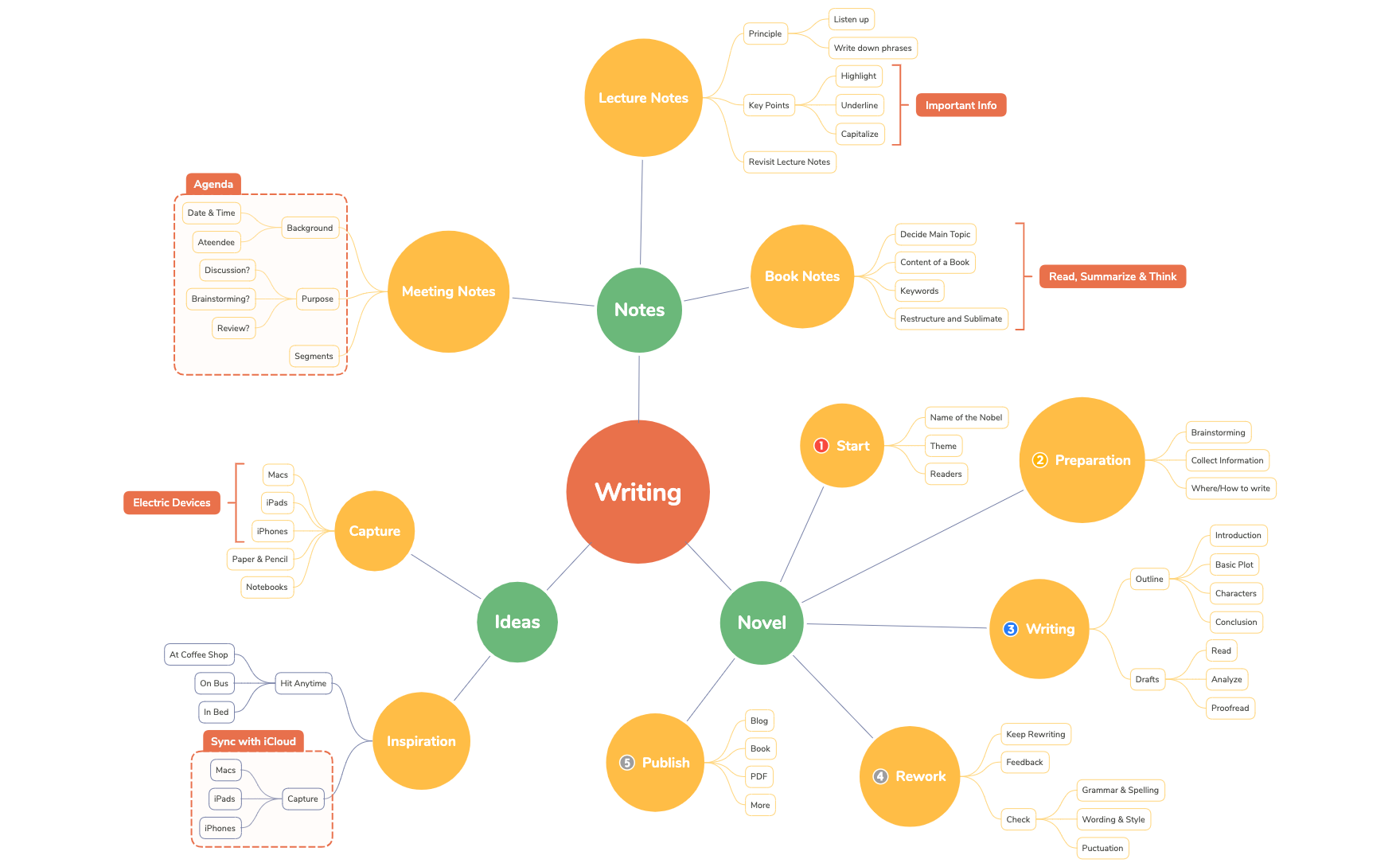
The Writing mind map template from Xmind provides a structured framework for writers to manage the entire writing lifecycle, from initial idea capture to final publication. With 75 nodes organized across 12 major branches, it covers Meeting Notes, Ideas, Novel, Capture, Writing, Preparation, Inspiration, Publish, Rework, Start, Book Notes, and Lecture Notes. The template includes specific nodes like 'Outline' with sub-nodes 'Introduction', 'Basic Plot', 'Characters', and 'Conclusion', as well as 'Rework' with a 'Check' section covering 'Grammar & Spelling', 'Wording & Style', and 'Puctuation'. This comprehensive mind map serves as an all-in-one writing cheat sheet for authors, students, and professionals.
利用規約Starting a new novel and need to outline the plot, characters, and structure.
Preparing for a client meeting and want to capture background, purpose, and key discussion segments.
Revising a draft and need a systematic checklist for grammar, style, and feedback integration.
Open the template in Xmind to explore the 12 major branches including Preparation, Writing, and Rework.
Replace the placeholder text in specific nodes like Outline or Characters with your own creative content and ideas.
Add new child nodes using the Tab key and apply custom styles or icons before exporting your final writing plan.
The template includes 75 nodes covering 12 key areas: Meeting Notes, Ideas, Novel, Capture, Writing, Preparation, Inspiration, Publish, Rework, Start, Book Notes, and Lecture Notes. Each branch has detailed sub-nodes like 'Outline' and 'Drafts'.
Start with the 'Start' branch to define your novel's name, theme, and target readers. Then use 'Preparation' for brainstorming and research, 'Writing' to outline and draft, and 'Rework' to revise based on feedback.
Yes, the template is fully editable. You can add, remove, or rearrange nodes, change colors and icons, and export it as an image, PDF, or other formats.
Absolutely. The 'Lecture Notes' branch provides a 'Principle' node (Listen up, Write down phrases) and 'Key Points' (Highlight, Underline, Capitalize, Important Info) to capture and organize lecture content.
The 'Capture' branch lists devices and methods for capturing ideas anytime, including Macs, iPads, iPhones, Paper & Pencil, Notebooks, and Electric Devices.
あなたのマインドマップ テンプレートを世界中のクリエイターと共有して、作品から収入を得ましょう。

