


'%3e%3cpath%20d='M4.7998%204.80029V24.8003C4.7998%2026.1283%205.8718%2027.2003%207.1998%2027.2003H27.1998'%20stroke='%234FA49A'%20stroke-width='1.92'%20stroke-linecap='round'%20stroke-linejoin='round'/%3e%3cpath%20d='M8.7998%2020.8001L14.3998%2015.2001L18.3998%2018.4001L25.5998%209.6001'%20stroke='%234FA49A'%20stroke-width='1.92'%20stroke-linecap='round'%20stroke-linejoin='round'/%3e%3cpath%20d='M20.7998%209.6001H25.5998V14.4001'%20stroke='%234FA49A'%20stroke-width='1.92'%20stroke-linecap='round'%20stroke-linejoin='round'/%3e%3c/g%3e%3cdefs%3e%3cclipPath%20id='clip0_11502_53026'%3e%3crect%20width='32'%20height='32'%20fill='white'/%3e%3c/clipPath%3e%3c/defs%3e%3c/svg%3e)

Digital analysts and marketing managers
Building a custom report filter to isolate traffic from specific URL patterns in Google Analytics.
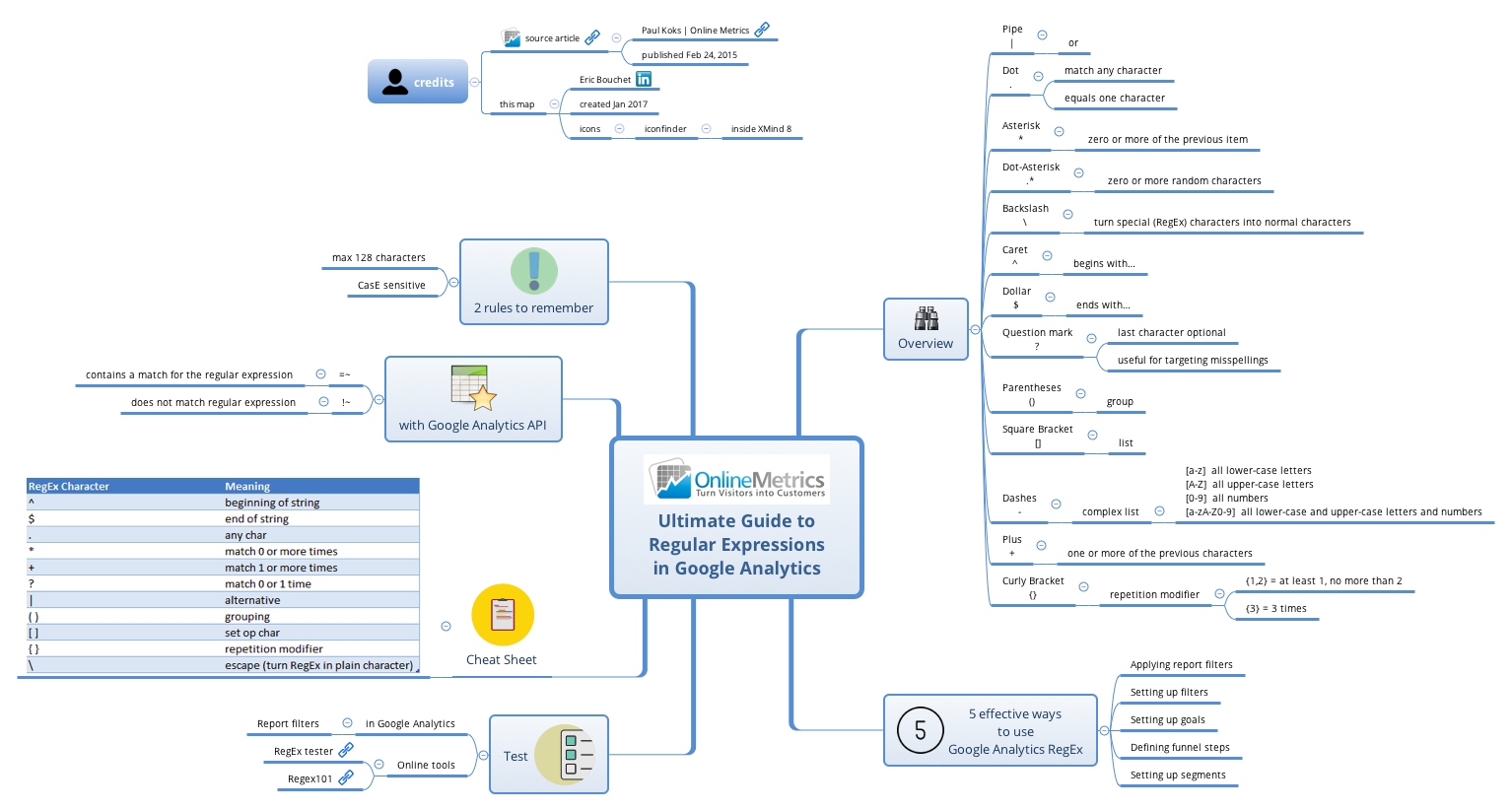
The 'Ultimate Guide to Regular Expressions in Google Analytics' mind map template by Eric Bouchet (based on Paul Koks' OnlineMetrics article) is a 65-node cheat sheet and reference for using RegEx in Google Analytics. It covers 12 essential RegEx characters (Pipe |, Dot ., Asterisk *, Dot-Asterisk .*, Backslash \, Caret ^, Dollar $, Question mark ?, Parentheses (), Square Bracket [], Plus +, Curly Bracket {}) with examples, plus 5 effective use cases (Applying report filters, Setting up filters, Setting up goals, Defining funnel steps, Setting up segments), online test tools (RegEx tester, Regex101), and API operators (=~ and !~). The template also includes 2 rules to remember (max 128 characters, case sensitive) and a Cheat Sheet section. This regular expressions cheat sheet is ideal for digital analysts, marketers, and SEO professionals who need a quick reference for RegEx in Google Analytics.
Terms and ConditionsBuilding a custom report filter to isolate traffic from specific URL patterns in Google Analytics.
Setting up a goal funnel that requires matching a series of page paths with optional parameters.
Creating a segment to analyze users who visited pages containing a certain keyword in the URL.
Download the .xmind file and open it in the Xmind application to begin exploring the RegEx cheat sheet.
Browse the overview of twelve essential characters and five practical Google Analytics use cases to understand how to build effective patterns.
Use the included testing tool links to validate your expressions and add your own frequently used patterns to the personalized cheat sheet branch.
The template includes 65 nodes covering 12 RegEx characters, 5 effective use cases, online test tools, API operators, and a cheat sheet. It's a comprehensive reference for using RegEx in Google Analytics.
Navigate to the '5 effective ways to use Google Analytics RegEx' branch and select 'Setting up filters'. Use the RegEx characters explained in the Overview to build filter patterns, and test them using the tools in the Test section.
Yes, the template is free to download and fully editable in Xmind. You can add your own RegEx examples, modify the cheat sheet, or expand the use cases to fit your workflow.
The template highlights two rules: RegEx patterns are limited to max 128 characters, and they are case sensitive. These are critical for building accurate filters and segments.
Yes, the 'with Google Analytics API' branch explains the =~ and !~ operators, which are used to match or exclude patterns in API queries. The template provides a solid foundation for API RegEx usage.
Share your mind map templates with creators around the world and start earning from your work.

