




Project managers and team leads
Kicking off a busy work week with multiple deadlines and interruptions
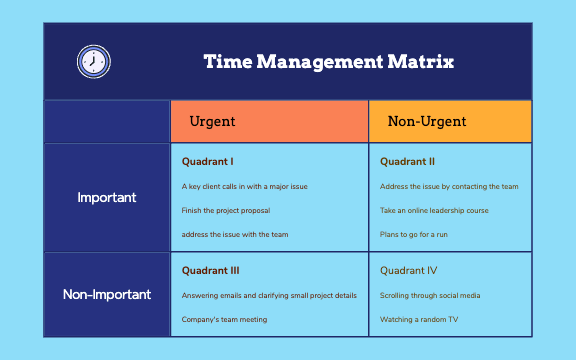
The Time Management Matrix mind map template, based on Stephen Covey's framework, helps users categorize tasks into four quadrants by urgency and importance. With 17 nodes across a single sheet, it covers concrete examples like 'A key client calls in with a major issue' (Quadrant I), 'Take an online leadership course' (Quadrant II), 'Answering emails and clarifying small project details' (Quadrant III), and 'Scrolling through social media' (Quadrant IV). This Time Management Matrix template is ideal for professionals and students seeking to prioritize effectively. The Time Management Matrix cheat sheet provides a visual layout of the four quadrants, enabling quick task sorting and time optimization.
Terms and ConditionsKicking off a busy work week with multiple deadlines and interruptions
Preparing for a quarterly review to identify time-wasting activities
Teaching time management principles in a workshop or class
Open the .xmind file in Xmind (desktop, web, or mobile app).
Review the four quadrants and their example tasks to understand the matrix structure.
Replace the example tasks (e.g., 'Finish the project proposal') with your own tasks by clicking on the node and typing.
Add new nodes by pressing Enter or Tab to expand any quadrant with additional tasks.
Customize colors, icons, or priorities using Xmind's formatting tools, then export or share as needed.
The template includes a single sheet with 17 nodes organized into four quadrants: Urgent/Important, Non-Urgent/Important, Urgent/Not Important, and Non-Urgent/Not Important, each with specific task examples.
Open the .xmind file in Xmind, then drag your own tasks into the appropriate quadrants. Replace the example tasks like 'Finish the project proposal' with your actual to-dos to visualize priorities.
Yes, the template is fully editable in Xmind (desktop, web, or mobile). You can customize node text, add icons, and export as PDF or image for printing.
Quadrant II (Non-Urgent & Important) focuses on long-term goals like 'Take an online leadership course', while Quadrant IV (Non-Urgent & Not Important) includes distractions like 'Scrolling through social media'.
Absolutely. Share the Xmind file with your team and collaboratively assign tasks to quadrants. Examples like 'Address the issue with the team' help illustrate urgent team matters.
Share your mind map templates with creators around the world and start earning from your work.
