


'%3e%3cpath%20d='M7%2010C8.65685%2010%2010%208.65685%2010%207C10%205.34315%208.65685%204%207%204C5.34315%204%204%205.34315%204%207C4%208.65685%205.34315%2010%207%2010Z'%20stroke='%234FA49A'%20stroke-width='1.92'/%3e%3cpath%20d='M10.5%207.2002H19.2C21.856%207.2002%2024%209.3442%2024%2012.0002C24%2014.6562%2021.856%2016.8002%2019.2%2016.8002H12.8C10.144%2016.8002%208%2018.9442%208%2021.6002C8%2024.2562%2010.144%2026.4002%2012.8%2026.4002H20.8'%20stroke='%234FA49A'%20stroke-width='2.2'%20stroke-linecap='round'%20stroke-linejoin='round'/%3e%3cpath%20d='M22.3882%2029.4343C22.1221%2029.6265%2021.8905%2029.7226%2021.6933%2029.7226C21.511%2029.7226%2021.3681%2029.6437%2021.2646%2029.486C21.1611%2029.3283%2021.1094%2029.0992%2021.1094%2028.7986V24.0159C21.1094%2023.7153%2021.1611%2023.4837%2021.2646%2023.3211C21.3681%2023.1585%2021.511%2023.0771%2021.6933%2023.0771C21.8905%2023.0771%2022.1196%2023.1683%2022.3808%2023.3507L25.6481%2025.6939C25.9437%2025.9058%2026.0916%2026.1399%2026.0916%2026.3962C26.0916%2026.6426%2025.9487%2026.8692%2025.6628%2027.0762L22.3882%2029.4343Z'%20fill='%234FA49A'/%3e%3c/g%3e%3cdefs%3e%3cclipPath%20id='clip0_11502_53067'%3e%3crect%20width='32'%20height='32'%20fill='white'/%3e%3c/clipPath%3e%3c/defs%3e%3c/svg%3e)

UX designers and chatbot developers
Designing a conversational commerce chatbot for an online electronics store
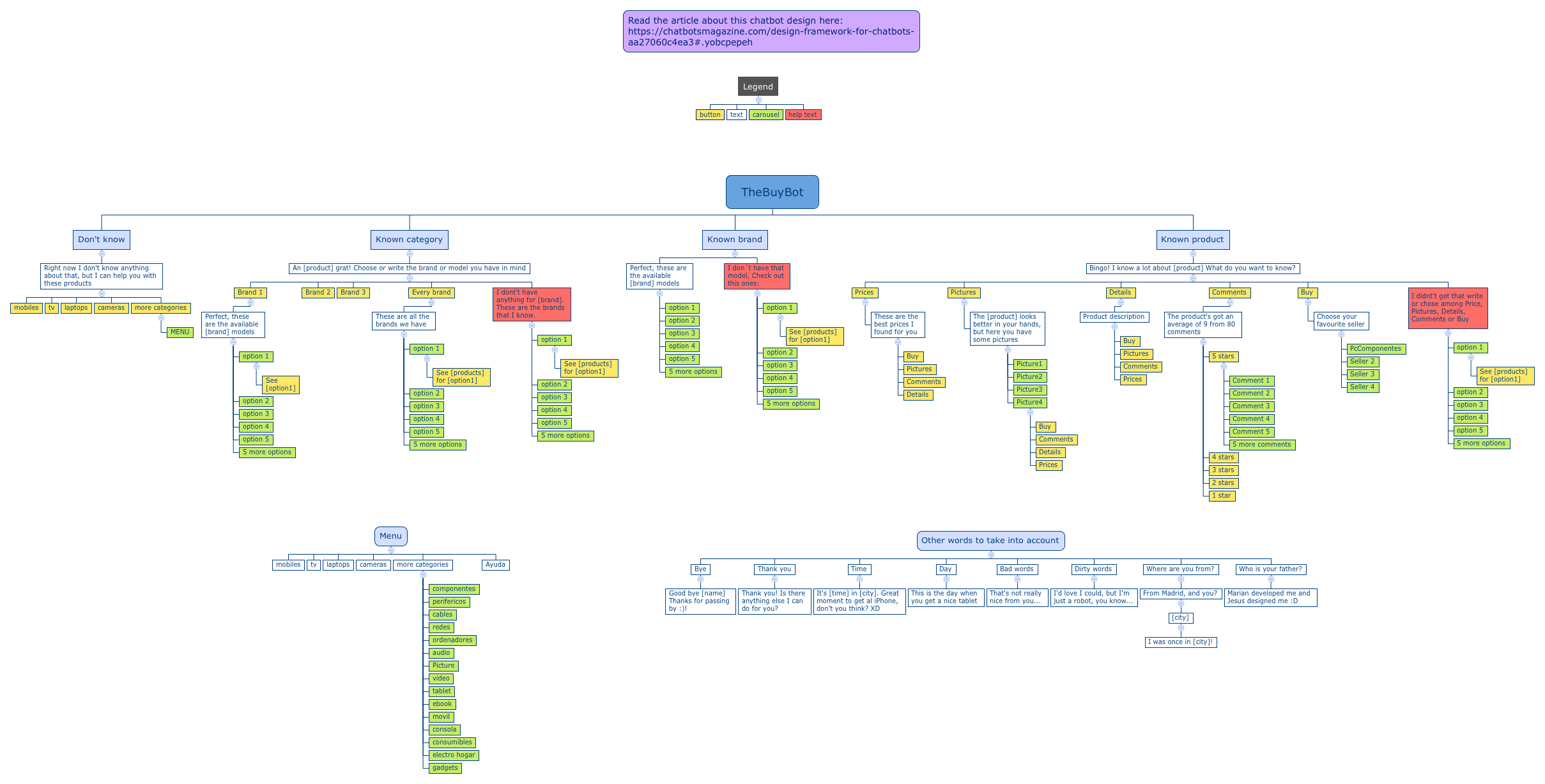
TheBuyBot is a chatbot UX design interaction flow mind map template that maps out a complete conversational commerce experience for product discovery and purchase. With 153 nodes organized into 8 main branches, it covers user intents from 'Don't know' to 'Known product', including fallback responses and menu navigation. The template includes specific interaction flows such as 'An [product] grat! Choose or write the brand or model you have in mind' and 'Bingo! I know a lot about [product] What do you want to know?', which guide users through category selection, brand filtering, and product details like Prices, Pictures, and Comments. Designed for e-commerce chatbot developers, this Xmind template provides a ready-to-use conversation structure that can be customized for any product catalog.
이용약관Designing a conversational commerce chatbot for an online electronics store
Mapping out user intent flows for a product recommendation bot
Creating a fallback strategy for unrecognized user inputs in a chatbot
Open the .xmind file to explore the eight main branches covering user intents from product discovery to specific brand inquiries.
Replace the template placeholders like product and brand with your specific catalog items and update the menu branch categories.
Refine the conversational flow for your chatbot and export the final mind map as an image or PDF for your development team.
The template includes 153 nodes covering user intents like 'Don't know', 'Known category', 'Known brand', and 'Known product', plus a Menu, Legend, and fallback responses for greetings, bad words, and time queries.
Open the .xmind file in Xmind, then replace placeholder values like [product] and [brand] with your actual catalog items. Customize the menu categories and product details to match your inventory.
Yes, the template is fully editable in Xmind (desktop or web). You can modify any node, add new branches, and export the flow for development.
The Legend defines visual UI elements such as button, text, carousel, and help text, helping designers and developers maintain consistent interaction patterns across the chatbot.
Absolutely. The 'Known product' branch includes sub-nodes for Prices, Pictures, Details, Comments, and Buy. You can edit these to link to your actual product data or API endpoints.
전 세계 크리에이터와 마인드맵 템플릿을 공유하고 작품으로 수익을 창출하세요.

