


'%3e%3cpath%20d='M9.59961%204H22.3996'%20stroke='%23FF9334'%20stroke-width='1.92'%20stroke-linecap='round'/%3e%3cpath%20d='M12.0001%204V12.8L7.20006%2025.6C6.72006%2026.928%207.68006%2028%209.12006%2028H22.8801C24.3201%2028%2025.2801%2026.928%2024.8001%2025.6L20.0001%2012.8V4'%20stroke='%23FF9334'%20stroke-width='1.92'%20stroke-linecap='round'%20stroke-linejoin='round'/%3e%3cpath%20d='M9.12012%2019.2002H22.8801'%20stroke='%23FF9334'%20stroke-width='1.92'/%3e%3cpath%20d='M12%2024C12.5523%2024%2013%2023.5523%2013%2023C13%2022.4477%2012.5523%2022%2012%2022C11.4477%2022%2011%2022.4477%2011%2023C11%2023.5523%2011.4477%2024%2012%2024Z'%20fill='%23FF9334'/%3e%3cpath%20d='M19.5%2024C20.3284%2024%2021%2023.3284%2021%2022.5C21%2021.6716%2020.3284%2021%2019.5%2021C18.6716%2021%2018%2021.6716%2018%2022.5C18%2023.3284%2018.6716%2024%2019.5%2024Z'%20fill='%23FF9334'/%3e%3cpath%20d='M16%2026C16.5523%2026%2017%2025.5523%2017%2025C17%2024.4477%2016.5523%2024%2016%2024C15.4477%2024%2015%2024.4477%2015%2025C15%2025.5523%2015.4477%2026%2016%2026Z'%20fill='%23FF9334'/%3e%3c/g%3e%3cdefs%3e%3cclipPath%20id='clip0_11502_53328'%3e%3crect%20width='32'%20height='32'%20fill='white'/%3e%3c/clipPath%3e%3c/defs%3e%3c/svg%3e)

Science teachers and homeschool educators
Preparing a middle school astronomy lesson on planetary classification
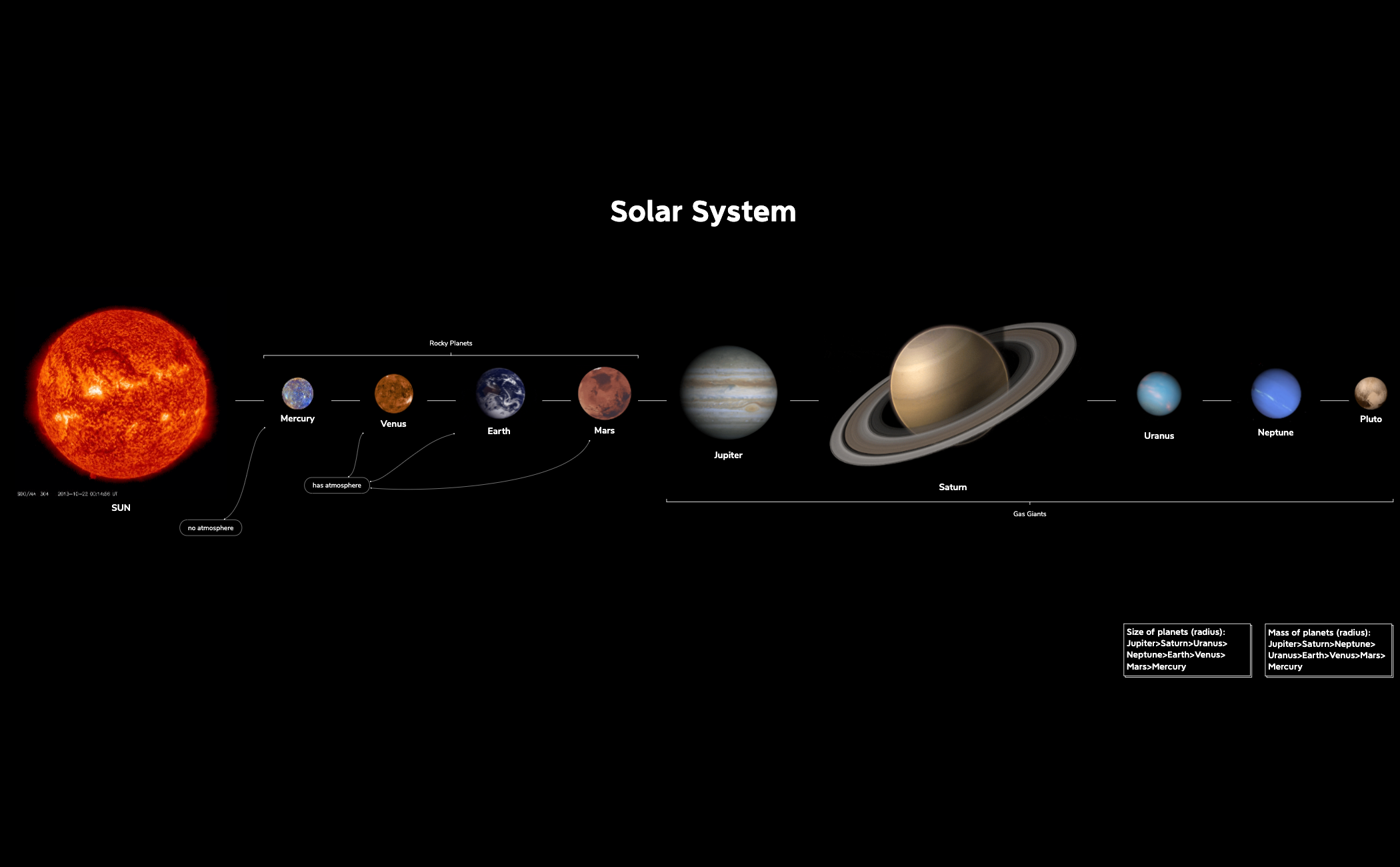
The Solar System mind map template offers a structured overview of the Sun, the eight planets, and Pluto, with 17 nodes covering key attributes such as atmosphere, size, and mass. Designed for educators, students, and astronomy enthusiasts, this Xmind template organizes celestial bodies under the root 'SUN' and includes branches for 'Gas Giants', 'Rocky Planets', 'has atmosphere', and 'no atmosphere'. It also features comparative data like 'Size of planets (radius): Jupiter>Saturn>Uranus>Neptune>Earth>Venus>Mars>Mercury' and 'Mass of planets (radius): Jupiter>Saturn>Neptune>Uranus>Earth>Venus>Mars>Mercury'. This Solar System cheat sheet provides a quick reference for planetary facts and rankings.
Terms and ConditionsPreparing a middle school astronomy lesson on planetary classification
Studying for a quiz on planet sizes and atmospheres
Creating a quick reference poster for a science fair project
Launch the .xmind file to navigate the structured branches from the Sun to the various planetary categories.
Select specific planet nodes to edit attributes like atmosphere or mass and add your own notes or images.
Utilize the comparative ranking branches for planetary analysis before exporting your map as a PDF or image.
The template includes the Sun, all eight planets plus Pluto, atmosphere classification (has atmosphere / no atmosphere), gas giants vs. rocky planets, and size/mass rankings of the planets.
Open the .xmind file in Xmind, then use the branches to explain planetary order, composition, and comparative sizes. You can add notes or images to each planet node for deeper lessons.
Yes, the template is fully editable in Xmind. You can customize nodes, add colors or icons, and export as PDF or image for printing.
Use the size and mass ranking branches to memorize order from largest to smallest. The atmosphere and composition branches help categorize planets by type.
Absolutely. In Xmind, you can add child nodes to the Sun branch to include other dwarf planets like Eris or Ceres, or expand existing nodes with additional data.
Share your mind map templates with creators around the world and start earning from your work.

