


'%3e%3cpath%20d='M5.8002%2011.6C5%2011.8144%204.2002%2012.32%204.2002%2013.2V15.8C4.2002%2016.68%205%2017.1856%205.8002%2017.4L21.8002%2021.2C22.6802%2021.456%2023.4002%2020.832%2023.4002%2019.92V8.08001C23.4002%207.16801%2022.6802%206.54401%2021.8002%206.80001L5.8002%2011.6Z'%20stroke='%234FA49A'%20stroke-width='1.92'%20stroke-linejoin='round'/%3e%3cpath%20d='M8%2018V25.25C8%2026.7625%208.75%2028%209.66667%2028H11.3333C12.25%2028%2013%2026.7625%2013%2025.25V19.5'%20stroke='%234FA49A'%20stroke-width='1.92'%20stroke-linecap='round'%20stroke-linejoin='round'/%3e%3cpath%20d='M26.5996%2010C28.1996%2011.92%2028.1996%2016.08%2026.5996%2018'%20stroke='%234FA49A'%20stroke-width='1.92'%20stroke-linecap='round'/%3e%3c/g%3e%3cdefs%3e%3cclipPath%20id='clip0_11502_53007'%3e%3crect%20width='32'%20height='32'%20fill='white'/%3e%3c/clipPath%3e%3c/defs%3e%3c/svg%3e)

Product marketing managers and GTM strategists
Planning a new product launch and need to map out all customer touchpoints from awareness to post-purchase.
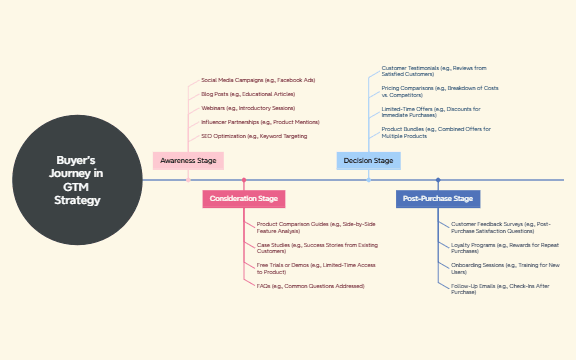
The Buyer's Journey in GTM Strategy mind map template breaks down the customer decision process into 4 core stages—Awareness, Consideration, Decision, and Post-Purchase—with 22 actionable tactics. Designed for marketing and sales teams, it covers channels like Social Media Campaigns (e.g., Facebook Ads), Product Comparison Guides (e.g., Side-by-Side Feature Analysis), and Customer Feedback Surveys (e.g., Post-Purchase Satisfaction Questions). This GTM cheat sheet helps optimize engagement at each touchpoint, from SEO Optimization to Loyalty Programs. The template is structured as a radial map with four main branches, each containing 4-5 specific tactics, making it easy to audit and align go-to-market activities.
利用規約Planning a new product launch and need to map out all customer touchpoints from awareness to post-purchase.
Reviewing existing marketing funnel performance and identifying gaps in content or offers at each stage.
Onboarding new sales or marketing hires and providing a visual overview of the buyer's journey.
Launch the template in Xmind to explore the four core stages of Awareness, Consideration, Decision, and Post-Purchase.
Replace the example channels with your specific campaigns and add sub-nodes to track budgets, owners, or key performance indicators.
Save your finalized GTM roadmap and export it as an image or PDF to align your marketing and sales teams.
The template includes 4 stages (Awareness, Consideration, Decision, Post-Purchase) with 22 specific tactics such as Social Media Campaigns, Case Studies, Pricing Comparisons, and Loyalty Programs.
Open the .xmind file in Xmind, then customize each stage with your own channels and offers. For example, replace example tactics with your actual blog topics or demo links.
Yes, the template is fully editable in Xmind. You can add, remove, or modify nodes, and export it as PDF or image for printing.
Use the template as a shared visual during GTM planning meetings. Assign owners to each tactic (e.g., 'Social Media Campaigns' to the marketing lead) and track progress.
Absolutely. Each node like 'Webinars (e.g., Introductory Sessions)' can be renamed or expanded with your specific webinar titles and dates.
あなたのマインドマップ テンプレートを世界中のクリエイターと共有して、作品から収入を得ましょう。

