


'%3e%3cpath%20d='M14.8644%204.33597C15.6164%203.58397%2016.3844%203.58397%2017.1364%204.33597L20.4644%207.66397C21.2164%208.41597%2021.6004%209.32797%2021.6004%2010.4V17.6C21.6004%2018.672%2021.3924%2020%2020.0004%2020.8C20.0004%2020.8%2017.6804%2022.4%2016.0004%2022.4C14.3204%2022.4%2012.0004%2020.8%2012.0004%2020.8C10.4004%2020%2010.4004%2018.672%2010.4004%2017.6V10.4C10.4004%209.32797%2010.7844%208.41597%2011.5364%207.66397L14.8644%204.33597Z'%20stroke='%234FA49A'%20stroke-width='1.92'%20stroke-linejoin='round'/%3e%3cpath%20d='M16.0001%2015.0402C17.0605%2015.0402%2017.9201%2014.1806%2017.9201%2013.1202C17.9201%2012.0598%2017.0605%2011.2002%2016.0001%2011.2002C14.9397%2011.2002%2014.0801%2012.0598%2014.0801%2013.1202C14.0801%2014.1806%2014.9397%2015.0402%2016.0001%2015.0402Z'%20stroke='%234FA49A'%20stroke-width='1.92'/%3e%3cpath%20d='M10.4007%2014.3999L7.20067%2017.5999L6.40067%2020.7999C6.19267%2021.3279%206.35267%2021.5999%206.88067%2021.5999L10.4007%2020.7999'%20stroke='%234FA49A'%20stroke-width='1.92'%20stroke-linecap='round'%20stroke-linejoin='round'/%3e%3cpath%20d='M21.5996%2014.3999L24.7996%2017.5999L25.5996%2020.7999C25.8076%2021.3279%2025.6476%2021.5999%2025.1196%2021.5999L21.5996%2020.7999'%20stroke='%234FA49A'%20stroke-width='1.92'%20stroke-linecap='round'%20stroke-linejoin='round'/%3e%3cpath%20d='M13.2793%2022.3999C13.2793%2024.7999%2014.3993%2027.0399%2015.9993%2028.3199C17.5993%2027.0399%2018.7193%2024.7999%2018.7193%2022.3999'%20stroke='%234FA49A'%20stroke-width='1.92'%20stroke-linecap='round'%20stroke-linejoin='round'/%3e%3c/g%3e%3cdefs%3e%3cclipPath%20id='clip0_11502_52996'%3e%3crect%20width='32'%20height='32'%20fill='white'/%3e%3c/clipPath%3e%3c/defs%3e%3c/svg%3e)

Product managers and engineering leads
Kicking off a new smartphone product development cycle
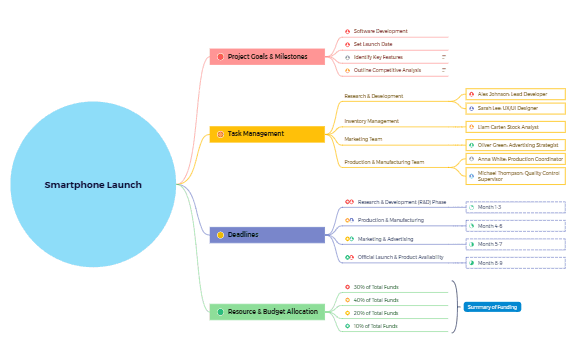
The Smartphone Launch mind map template provides a structured overview for planning and executing a smartphone product launch, covering 4 major branches and 32 nodes. It includes project goals such as 'Software Development' and 'Set Launch Date', task management with assigned roles like 'Alex Johnson: Lead Developer', deadlines spanning Month 1-9, and budget allocation percentages. This Smartphone Launch template is ideal for product managers and marketing teams coordinating cross-functional efforts.
使用条款Kicking off a new smartphone product development cycle
Planning a cross-functional launch event with marketing and production teams
Allocating budget across R&D, manufacturing, marketing, and launch activities
Launch the template in Xmind to review the four main branches and expand the 32 nodes for a complete project overview.
Replace the placeholder names and budget percentages with your specific team members and financial allocations for the launch.
Adjust the timeline in the Deadlines branch and add sub-nodes to document specific tasks, risks, or dependencies for your product.
The template includes four main branches: Project Goals & Milestones, Task Management, Deadlines, and Resource & Budget Allocation, with 32 nodes covering objectives, team roles, timeline phases, and budget percentages.
Open the .xmind file in Xmind, then customize each branch: set your specific goals, assign team members to tasks, adjust deadlines to your timeline, and allocate budget percentages as needed.
Yes, the template is fully editable in Xmind. You can add, remove, or modify nodes, and export it as an image or PDF for printing.
Use the Deadlines branch to set milestones and update task statuses. You can also add progress markers or labels to each node in Xmind to monitor completion.
Absolutely. The Resource & Budget Allocation branch shows example percentages (30%, 40%, 20%, 10%) which you can adjust to match your actual budget distribution.
把你的思维导图模板分享给全球创作者,从你的作品中获得收益。

