


'%3e%3cpath%20d='M14.8644%204.33597C15.6164%203.58397%2016.3844%203.58397%2017.1364%204.33597L20.4644%207.66397C21.2164%208.41597%2021.6004%209.32797%2021.6004%2010.4V17.6C21.6004%2018.672%2021.3924%2020%2020.0004%2020.8C20.0004%2020.8%2017.6804%2022.4%2016.0004%2022.4C14.3204%2022.4%2012.0004%2020.8%2012.0004%2020.8C10.4004%2020%2010.4004%2018.672%2010.4004%2017.6V10.4C10.4004%209.32797%2010.7844%208.41597%2011.5364%207.66397L14.8644%204.33597Z'%20stroke='%234FA49A'%20stroke-width='1.92'%20stroke-linejoin='round'/%3e%3cpath%20d='M16.0001%2015.0402C17.0605%2015.0402%2017.9201%2014.1806%2017.9201%2013.1202C17.9201%2012.0598%2017.0605%2011.2002%2016.0001%2011.2002C14.9397%2011.2002%2014.0801%2012.0598%2014.0801%2013.1202C14.0801%2014.1806%2014.9397%2015.0402%2016.0001%2015.0402Z'%20stroke='%234FA49A'%20stroke-width='1.92'/%3e%3cpath%20d='M10.4007%2014.3999L7.20067%2017.5999L6.40067%2020.7999C6.19267%2021.3279%206.35267%2021.5999%206.88067%2021.5999L10.4007%2020.7999'%20stroke='%234FA49A'%20stroke-width='1.92'%20stroke-linecap='round'%20stroke-linejoin='round'/%3e%3cpath%20d='M21.5996%2014.3999L24.7996%2017.5999L25.5996%2020.7999C25.8076%2021.3279%2025.6476%2021.5999%2025.1196%2021.5999L21.5996%2020.7999'%20stroke='%234FA49A'%20stroke-width='1.92'%20stroke-linecap='round'%20stroke-linejoin='round'/%3e%3cpath%20d='M13.2793%2022.3999C13.2793%2024.7999%2014.3993%2027.0399%2015.9993%2028.3199C17.5993%2027.0399%2018.7193%2024.7999%2018.7193%2022.3999'%20stroke='%234FA49A'%20stroke-width='1.92'%20stroke-linecap='round'%20stroke-linejoin='round'/%3e%3c/g%3e%3cdefs%3e%3cclipPath%20id='clip0_11502_52996'%3e%3crect%20width='32'%20height='32'%20fill='white'/%3e%3c/clipPath%3e%3c/defs%3e%3c/svg%3e)

Product marketing managers and growth teams
Planning the go-to-market strategy for a new software product launch.
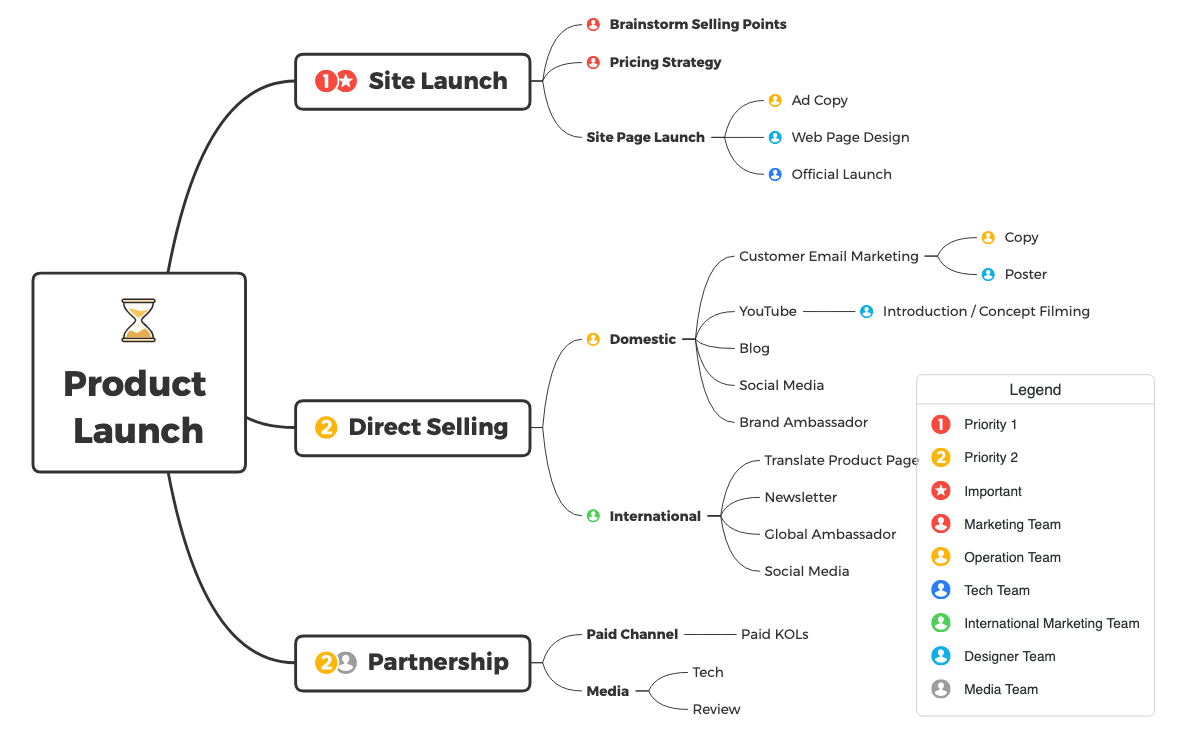
The Product Launch mind map template from Xmind helps marketing and product teams orchestrate a multi-channel go-to-market strategy across 29 nodes organized into three core branches: Site Launch, Direct Selling, and Partnership. This template covers the full launch lifecycle from brainstorming selling points and pricing strategy to international expansion via translated product pages and global ambassadors. It includes actionable sub-branches such as Customer Email Marketing with Copy and Poster tasks, YouTube Introduction / Concept Filming, and Paid KOLs under Partnership. Designed as a visual checklist, it ensures no critical step is overlooked during a product rollout.
使用條款Planning the go-to-market strategy for a new software product launch.
Coordinating cross-channel marketing activities before a major release.
Expanding a product into international markets with localized campaigns.
Open the template in Xmind to explore the three main branches covering Site Launch, Direct Selling, and Partnership.
Replace the placeholder nodes with your specific product selling points and marketing tasks across the 29 pre-organized nodes.
Assign deadlines and priorities using Xmind icons before exporting the map as a PDF or image for your stakeholders.
The template includes 29 nodes across three main branches: Site Launch, Direct Selling, and Partnership. It covers tasks like brainstorming selling points, pricing strategy, ad copy, email marketing, YouTube content, social media, brand ambassadors, and paid partnerships.
Open the .xmind file in Xmind, then replace the placeholder tasks with your own launch activities. Customize each branch—Site Launch, Direct Selling, Partnership—by adding deadlines, assignees, and notes. Use it as a live checklist during your launch process.
Yes, the template is fully editable in Xmind (desktop, web, or mobile). You can add, remove, or reorder nodes. Export it as an image, PDF, or outline for printing or sharing with your team.
Use the International sub-branch under Direct Selling. It includes Translate Product Page, Newsletter, Global Ambassador, and Social Media. Assign each task to a team member and set due dates using Xmind's task management features.
Absolutely. The Partnership branch currently has Paid KOLs and Media (Tech, Review). You can add new sub-nodes for influencers, affiliate programs, or co-marketing partners by simply editing the mind map.
把你的心智圖範本分享給全球創作者,從你的作品中獲得收益。

