




Business development managers and partnership leads
Mapping out strategic partnerships with social media platforms like Pinterest or LinkedIn
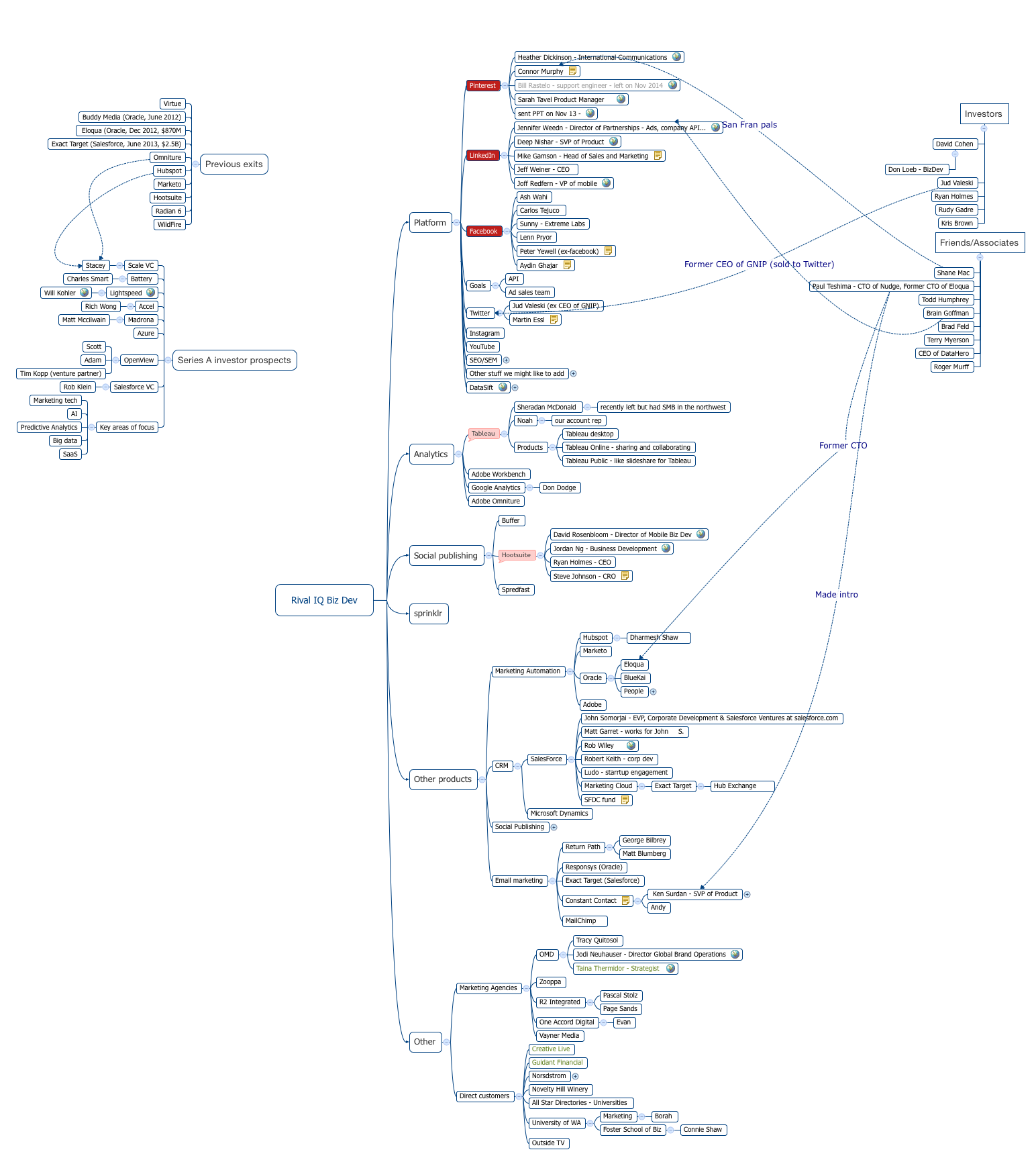
The Rival IQ Biz Dev mind map template is a strategic relationship tracker used by business development professionals to map out partnerships, prospects, and competitive intelligence across social media platforms, analytics tools, and marketing technology vendors. It covers 188 nodes organized into 10 branches, including Platform, Analytics, Social publishing, and Investors. Key nodes like 'Heather Dickinson - International Communications' (Pinterest) and 'David Rosenbloom - Director of Mobile Biz Dev' (Hootsuite) illustrate the depth of contact-level tracking. This template serves as a living CRM for biz dev teams to manage outreach, monitor competitors, and prioritize investor relationships.
Условия использованияMapping out strategic partnerships with social media platforms like Pinterest or LinkedIn
Tracking competitive intelligence on analytics and marketing automation vendors such as Tableau or Hubspot
Prioritizing Series A investor outreach based on focus areas like 'Marketing tech' and 'AI'
Open the .xmind file in Xmind desktop or web application.
Browse the main branches (Platform, Analytics, Social publishing, etc.) to understand the existing contact and company structure.
Add your own contacts by right-clicking a branch and selecting 'Add Topic'. Fill in names, titles, and notes.
Use markers or labels to indicate outreach status (e.g., 'Contacted', 'Meeting Scheduled', 'Closed').
Export the mind map as an image or PDF to share with your team during strategy reviews.
The template includes 188 nodes across 10 branches covering platform partnerships (Pinterest, LinkedIn, Facebook, Twitter), analytics tools (Tableau, Google Analytics), social publishing tools (Buffer, Hootsuite), competitor products, marketing agencies, direct customers, investor prospects, and previous exits.
Use the Platform and Social publishing branches to identify key contacts at target companies (e.g., 'Jennifer Weedn - Director of Partnerships' at LinkedIn). Track outreach status by adding notes or markers to each node, and prioritize follow-ups based on the Investors or Series A prospects branches.
Yes, the .xmind file is fully editable. You can add new contacts, update statuses, reorganize branches, and attach files or links to each node. It works on Xmind desktop and web versions.
It lists notable acquisitions in the marketing tech space, such as 'Buddy Media (Oracle, June 2012)' and 'Exact Target (Salesforce, June 2013, $2.5B)', providing context for investor relationships and competitive landscape.
Absolutely. Replace the company names and contacts with your own prospects. Use the existing structure as a framework to organize by platform, product category, or investor type. Add custom fields like 'Priority' or 'Next Step' using Xmind's labels and markers.
Поделитесь своими шаблонами интеллект-карт с авторами по всему миру и начните зарабатывать на своих работах.

