




Product managers and marketing leads
Kicking off a new product launch to assign tasks and set deadlines
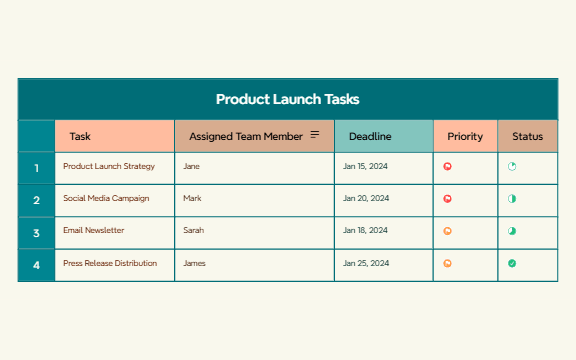
The Product Launch Tasks mind map template provides a structured overview of 4 key tasks—Product Launch Strategy, Social Media Campaign, Email Newsletter, and Press Release Distribution—each assigned to a specific team member (Jane, Mark, Sarah, James) with deadlines, priority levels, and status tracking. This template helps project managers and marketing teams coordinate product launches by visualizing assignments, timelines, and progress in a single view. It includes 26 nodes organized into 5 branches: Task, Assigned Team Member, Deadline, Priority, and Status. The Product Launch Tasks mind map is ideal for kickoff meetings and weekly check-ins, offering a clear snapshot of who does what and by when.
이용약관Kicking off a new product launch to assign tasks and set deadlines
Weekly status meetings to review progress on launch activities
Onboarding new team members to a launch project
Open the .xmind file in Xmind (desktop, web, or mobile app).
Review the 5 main branches: Task, Assigned Team Member, Deadline, Priority, Status.
Replace the sample tasks with your own launch activities and update team member names.
Set realistic deadlines and assign priority levels (e.g., High, Medium, Low).
Update the Status branch as tasks progress (e.g., Not Started, In Progress, Completed).
The template includes 5 main branches: Task, Assigned Team Member, Deadline, Priority, and Status. It covers 4 specific tasks (Product Launch Strategy, Social Media Campaign, Email Newsletter, Press Release Distribution) with team assignments and deadlines.
Open the .xmind file in Xmind, then replace the sample tasks with your own launch activities. Update the team member names, deadlines, and set priority/status for each task. Use it in kickoff meetings to assign responsibilities and track progress.
Yes, the template is fully editable in Xmind (desktop or web). You can add, remove, or modify nodes, and export the mind map as an image or PDF for printing or sharing.
Absolutely. The Priority and Status branches are placeholders. You can rename them to your own categories (e.g., High/Medium/Low, Not Started/In Progress/Done) to fit your workflow.
Use the Deadline branch to set target dates for each task. You can add reminders or sort tasks by date. The visual layout helps you quickly see which deadlines are approaching.
전 세계 크리에이터와 마인드맵 템플릿을 공유하고 작품으로 수익을 창출하세요.

