




Product managers and business analysts
Starting a new software development project that needs a thorough requirements capture from stakeholders.
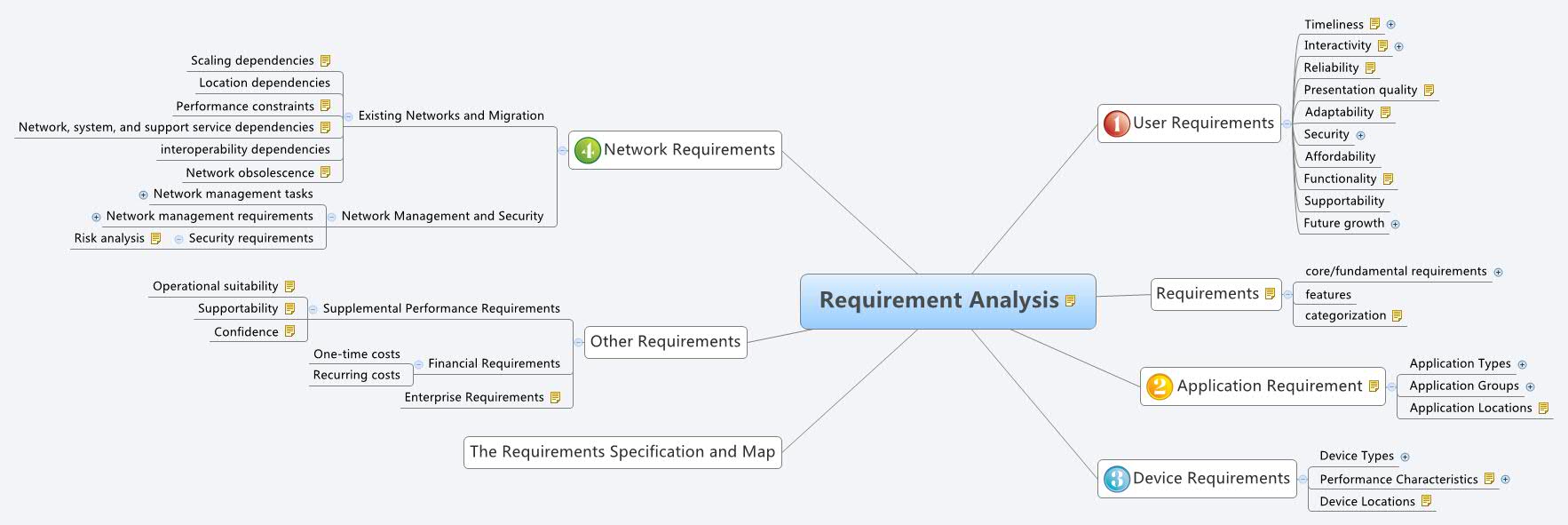
The Requirement Analysis mind map template from Xmind provides a structured framework for capturing and organizing system requirements across 95 nodes. It covers user needs, application types, device performance, network migration, and financial constraints, making it ideal for systems engineers and product managers. Key branches include 'User Requirements' with nodes like 'Timeliness' (sub-divided into 'end-to-end' and 'round-trip') and 'Security' (covering 'confidentiality', 'integrity', 'authenticity'). The template also details 'Application Types' such as 'Mission-critical' and 'Real-time', and addresses 'Existing Networks and Migration' with dependencies like 'interoperability dependencies'. This comprehensive cheat sheet ensures no requirement category is overlooked during planning.
Terms and ConditionsStarting a new software development project that needs a thorough requirements capture from stakeholders.
Planning a network infrastructure upgrade where existing constraints and migration dependencies must be documented.
Conducting a feasibility study for a mission-critical system requiring detailed performance and security specifications.
Open the .xmind file to visualize the comprehensive structure covering user needs, application types, and network migration.
Expand the branches to replace placeholder nodes with your specific project data regarding security, hardware specs, and application performance.
Fill in the network migration and financial constraint sections before exporting the final map as a PDF or image for stakeholder review.
The template includes 95 nodes organized into six main branches: User Requirements, Requirements, Application Requirement, Device Requirements, Network Requirements, and Other Requirements, plus a specification map.
Open the .xmind file in Xmind, then expand each branch to fill in your specific requirements. Start with User Requirements (e.g., Timeliness, Security), then move to Application Types and Network constraints.
Yes, the template is fully editable in Xmind. You can add, remove, or modify nodes to match your project's scope, and reorganize branches as needed.
It categorizes applications into Mission-critical (RMA), Rate-critical (Capacity), and Real-time (Delay), helping you define performance metrics for each type.
Absolutely. The 'Existing Networks and Migration' branch includes nodes for scaling, location, performance, and interoperability dependencies that you can tailor to your environment.
Use it during the requirements gathering phase of any system design, software development, or infrastructure project to ensure comprehensive coverage of user, application, device, network, and financial needs.
Share your mind map templates with creators around the world and start earning from your work.

