


'%3e%3cpath%20d='M3.2002%2016.6001H28.8002'%20stroke='%2352AA6F'%20stroke-width='2.25'%20stroke-linecap='round'/%3e%3cpath%20d='M5%2017.6001C5%2022.4001%208.8%2027.5%2016%2027.5C23.2%2027.5%2027%2022.4536%2027%2017.6536'%20stroke='%2352AA6F'%20stroke-width='2.25'%20stroke-linecap='round'%20stroke-linejoin='round'/%3e%3cpath%20d='M11.2002%2012.7998C11.2002%209.5998%2012.8002%208.7%2012.8002%205.5M16.0002%2012.7998C16.0002%209.5998%2017.6002%208.7%2017.6002%205.5M20.8002%2012.7998C20.8002%209.5998%2022.4002%208.7%2022.4002%205.5'%20stroke='%2352AA6F'%20stroke-width='2.25'%20stroke-linecap='round'/%3e%3c/g%3e%3cdefs%3e%3cclipPath%20id='clip0_11502_53637'%3e%3crect%20width='32'%20height='32'%20fill='white'/%3e%3c/clipPath%3e%3c/defs%3e%3c/svg%3e)

Home cooks and meal planners
Planning a weekly meal prep and need to organize multiple recipes in one place.
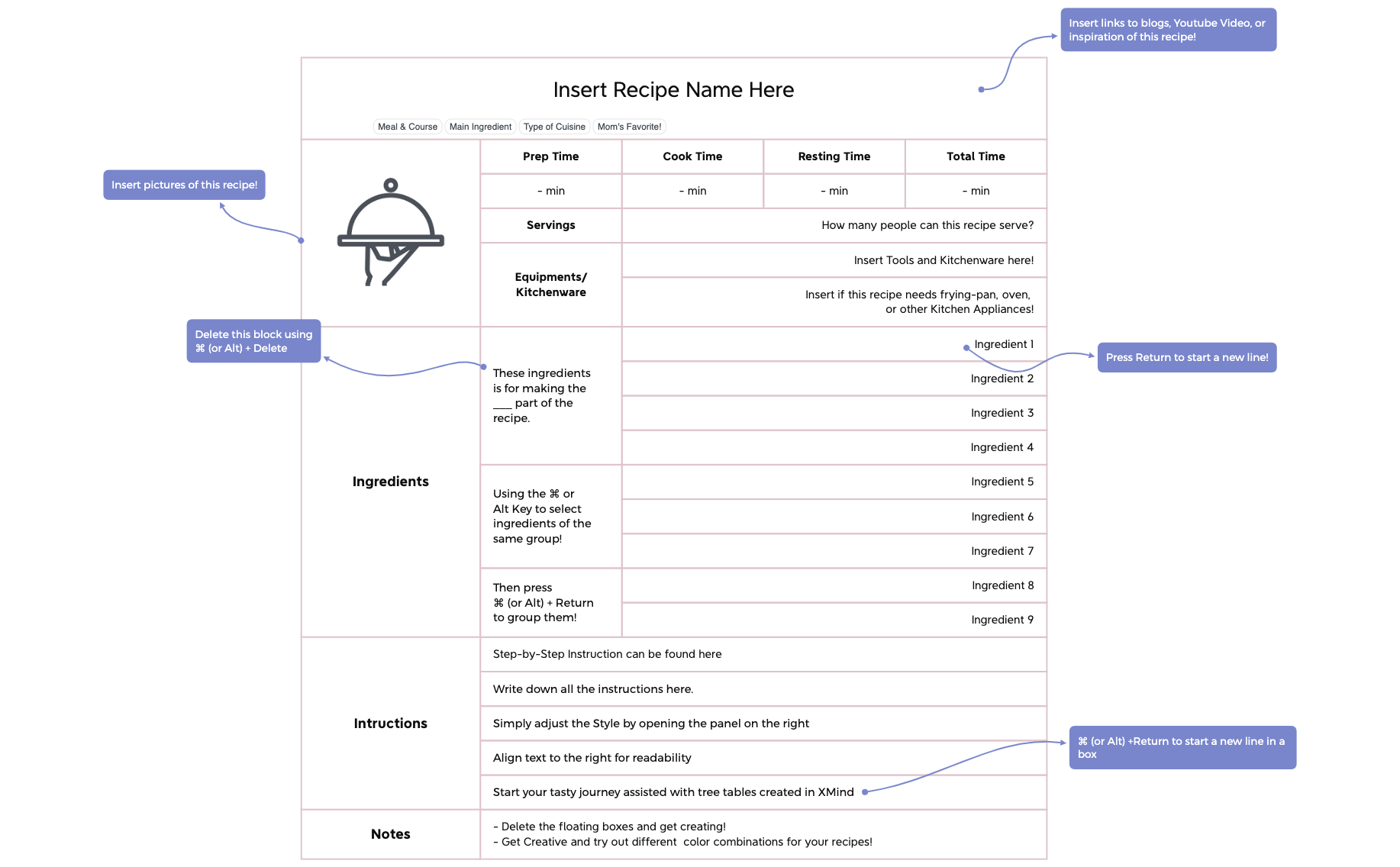
The Recipe Template is a structured mind map for organizing cooking and baking recipes, featuring 41 nodes across a single sheet. It covers ingredients with grouping tips, step-by-step instructions, and notes sections. Key nodes include 'Ingredients', 'Intructions', and 'Notes', with practical shortcuts like '⌘ (or Alt) +Return to start a new line in a box'. This template helps home cooks and food bloggers create clear, editable recipe cheat sheets in Xmind.
Terms and ConditionsPlanning a weekly meal prep and need to organize multiple recipes in one place.
Creating a digital cookbook with step-by-step instructions and ingredient lists.
Teaching a cooking class and need a clear visual guide for students.
Open the .xmind file and replace the central topic with your specific recipe title to begin your culinary organization.
Fill the Ingredients branch using the ⌘+Return shortcut for new lines and draft your cooking steps in the Instructions section.
Use the right panel to adjust text styles and add images or notes to the floating nodes for a complete recipe cheat sheet.
It includes branches for Ingredients, Instructions, and Notes, plus floating nodes for shortcuts and media links. The template has 41 nodes to help you structure any recipe.
Open the .xmind file, replace 'Insert Recipe Name Here' with your recipe title, then fill in ingredients and steps. Use ⌘+Return to add new lines within a box.
Yes, select multiple ingredient nodes using ⌘ or Alt key, then press ⌘+Return to group them. The template includes example groups like 'These ingredients is for making the ___ part of the recipe.'
Yes, it's a free Xmind template that you can fully customize. You can add images, links, and change colors using the right panel.
Use the floating node 'Insert pictures of this recipe!' to add images, and 'Insert links to blogs, Youtube Video, or inspiration of this recipe!' to attach URLs.
Share your mind map templates with creators around the world and start earning from your work.

