




IT managers and procurement teams
Selecting a new software vendor for your organization
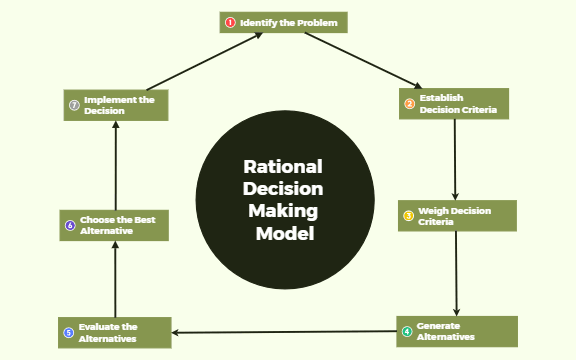
The Rational Decision Making Model mind map template provides a structured 7-step framework for making logical, evidence-based decisions. Used by project managers, business analysts, and team leads, this template covers the entire decision process from problem identification to implementation. Key steps include 'Identify the Problem', 'Generate Alternatives', and 'Choose the Best Alternative', ensuring a systematic approach that minimizes bias. This template serves as a practical cheat sheet for professionals seeking a repeatable decision-making process.
Terms and ConditionsSelecting a new software vendor for your organization
Deciding between multiple product feature priorities for the next sprint
Evaluating job candidates after final interviews
Open the .xmind file in Xmind (desktop, web, or mobile app).
Review the 7-step structure and replace the node titles with your specific decision context.
Add sub-nodes under each step to detail your problem, criteria, alternatives, and evaluation scores.
Use the 'Weigh Decision Criteria' node to assign importance weights and score each alternative.
Save your customized template and share it with stakeholders or export as an image for presentations.
The template includes 7 core steps: Identify the Problem, Establish Decision Criteria, Weigh Decision Criteria, Generate Alternatives, Evaluate the Alternatives, Choose the Best Alternative, and Implement the Decision. Each step is a node ready for customization.
Open the .xmind file in Xmind, then replace the placeholder nodes with your specific problem, criteria, and alternatives. Follow the sequential flow from top to bottom to ensure a thorough analysis.
Yes, the template is fully editable in Xmind (desktop, web, or mobile). You can add notes, change colors, or export as PDF or image for printing.
Use the 'Weigh Decision Criteria' node to assign weights to each criterion, then score each alternative under 'Evaluate the Alternatives'. This quantifies trade-offs and supports objective comparison.
Absolutely. The 'Establish Decision Criteria' node is a placeholder; you can add as many sub-nodes as needed, such as cost, risk, or alignment with goals.
Share your mind map templates with creators around the world and start earning from your work.
