



QA leads and test managers
Starting a new software project that requires a structured QA process from requirement analysis to production deployment.
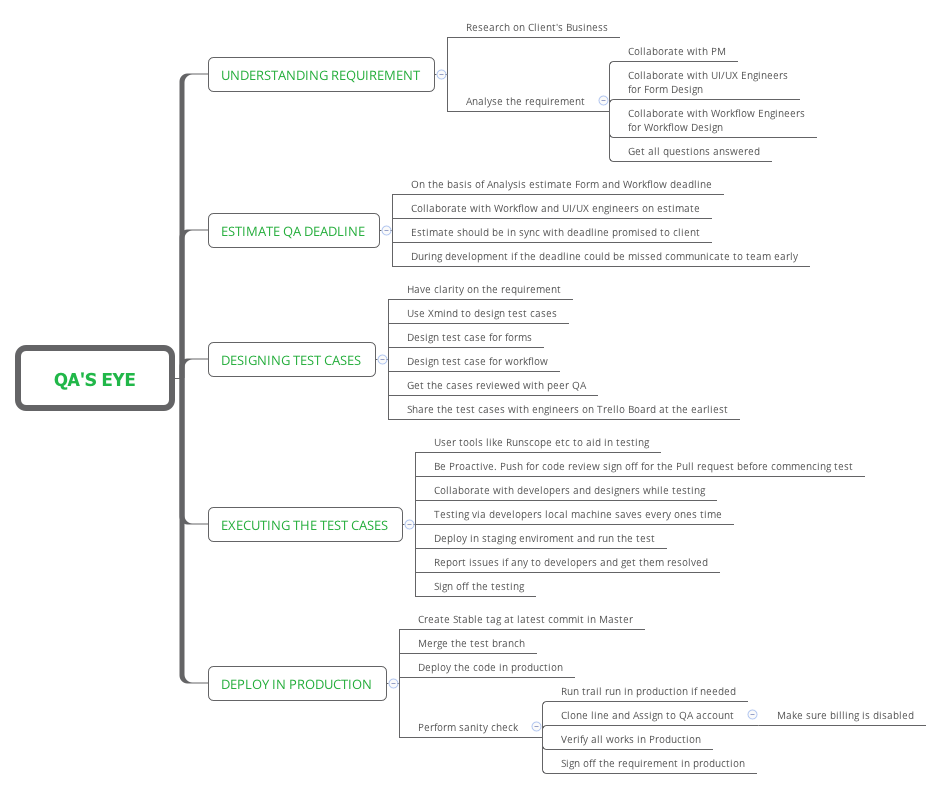
QA's Eye is a structured mind map template for software quality assurance professionals, covering the full QA lifecycle across 5 main branches and 38 nodes. It guides users from understanding requirements through production deployment, with specific steps like 'Research on Client's Business', 'Design test case for forms', and 'Perform sanity check'. This template serves as a comprehensive cheat sheet for QA engineers, test leads, and project managers seeking a repeatable testing workflow. The layout follows a linear process flow, making it easy to track progress from requirement analysis to production sign-off.
Términos y condicionesStarting a new software project that requires a structured QA process from requirement analysis to production deployment.
Onboarding new QA engineers to a team and need a standardized workflow for testing and deployment.
Preparing for a production release and need a checklist for sanity checks, staging tests, and sign-off.
Open the .xmind file in Xmind Desktop or Xmind Web (free or pro version).
Review the 5 main branches and expand each to see detailed sub-nodes for your QA process.
Customize the nodes by editing text: replace example steps with your team's specific tools, collaborators, or checklists.
Add new branches or sub-nodes as needed, e.g., for additional testing environments or reporting steps.
Export the completed mind map as an image, PDF, or share it with your team via Xmind Cloud or other platforms.
The template covers 5 key phases: Understanding Requirement, Estimate QA deadline, Designing Test Cases, Executing the Test Cases, and Deploy in Production, with 38 detailed nodes for actionable steps.
Start by gaining clarity on requirements, then use Xmind to design test cases for forms and workflows. Get cases reviewed by a peer QA and share them on a Trello Board early.
Yes, it supports agile workflows with steps like collaborating with developers, using tools like Runscope, and deploying to staging before production.
Absolutely. You can add, remove, or modify nodes to fit your team's specific processes, such as adding new testing tools or adjusting the deployment checklist.
It helps QA leads estimate deadlines based on requirement analysis, collaborate with engineers on estimates, and communicate risks early if deadlines may be missed.
Comparte tus plantillas de mapas mentales con creadores de todo el mundo y empieza a ganar con tu trabajo.

