




Enterprise Architects and PMO leads
Kicking off a new enterprise-scale project requiring structured phase-gate governance
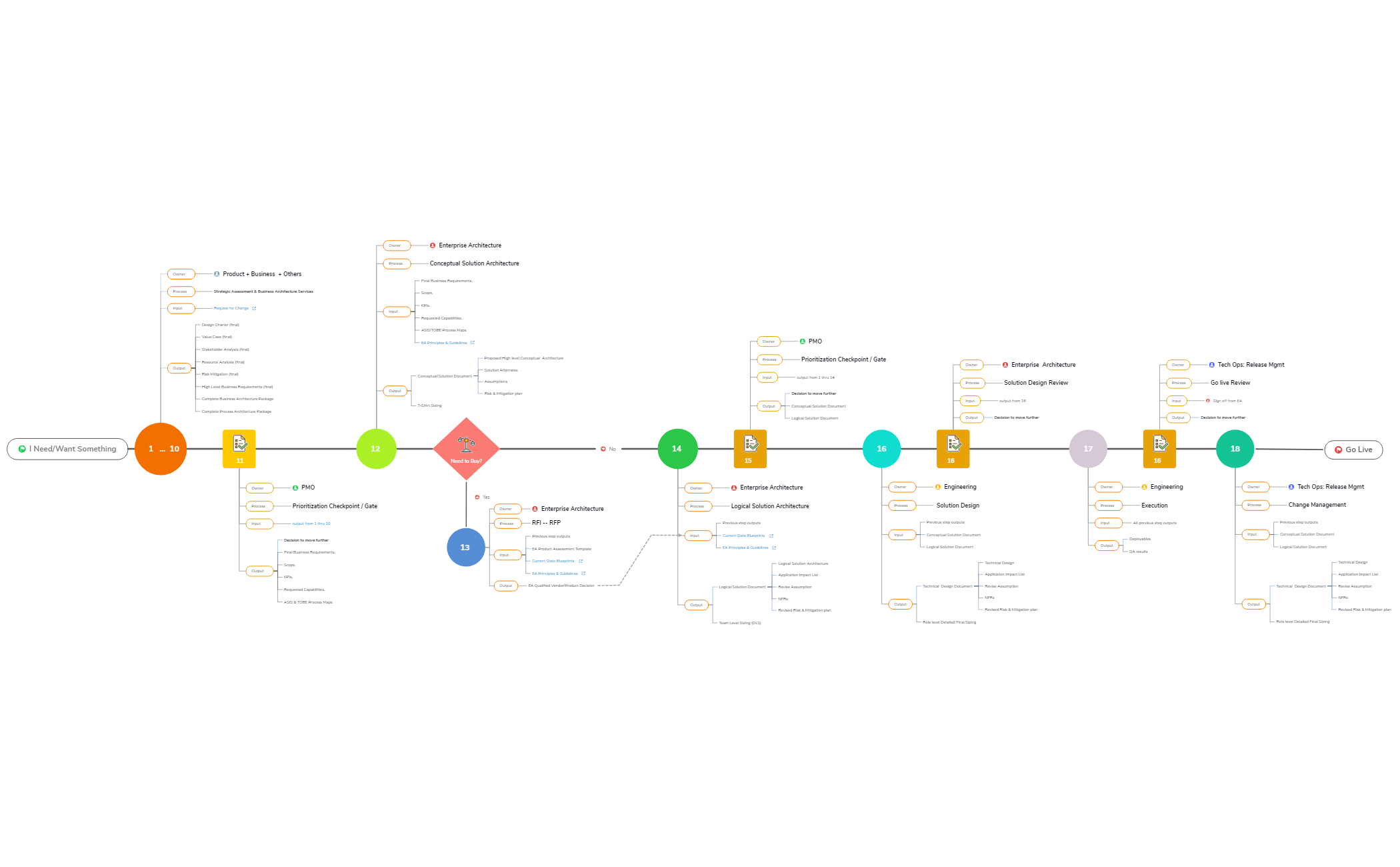
The Project Execution- EA View mind map template provides a comprehensive 156-node business timeline for enterprise architecture project delivery, from initial request through go-live. It covers 18 sequential phases including 'Strategic Assessment & Business Architecture Services', 'Conceptual Solution Architecture', and 'Solution Design Review', each with defined Owner, Process, Input, and Output nodes. This template serves as a structured cheat sheet for PMOs, enterprise architects, and engineering teams to track deliverables like 'Design Charter (final)', 'Logical Solution Document', and 'Technical Design Document'. It integrates decision gates, vendor assessment (RFI-RFP), and change management, making it an essential project execution template for large-scale EA initiatives.
Terms and ConditionsKicking off a new enterprise-scale project requiring structured phase-gate governance
Tracking deliverables and approvals across multiple teams (business, architecture, engineering, operations)
Evaluating vendor solutions vs. internal development during the RFI-RFP phase
Open the template in Xmind and review the 18 sequential phases from initial request to go-live to understand the enterprise architecture timeline.
Expand the sub-nodes for each phase to define specific owners, processes, and inputs while replacing placeholder text with your actual project deliverables.
Customize the integrated decision gates and output nodes to align with your organization's specific approval criteria and technical design documentation requirements.
The template includes 156 nodes organized across 18 phases from 'I Need/Want Something' to 'Go Live', covering strategic assessment, solution architecture, design, execution, and change management. Each phase details Owner, Process, Input, and Output.
Open the .xmind file in Xmind, then follow the sequential phases from top to bottom. Customize the Owner, Process, Input, and Output nodes to match your organization's roles and deliverables. Use the decision gates (e.g., 'Prioritization Checkpoint / Gate') to track approvals.
The template is available on Xmind's marketplace and is fully editable. You can add or remove nodes, modify text, and adjust the layout to fit your project's specific EA workflow.
The 'Need to Buy?' node determines whether the solution requires purchasing a vendor product (Yes path leads to RFI-RFP) or can be built internally (No path proceeds to logical solution architecture).
Yes, each output node (e.g., 'Design Charter (final)', 'Technical Design Document') can be expanded with sub-nodes or notes to include specific content, templates, or links to external documents.
Share your mind map templates with creators around the world and start earning from your work.

