




Product managers and cross-functional teams
Starting a new product initiative from scratch
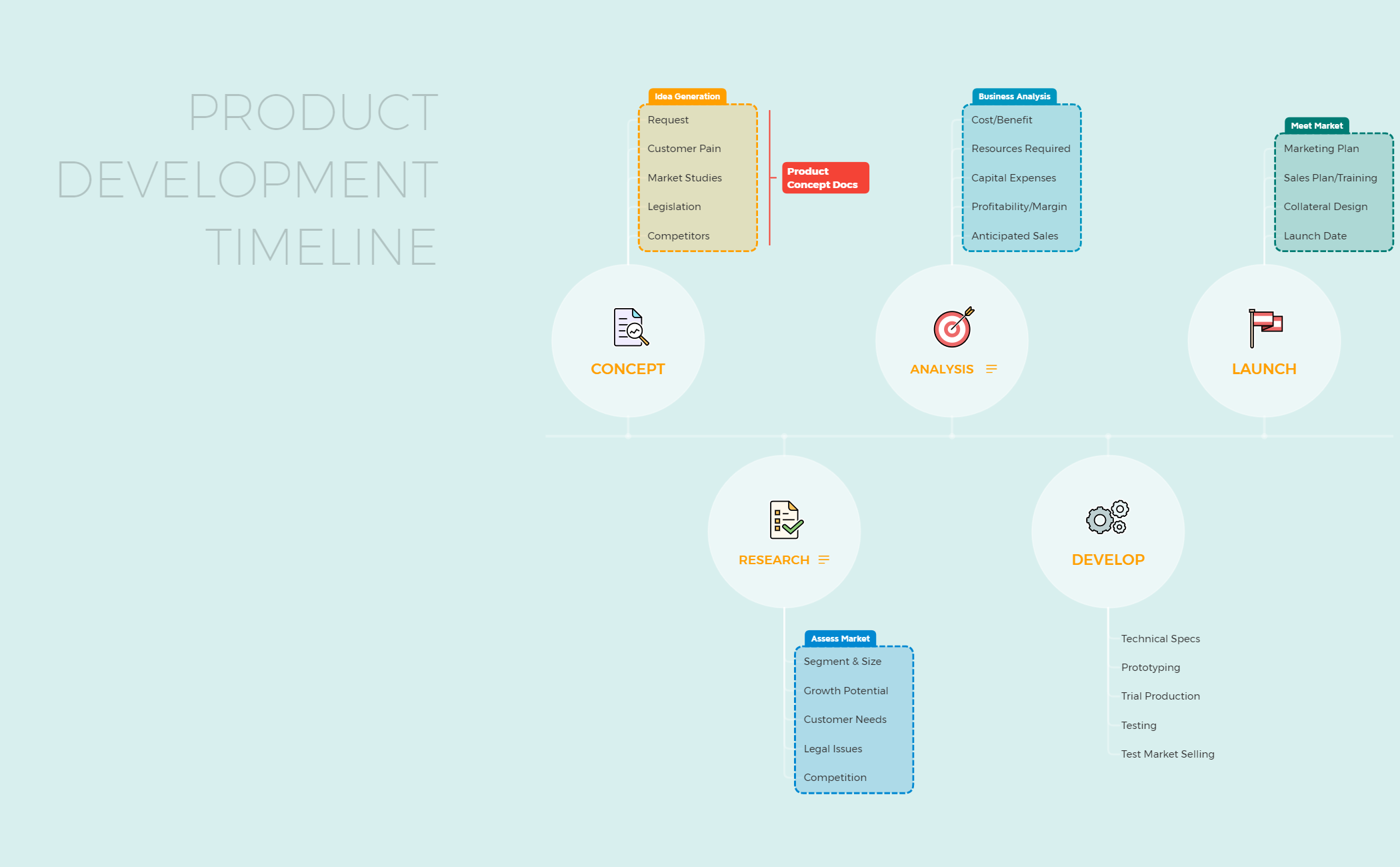
The Product Development Timeline mind map template from Xmind provides a structured framework for managing the entire product lifecycle, from initial concept through market launch. It covers 6 major phases—Concept, Research, Analysis, Develop, Launch, and a central PRODUCT DEVELOPMENT TIMELINE node—with 32 total nodes to track milestones, deliverables, and dependencies. Key branches include 'Concept' for ideation and 'Launch' for go-to-market activities, ensuring teams can align on priorities and deadlines. This template serves as a visual roadmap for product managers, designers, and engineers to coordinate cross-functional efforts and reduce time-to-market.
Terms and ConditionsStarting a new product initiative from scratch
Planning a major product update or version release
Aligning stakeholders on a product roadmap before execution
Open the template in Xmind to explore the six major phases from initial concept to market launch.
Replace the placeholder nodes with your specific project deliverables, deadlines, and team assignments.
Utilize the timeline view or Gantt chart to manage dependencies and track your product development progress.
The template includes 6 phases: Concept, Research, Analysis, Develop, Launch, and a central PRODUCT DEVELOPMENT TIMELINE node. It contains 32 nodes covering milestones, tasks, and deliverables for each phase.
Open the .xmind file in Xmind, then customize each phase branch by adding your specific tasks, deadlines, and owners. Use the timeline view to visualize dependencies and track progress.
Yes, the template is fully editable in Xmind Desktop or Web. You can add, remove, or rearrange nodes, and share the file with your team for collaboration.
While the template follows a linear timeline, you can adapt it for agile by breaking the Develop phase into sprints and adding iterative feedback loops.
Assign due dates and priority markers to key nodes in each phase. Use the 'Launch' branch to define final milestones like beta release and market launch.
Share your mind map templates with creators around the world and start earning from your work.

