




Product managers and engineering leads
Quarterly product roadmap planning to align engineering, design, and business teams on priorities.
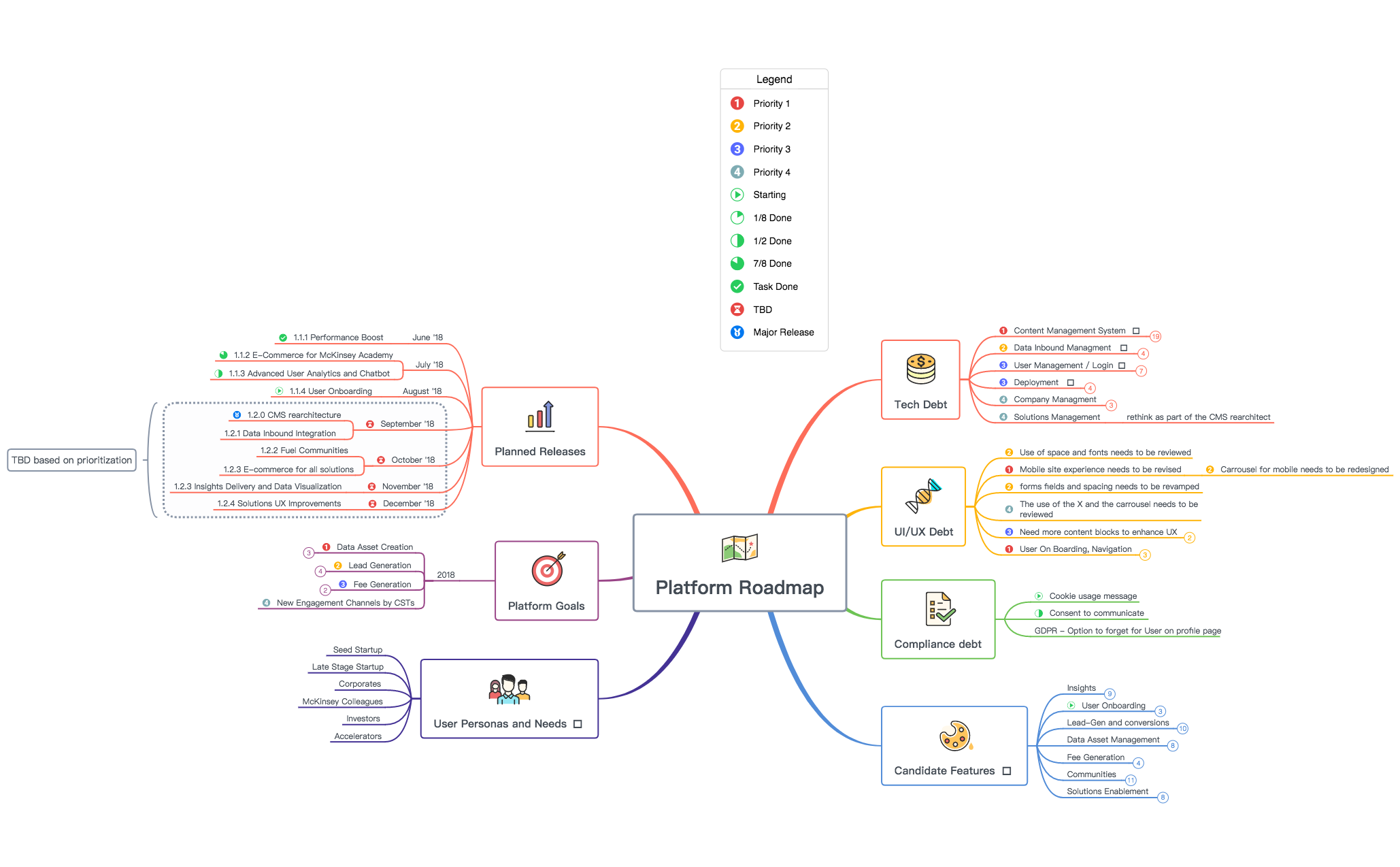
The Platform Roadmap FuelByMckinsey mind map template provides a structured 165-node overview of product planning for a digital platform, covering Tech Debt, UI/UX Debt, Compliance Debt, Candidate Features, User Personas and Needs, Platform Goals, and Planned Releases. This Platform Roadmap template helps product managers and teams align on priorities, from 'Headless CMS implementation rearchitecture' to 'Lead-Gen and conversions' and 'Fee Generation'. It includes specific nodes like 'Yoast Plugging implemented' for SEO and 'Matchmaking between Corporates and startups' for community features. The template is organized as a hierarchical tree with seven main branches, each detailing actionable items and milestones. It serves as a comprehensive Platform Roadmap cheat sheet for strategic planning and execution.
Termos e condiçõesQuarterly product roadmap planning to align engineering, design, and business teams on priorities.
Tracking technical debt and UI/UX improvements across multiple sprints.
Evaluating and prioritizing new feature candidates for a digital platform.
Open the .xmind file to review the seven main branches covering tech debt, compliance, and platform goals.
Personalize the 165-node structure by editing node text, adding specific tasks, and adjusting your release milestones.
Update task statuses as a living document and export the final roadmap as a PDF or image for team alignment.
The template includes 165 nodes across seven branches: Tech Debt, UI/UX Debt, Compliance Debt, Candidate Features, User Personas and Needs, Platform Goals, and Planned Releases. It covers detailed items like CMS rearchitecture, user onboarding, and lead generation.
Open the .xmind file in Xmind, then customize the branches by adding your own tasks, deadlines, and priorities. Use the Planned Releases section to map out your timeline and the Tech Debt branch to track technical improvements.
Yes, the template is fully editable in Xmind. You can add, remove, or modify nodes to fit your specific product roadmap, adjust colors and icons, and export it as an image or PDF.
The Candidate Features branch includes Insights, User Onboarding, Lead-Gen and conversions, Data Asset Management, Fee Generation, Communities, and Solutions Enablement. Each sub-branch contains specific features like 'Recommendation engine for news feed' and 'Shopping basket for any solution'.
The Planned Releases section lists monthly releases from June to December '18, such as '1.1.1 Performance Boost' in June and '1.2.4 Solutions UX Improvements' in December. It helps visualize the product timeline and dependencies.
Compartilhe seus modelos de mapas mentais com criadores ao redor do mundo e comece a ganhar com seu trabalho.

