


'%3e%3cpath%20d='M9.59961%204H22.3996'%20stroke='%23FF9334'%20stroke-width='1.92'%20stroke-linecap='round'/%3e%3cpath%20d='M12.0001%204V12.8L7.20006%2025.6C6.72006%2026.928%207.68006%2028%209.12006%2028H22.8801C24.3201%2028%2025.2801%2026.928%2024.8001%2025.6L20.0001%2012.8V4'%20stroke='%23FF9334'%20stroke-width='1.92'%20stroke-linecap='round'%20stroke-linejoin='round'/%3e%3cpath%20d='M9.12012%2019.2002H22.8801'%20stroke='%23FF9334'%20stroke-width='1.92'/%3e%3cpath%20d='M12%2024C12.5523%2024%2013%2023.5523%2013%2023C13%2022.4477%2012.5523%2022%2012%2022C11.4477%2022%2011%2022.4477%2011%2023C11%2023.5523%2011.4477%2024%2012%2024Z'%20fill='%23FF9334'/%3e%3cpath%20d='M19.5%2024C20.3284%2024%2021%2023.3284%2021%2022.5C21%2021.6716%2020.3284%2021%2019.5%2021C18.6716%2021%2018%2021.6716%2018%2022.5C18%2023.3284%2018.6716%2024%2019.5%2024Z'%20fill='%23FF9334'/%3e%3cpath%20d='M16%2026C16.5523%2026%2017%2025.5523%2017%2025C17%2024.4477%2016.5523%2024%2016%2024C15.4477%2024%2015%2024.4477%2015%2025C15%2025.5523%2015.4477%2026%2016%2026Z'%20fill='%23FF9334'/%3e%3c/g%3e%3cdefs%3e%3cclipPath%20id='clip0_11502_53328'%3e%3crect%20width='32'%20height='32'%20fill='white'/%3e%3c/clipPath%3e%3c/defs%3e%3c/svg%3e)

Networking students and certification candidates
Preparing for a networking certification exam (e.g., CCNA) that requires memorizing the TCP/IP layers and protocols.
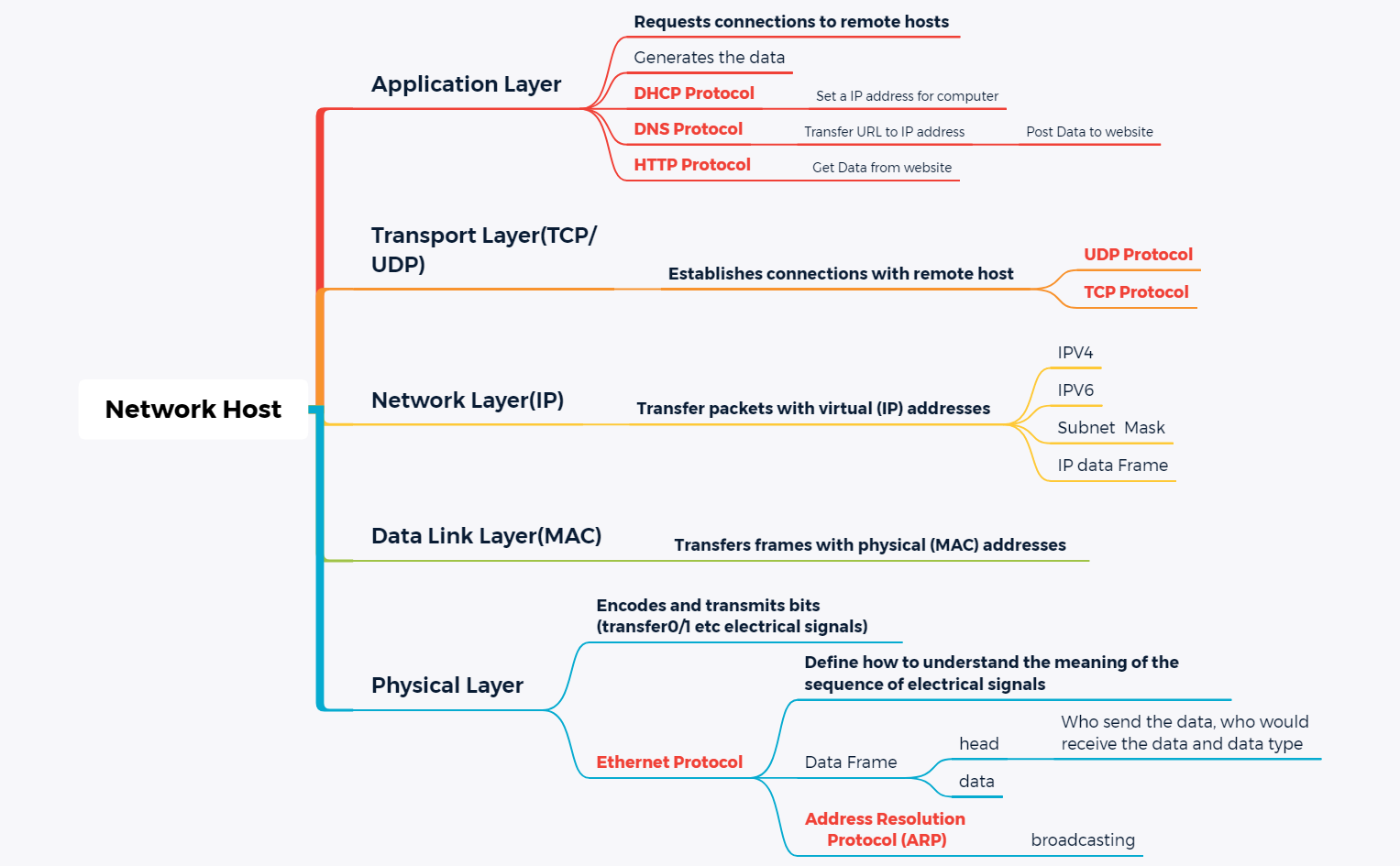
The Network Host mind map template provides a structured overview of the TCP/IP protocol stack, covering all five layers from Application to Physical. It includes 33 nodes organized under Application Layer (DHCP, DNS, HTTP), Transport Layer (TCP/UDP), Network Layer (IPV4, IPV6, Subnet Mask), Data Link Layer (MAC), and Physical Layer (Ethernet Protocol, ARP). This Network Host cheat sheet is ideal for networking students and IT professionals who need a concise reference for how data flows through a network host. Key nodes like 'DHCP Protocol' and 'Address Resolution Protocol (ARP)' are explained with their roles in IP assignment and MAC address resolution.
Terms and ConditionsPreparing for a networking certification exam (e.g., CCNA) that requires memorizing the TCP/IP layers and protocols.
Troubleshooting a network connectivity issue and needing a quick reference for how data flows through each layer.
Teaching an introductory networking class and needing a visual aid to explain the OSI/TCP/IP model.
Download the .xmind file and open it to browse the five main layers from Application to Physical.
Click on specific nodes like DHCP or ARP to read descriptions and add your own personalized study notes.
Save your customized network host map as an image or PDF to use as a portable study guide.
The template covers all five layers of the TCP/IP model: Application, Transport, Network, Data Link, and Physical. It includes protocols like DHCP, DNS, HTTP, TCP, UDP, IPV4, IPV6, Ethernet, and ARP, with 33 nodes explaining their functions.
Open the .xmind file in Xmind, then expand each layer to review protocol details. Use it as a study aid to visualize how data travels from application to physical medium, and customize nodes with your own notes.
Yes, the template is fully editable in Xmind. You can add, remove, or modify nodes. Export it as PDF or image for printing as a reference poster.
ARP maps IP addresses to physical MAC addresses on a local network. The template explains it under the Data Link Layer, including the broadcasting mechanism to discover hosts.
Absolutely. You can add subtopics for each protocol, such as port numbers for TCP/UDP or frame structure for Ethernet. The template is a starting point for deeper exploration.
Share your mind map templates with creators around the world and start earning from your work.

