




Basketball fans and office pool participants
Filling out a March Madness bracket pool with friends or coworkers
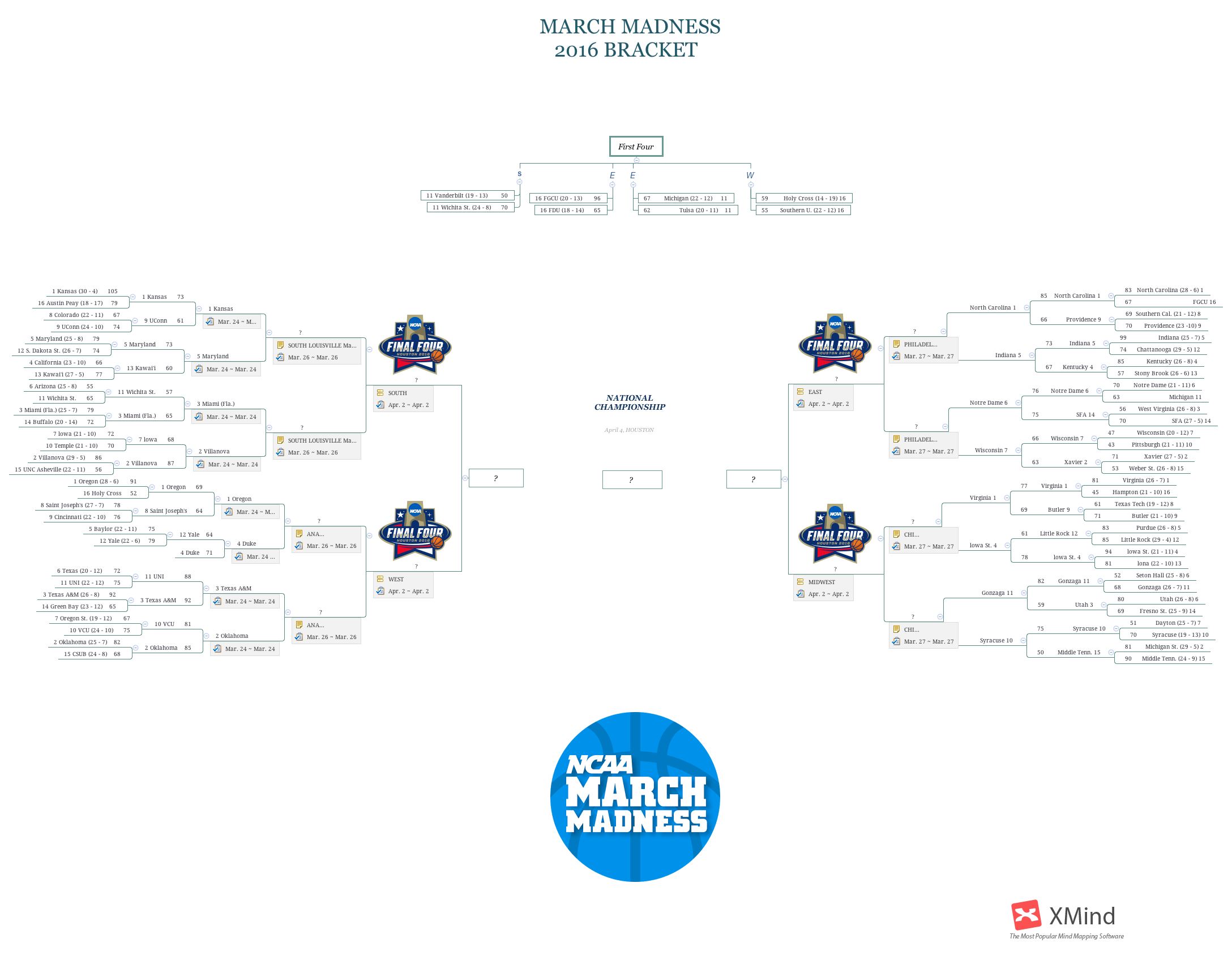
The NATIONAL CHAMPIONSHIP mind map template captures the complete 2016 NCAA Division I men's basketball tournament bracket, featuring 143 nodes across a single sheet. It includes the full 64-team bracket from the First Four through the championship game on April 4 in Houston, with regional brackets for the West, East, South, and Midwest. Key nodes such as 'MARCH MADNESS 2016 BRACKET' and 'First Four' organize the tournament structure, while team entries like '1 Kansas' and '2 Villanova' show seeding and matchups. This template serves as a ready-made bracket cheat sheet for fans and analysts tracking the historic 2016 tournament.
Terms and ConditionsFilling out a March Madness bracket pool with friends or coworkers
Analyzing historical tournament data for sports journalism or content creation
Teaching students about tournament structures and bracket logic in a sports management class
Launch the template in Xmind to explore the complete 2016 tournament structure from the First Four through the regional brackets.
Double-click any node to update team names, seeds, or scores and use the formatting toolbar to add visual markers for winners.
Save your finalized bracket as a high-resolution image or PDF to share your tournament analysis and predictions with others.
The template includes the full 2016 NCAA tournament bracket with 143 nodes, covering the First Four, regional brackets, and the championship game on April 4 in Houston. It lists all 64 teams with seeds and play-in game scores.
Open the .xmind file in Xmind desktop or web, then fill in game results by editing node names or adding notes. You can color-code winning teams or branches to visualize progression through the bracket.
Yes, the template is fully editable in Xmind. You can customize team names, seeds, scores, and layout. Export as PDF or image for printing or sharing.
Use the regional branches (e.g., '1 Kansas' vs '5 Maryland') to compare teams side by side. Add notes or icons to highlight key stats, upsets, or predictions for each matchup.
Absolutely. Replace the play-in game entries and scores with data from any tournament year. The structure is reusable for any NCAA or similar bracket.
Share your mind map templates with creators around the world and start earning from your work.

