




Project managers and team leads
Evaluating mind mapping software for team collaboration and need to compare cloud-based vs desktop tools.
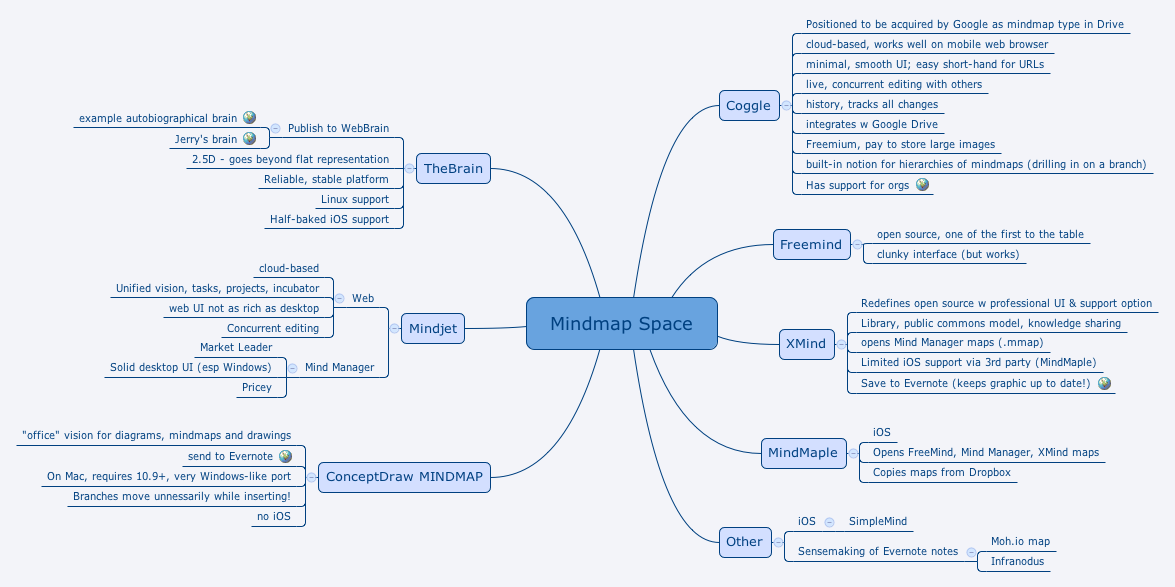
The 'Mindmap Space' mind map template surveys 8 major mind mapping tools as of 2015, including Coggle, Freemind, XMind, MindMaple, ConceptDraw MINDMAP, Mindjet, and TheBrain. It covers 54 nodes across a single sheet, comparing features like cloud support, platform availability, pricing, and unique capabilities. Key nodes include 'XMind' (redefines open source with professional UI), 'TheBrain' (2.5D representation), and 'Coggle' (live concurrent editing). This template serves as a competitive analysis cheat sheet for anyone evaluating mind mapping software.
Điều khoản sử dụngEvaluating mind mapping software for team collaboration and need to compare cloud-based vs desktop tools.
Researching open-source mind mapping alternatives with professional UI and support options.
Preparing a presentation or report on the mind mapping software landscape for stakeholders.
Open the .xmind file in Xmind desktop (Windows/Mac/Linux) or Xmind web.
Browse the top-level branches to see each tool. Click the '+' icon to expand details.
To customize, double-click any node to edit text. Add new nodes by pressing Tab or Insert.
Use the 'Format' panel to change colors, add icons, or apply themes for visual clarity.
Export your final comparison as PDF, image, or share the interactive map via Xmind Share.
The template surveys 8 mind mapping tools: Coggle, Freemind, XMind, MindMaple, Other (SimpleMind, Moh.io map, Infranodus), ConceptDraw MINDMAP, Mindjet, and TheBrain. It covers features, platform support, pricing, and unique capabilities for each.
Open the .xmind file in Xmind desktop or web. Each top-level node represents a tool. Expand branches to see detailed pros, cons, and features. Customize by adding your own notes or ratings.
Yes, the template is fully editable in Xmind. You can add, remove, or modify nodes. Export as PDF or image for printing.
Use the template as a checklist: review each tool's features like cloud support, platform compatibility, pricing, and unique aspects. Compare side-by-side by collapsing/expanding branches.
Absolutely. Add new tools, update information, or reorganize branches. Xmind allows you to add icons, colors, and notes to personalize your analysis.
Chia sẻ mẫu sơ đồ tư duy của bạn với người sáng tạo trên khắp thế giới và bắt đầu kiếm tiền từ tác phẩm của mình.

