




Team leads and presentation coaches
Planning a team meeting to review presentation techniques and multimedia usage.
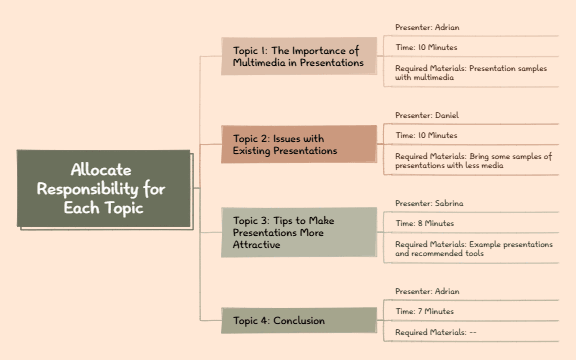
The Meeting Agenda Template 2.4 is a structured mind map designed for planning and managing presentation meetings. It covers 4 key topics with assigned presenters, time allocations, and required materials, ensuring efficient discussion and time management. The template includes nodes like 'Topic 1: The Importance of Multimedia in Presentations' with presenter 'Adrian' and '10 Minutes' time slot, and 'Topic 2: Issues with Existing Presentations' assigned to 'Daniel'. This meeting agenda template helps teams allocate responsibility for each topic, streamline presentations, and stay on track. It serves as a practical meeting agenda cheat sheet for facilitators and presenters.
Условия использованияPlanning a team meeting to review presentation techniques and multimedia usage.
Preparing a workshop on improving presentation skills with assigned speakers.
Structuring a departmental meeting to address common presentation issues and solutions.
Open the .xmind file in Xmind (desktop, web, or mobile).
Review the four main topics and replace them with your own agenda items.
Assign presenters by editing the 'Presenter' nodes under each topic.
Adjust the 'Time' and 'Required Materials' nodes to fit your meeting schedule.
Save and share the template with your team, or export it as a PDF for handouts.
The template includes 4 main topics with assigned presenters, time limits, and required materials. It covers multimedia importance, presentation issues, improvement tips, and a conclusion section.
Open the .xmind file in Xmind, then replace the topic names, presenters, times, and materials with your own meeting details. Use the structure to assign responsibility and keep discussions focused.
Yes, the template is fully editable in Xmind. You can customize nodes, add notes, and export as PDF or image for printing.
Use the 'Time' nodes under each topic to set realistic durations. The template suggests 10, 10, 8, and 7 minutes, which you can adjust based on your agenda.
Absolutely. In Xmind, you can add new branches under the root or existing topics to expand the agenda as needed.
Поделитесь своими шаблонами интеллект-карт с авторами по всему миру и начните зарабатывать на своих работах.
