


'%3e%3cpath%20d='M5.8002%2011.6C5%2011.8144%204.2002%2012.32%204.2002%2013.2V15.8C4.2002%2016.68%205%2017.1856%205.8002%2017.4L21.8002%2021.2C22.6802%2021.456%2023.4002%2020.832%2023.4002%2019.92V8.08001C23.4002%207.16801%2022.6802%206.54401%2021.8002%206.80001L5.8002%2011.6Z'%20stroke='%234FA49A'%20stroke-width='1.92'%20stroke-linejoin='round'/%3e%3cpath%20d='M8%2018V25.25C8%2026.7625%208.75%2028%209.66667%2028H11.3333C12.25%2028%2013%2026.7625%2013%2025.25V19.5'%20stroke='%234FA49A'%20stroke-width='1.92'%20stroke-linecap='round'%20stroke-linejoin='round'/%3e%3cpath%20d='M26.5996%2010C28.1996%2011.92%2028.1996%2016.08%2026.5996%2018'%20stroke='%234FA49A'%20stroke-width='1.92'%20stroke-linecap='round'/%3e%3c/g%3e%3cdefs%3e%3cclipPath%20id='clip0_11502_53007'%3e%3crect%20width='32'%20height='32'%20fill='white'/%3e%3c/clipPath%3e%3c/defs%3e%3c/svg%3e)

Marketing managers and campaign coordinators
Launching a new product campaign and need to align content creation with media buying.
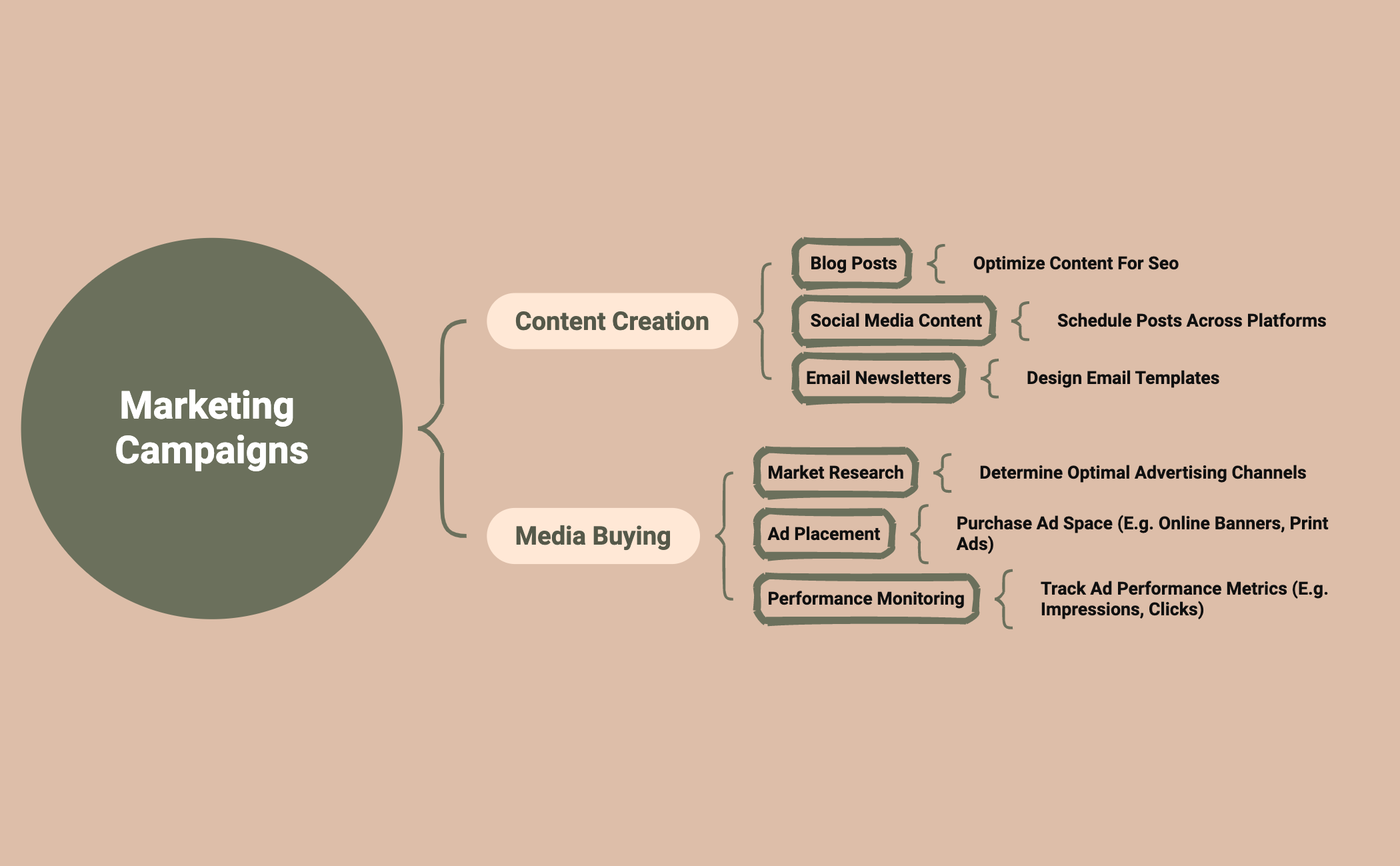
The Marketing Campaigns mind map template from Xmind provides a structured overview of essential components for effective marketing campaigns, covering 15 nodes across two main branches: Content Creation and Media Buying. It helps streamline planning by detailing actionable steps such as 'Optimize Content for SEO', 'Schedule posts across platforms', and 'Track ad performance metrics (e.g. impressions, clicks)'. This template is ideal for marketers and campaign managers seeking a clear, organized approach to campaign execution.
Điều khoản sử dụngLaunching a new product campaign and need to align content creation with media buying.
Reviewing past campaign performance to optimize future ad spend and content strategy.
Onboarding new team members to standard campaign planning processes.
Launch the template in Xmind to review the pre-structured branches for Content Creation and Media Buying.
Replace placeholder text with your specific marketing tasks and add new topics to expand your campaign details.
Update the map with performance metrics and export your final plan as a PDF or image to share with your team.
The template includes two main branches: Content Creation (Blog Posts, Social Media Content, Email Newsletters) and Media Buying (Market Research, Ad Placement, Performance Monitoring), with specific action items under each.
Open the .xmind file in Xmind, then expand each branch to add your own tasks and deadlines. Customize nodes like 'Optimize Content for SEO' with your specific keywords and channels.
Yes, the template is free to use and fully editable in Xmind (desktop, web, or mobile). You can add, remove, or modify nodes to fit your campaign needs.
Yes, the 'Performance Monitoring' node under Media Buying includes tracking metrics like impressions and clicks. You can add sub-nodes for specific KPIs.
Share the .xmind file via cloud storage or use Xmind's export feature to PDF or image. Team members can add comments or edit branches in real-time if using Xmind for Teams.
Chia sẻ mẫu sơ đồ tư duy của bạn với người sáng tạo trên khắp thế giới và bắt đầu kiếm tiền từ tác phẩm của mình.

