




Plant managers and process engineers
Planning a new cement plant layout or upgrading existing production lines.
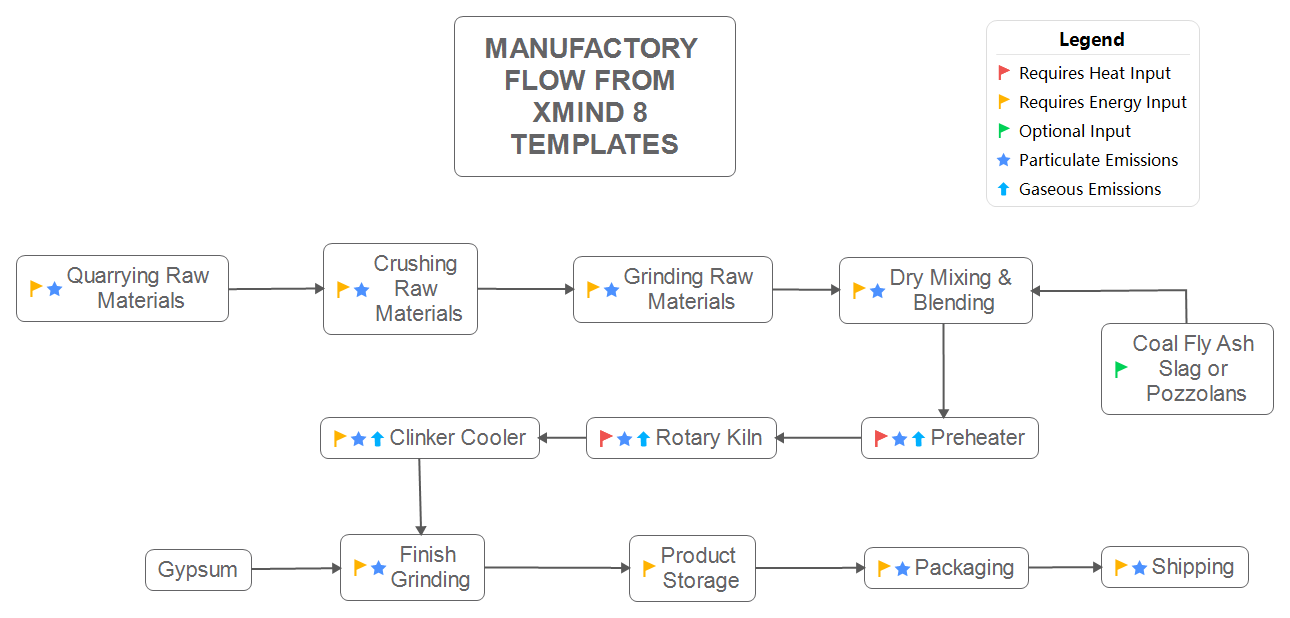
The Manufactory Flow From XMind 8 Templates mind map outlines a complete cement production process, covering 13 key stages from raw material extraction to final shipping. This template is used by manufacturing engineers, plant managers, and operations teams to visualize and optimize production workflows. It includes critical nodes such as 'Crushing Raw Materials', 'Rotary Kiln', and 'Finish Grinding', providing a structured overview of the entire manufacturing flow. Designed as a linear process map, it helps identify bottlenecks and improve efficiency in cement plants.
Conditions d'utilisationPlanning a new cement plant layout or upgrading existing production lines.
Training new operators on the end-to-end manufacturing process.
Conducting a bottleneck analysis in the grinding or kiln section.
Open the template in Xmind and rename the default 13-stage flow nodes to match your plant's specific equipment and terminology.
Add subtopics for detailed parameters like temperature zones and use icons to mark critical quality checkpoints or bottlenecks.
Save your finalized manufacturing flow as a PDF or image to share with operations teams for process optimization and training.
The template includes 13 process nodes covering the entire cement manufacturing flow, from quarrying and crushing to packaging and shipping. It also lists additives like gypsum and coal fly ash.
You can customize the nodes to reflect your plant's specific equipment and parameters. Use it to map current workflows, identify delays, and plan improvements in areas like the rotary kiln or finish grinding.
Yes, the .xmind file is fully editable. You can add notes, change colors, and export it as an image or PDF for printing or sharing.
The 'Preheater' node represents the system that preheats raw meal before it enters the rotary kiln, improving energy efficiency in the clinker production process.
Absolutely. Xmind allows you to insert new branches, subtopics, and cross-links to expand the flow with additional steps like quality control or maintenance.
Partagez vos modèles de cartes mentales avec des créateurs du monde entier et commencez à gagner avec votre travail.

