



HR managers and leadership coaches
When preparing a management training session comparing classic and modern frameworks
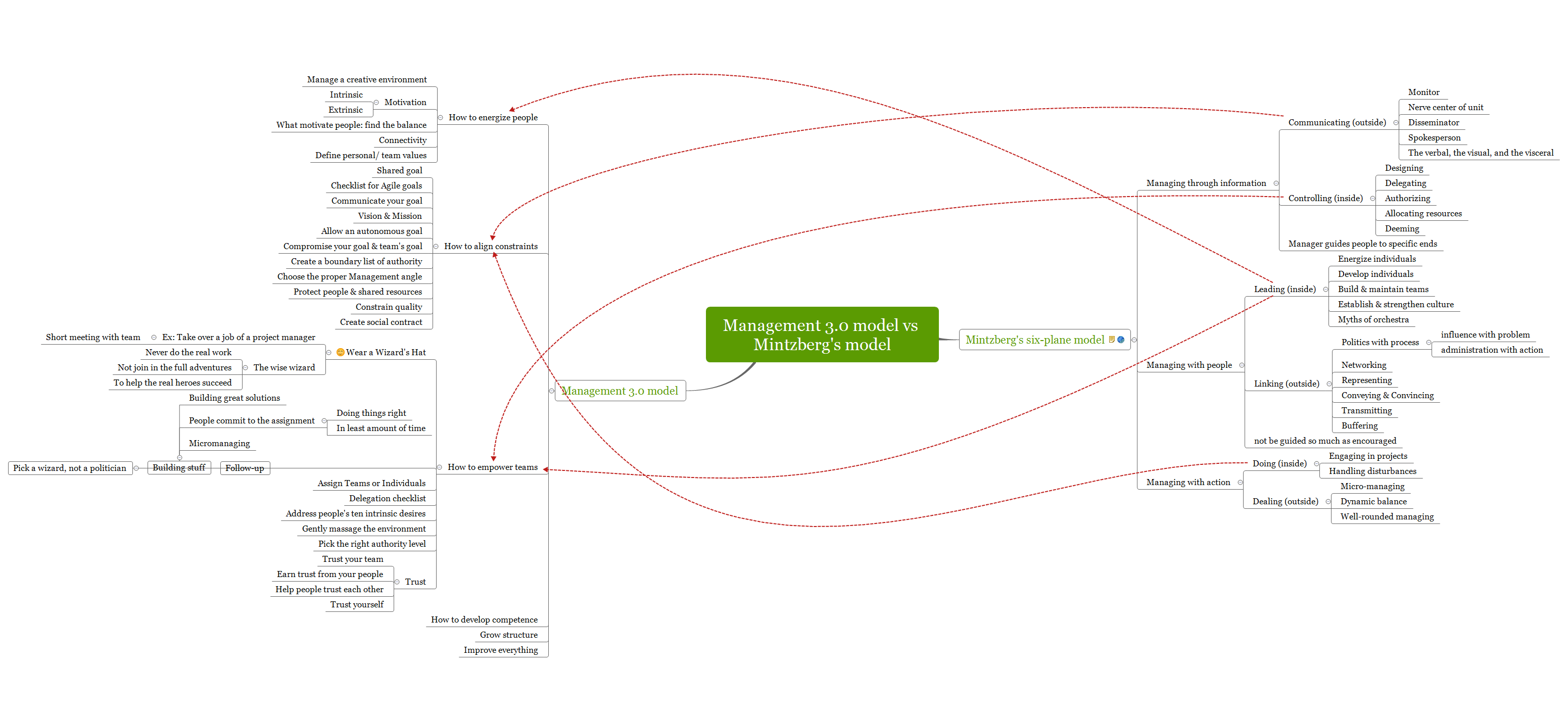
The Management 3.0 model vs Mintzberg's model mind map template compares two influential management frameworks across 91 nodes. Mintzberg's six-plane model covers managing through information, with people, and with action, including specific nodes like 'Communicating (outside)', 'Leading (inside)', and 'Doing (inside)'. The Management 3.0 model focuses on energizing people, aligning constraints, and empowering teams, with nodes such as 'How to energize people', 'How to align constraints', and 'How to empower teams'. This template provides a structured comparison for managers and leaders to understand and apply both models in practice.
Условия использованияWhen preparing a management training session comparing classic and modern frameworks
During a strategic planning meeting to decide which management approach fits the team culture
When writing a research paper or article on management models
Open the .xmind file in Xmind (desktop, web, or mobile).
Browse the two main branches: Mintzberg's six-plane model and Management 3.0 model.
Click on any node to read its details; use the 'Notes' feature to add your own insights.
Customize the template by adding new sub-nodes, changing colors, or attaching icons to highlight key concepts.
Export the final mind map as an image, PDF, or share it with your team via Xmind Cloud.
The template includes two main branches: Mintzberg's six-plane model (managing through information, with people, with action) and Management 3.0 model (energize people, align constraints, empower teams, develop competence, grow structure, improve everything).
Open the .xmind file in Xmind, then explore each branch side by side. You can add notes or color-code nodes to highlight similarities and differences between the two models.
Yes, the template is fully editable in Xmind (desktop or web). You can customize nodes, add icons, and export as PDF or image for printing.
The 'Wear a Wizard's Hat' node suggests taking on a facilitator role, e.g., taking over a project manager's job temporarily, to empower teams and guide without micromanaging.
It includes 'Doing (inside)' (engaging in projects, handling disturbances) and 'Dealing (outside)' (micro-managing, dynamic balance) to describe hands-on management.
Поделитесь своими шаблонами интеллект-карт с авторами по всему миру и начните зарабатывать на своих работах.

