


'%3e%3cpath%20d='M4.80078%207.2001C4.80078%206.4001%205.44078%205.6001%206.40078%205.6001H25.6008C26.5608%205.6001%2027.2008%206.4001%2027.2008%207.2001C27.2008%207.5201%2027.1048%207.8401%2026.9288%208.1121L19.4728%2018.4001C19.2968%2018.6721%2019.2008%2018.9921%2019.2008%2019.3121V27.2001C19.2008%2028.0801%2018.4808%2028.8001%2017.6008%2028.8001H14.4008C13.5208%2028.8001%2012.8008%2028.0801%2012.8008%2027.2001V19.3121C12.8008%2018.9921%2012.7048%2018.6721%2012.5288%2018.4001L5.07278%208.1121C4.89678%207.8401%204.80078%207.5201%204.80078%207.2001Z'%20stroke='%234FA49A'%20stroke-width='2.2'%20stroke-linejoin='round'/%3e%3c/g%3e%3cdefs%3e%3cclipPath%20id='clip0_11502_53091'%3e%3crect%20width='32'%20height='32'%20fill='white'/%3e%3c/clipPath%3e%3c/defs%3e%3c/svg%3e)

Sales managers and operations teams
Setting up a new sales process for a logistics company
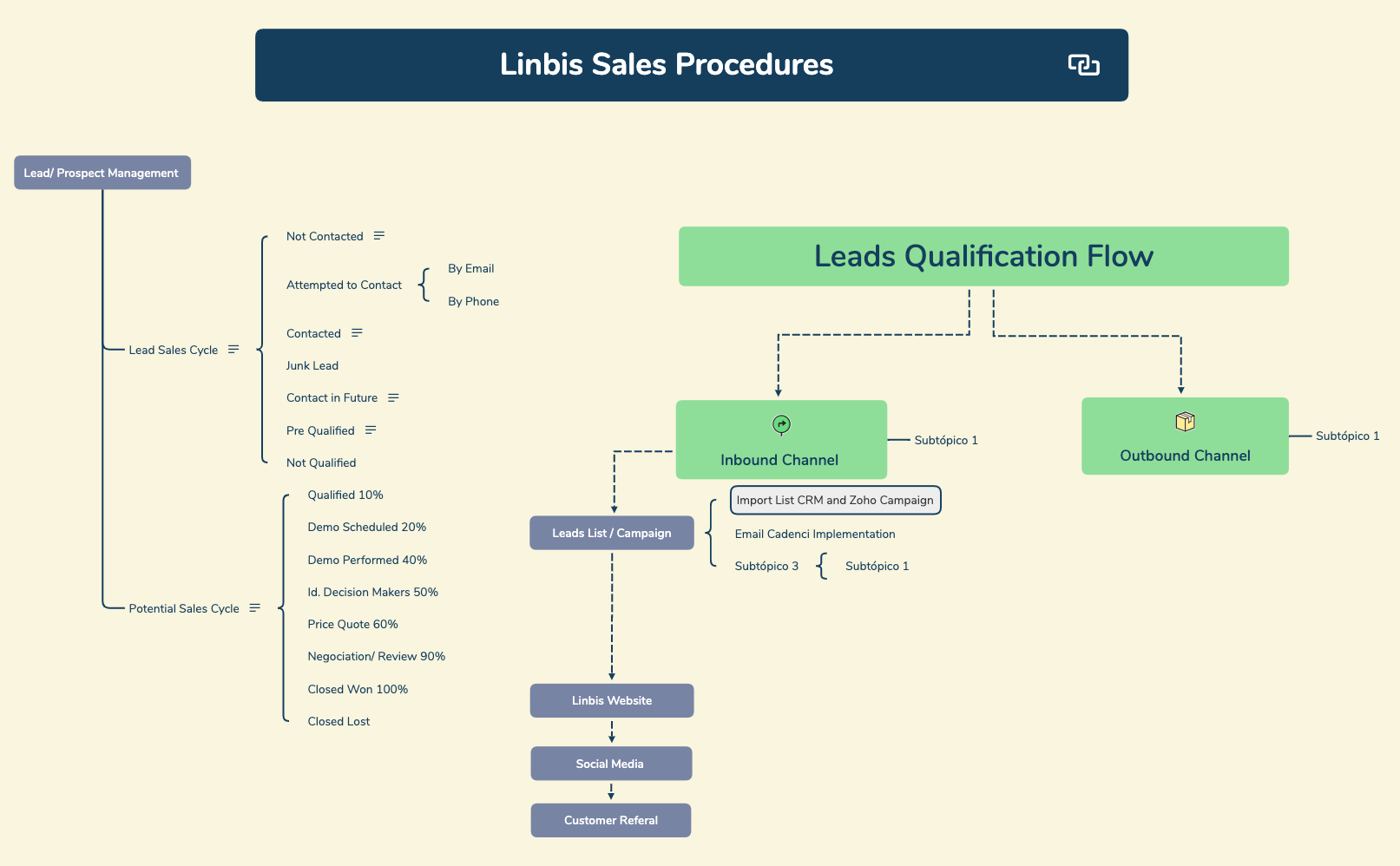
The Logistics Management System template provides a structured overview of sales procedures, covering lead qualification flows and outbound/inbound channels. It includes 34 nodes organized under the root 'Linbis Sales Procedures', with branches for 'Lead/ Prospect Management', 'Outbound Channel', 'Inbound Channel', 'Leads Qualification Flow', 'Leads List / Campaign', 'Linbis Website', 'Social Media', and 'Customer Referal'. The template details the 'Lead Sales Cycle' with stages from 'Not Contacted' to 'Pre Qualified', and the 'Potential Sales Cycle' with percentage-based milestones from 'Qualified 10%' to 'Closed Won 100%'. This logistics management mind map template is ideal for sales teams to track prospects and streamline operations.
Terms and ConditionsSetting up a new sales process for a logistics company
Training new sales representatives on lead qualification workflows
Reviewing and optimizing existing lead management cycles
Open the template in Xmind to explore the 34 nodes covering lead qualification flows and inbound or outbound channel structures.
Modify the Lead Management branches and Potential Sales Cycle percentages to align with your specific deal tracking and qualification milestones.
Populate the channel placeholders and campaign branches with your specific marketing details to integrate the map with your existing sales tools.
The template includes 34 nodes covering lead management, sales cycles, outbound/inbound channels, leads qualification flow, and campaign management, all under the 'Linbis Sales Procedures' root.
Follow the 'Lead/ Prospect Management' branch to track leads through stages like 'Not Contacted', 'Attempted to Contact', and 'Pre Qualified'. Then use the 'Potential Sales Cycle' to monitor progress from 'Qualified 10%' to 'Closed Won 100%'.
Yes, you can open the .xmind file in Xmind desktop or web and customize all nodes, including adding details to 'Outbound Channel' and 'Inbound Channel' placeholders.
It helps manage campaign data, including importing lists from CRM and Zoho Campaign, and implementing email cadences for lead nurturing.
Yes, the 'Potential Sales Cycle' includes percentage-based milestones like 'Demo Scheduled 20%' and 'Negociation/ Review 90%' to quantify deal progress.
Share your mind map templates with creators around the world and start earning from your work.

