


'%3e%3cpath%20d='M6%2019.2002H26M8.6%2019.2002L10.2%2028.2002H21.8L23.4%2019.2002'%20stroke='%2352AA6F'%20stroke-width='2.25'%20stroke-linecap='round'%20stroke-linejoin='round'/%3e%3cpath%20d='M16%2019.2002V11.2002'%20stroke='%2352AA6F'%20stroke-width='2.25'%20stroke-linecap='round'/%3e%3cpath%20d='M16%2016C8%2013.8564%208%2010.2%208%207C11.2%207%2014.4%208.6%2016%2013.4'%20stroke='%2352AA6F'%20stroke-width='1.92'%20stroke-linejoin='round'/%3e%3cpath%20d='M16%2012.5C20.5%2012.5%2024%208.2%2024%205C20%205.00016%2016.5%207%2016%2012.5Z'%20stroke='%2352AA6F'%20stroke-width='1.92'%20stroke-linejoin='round'/%3e%3c/g%3e%3cdefs%3e%3cclipPath%20id='clip0_11502_53598'%3e%3crect%20width='32'%20height='32'%20fill='white'/%3e%3c/clipPath%3e%3c/defs%3e%3c/svg%3e)

Life coaches and personal development counselors
During a life coaching session to help a client assess their relationship balance across professional and personal spheres.
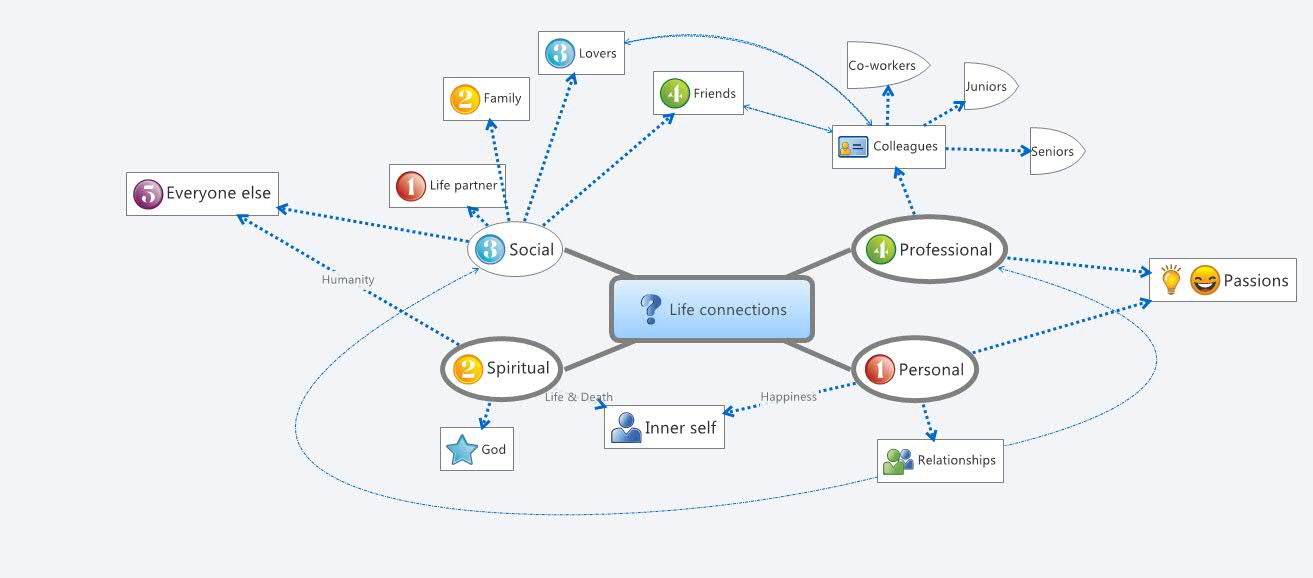
The Life Connections mind map template helps individuals map and reflect on the key relationships and areas in their lives, covering 18 distinct nodes across professional, personal, social, and spiritual domains. It includes specific categories such as 'Family', 'Friends', 'Life partner', 'Colleagues', and 'Inner self', providing a structured framework for self-assessment and relationship management. This template serves as a visual cheat sheet for understanding one's social ecosystem and identifying areas for growth or balance.
Terms and ConditionsDuring a life coaching session to help a client assess their relationship balance across professional and personal spheres.
At the start of a new year or quarter to set intentions for improving key relationships like 'Family' or 'Life partner'.
In a team-building workshop to explore how colleagues perceive their work relationships (e.g., 'Colleagues', 'Seniors').
Open the template in Xmind to review the 18 pre-defined nodes spanning professional, personal, social, and spiritual domains.
Click on specific categories like Family or Colleagues to add personal notes, insert icons, and adjust colors to reflect your unique social ecosystem.
Evaluate your relationship balance across all branches before exporting the final map as an image or PDF for your personal growth records.
The template includes 18 nodes organized under top-level categories like Professional, Personal, Social, Spiritual, and specific relationships such as Family, Friends, Life partner, Colleagues, and Inner self.
Open the template in Xmind, then add notes or ratings to each node (e.g., satisfaction level) to evaluate your relationships. You can also add sub-nodes to detail specific connections.
Yes, the Xmind template is fully editable. You can customize nodes, add colors or icons, and export as PDF or image for printing.
Start by reviewing each node (e.g., 'Family', 'Friends') and add sub-nodes for specific people. Use colors or priority markers to indicate closeness or areas needing attention.
Absolutely. It can be used in workshops to help participants visualize their support networks or in coaching sessions to discuss work-life balance.
Share your mind map templates with creators around the world and start earning from your work.

