




Support managers and knowledge base administrators
When launching a new knowledge management initiative in a customer support center
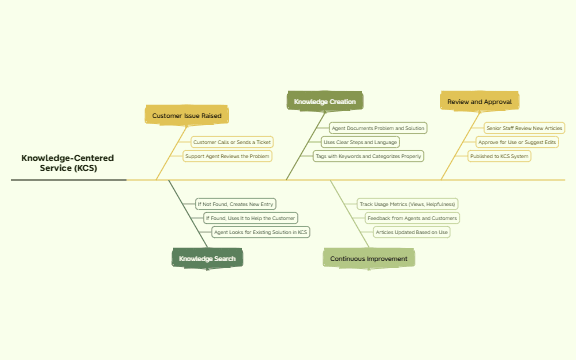
The Knowledge-Centered Service (KCS) mind map template provides a structured workflow for implementing KCS methodology in customer support environments. It covers 5 core phases—Customer Issue Raised, Knowledge Search, Knowledge Creation, Continuous Improvement, and Review and Approval—with 20 nodes detailing each step. This template helps support teams streamline knowledge capture and reuse, reducing resolution time and improving consistency. Key nodes include 'Agent Looks for Existing Solution in KCS', 'Tags with Keywords and Categorizes Properly', and 'Track Usage Metrics (Views, Helpfulness)'. Designed for Xmind, this KCS cheat sheet offers a visual guide to the entire knowledge-centered service lifecycle.
使用条款When launching a new knowledge management initiative in a customer support center
During quarterly process review to identify gaps in knowledge capture and reuse
When training new support agents on KCS methodology and best practices
Open the .xmind file in Xmind desktop or web application.
Review the 5 main branches: Customer Issue Raised, Knowledge Search, Knowledge Creation, Continuous Improvement, and Review and Approval.
Customize each node by editing the text to match your organization's specific processes and terminology.
Add sub-nodes or notes to include detailed procedures, examples, or links to your knowledge base system.
Export the completed map as an image or PDF for team reference, or share the .xmind file for collaborative editing.
The template includes 5 main phases: Customer Issue Raised, Knowledge Search, Knowledge Creation, Continuous Improvement, and Review and Approval, with 20 detailed nodes covering each step of the KCS workflow.
Start by mapping the customer issue flow, then define how agents search existing knowledge, create new articles, and continuously improve content. Use the review and approval branch to establish quality control.
Yes, the template is fully editable in Xmind. You can add or remove nodes, customize text, and adjust the layout to fit your team's specific KCS processes.
Use the template as a visual guide during team training. Walk through each phase, assign responsibilities, and customize the nodes to match your existing support tools and workflows.
Yes, the Continuous Improvement branch includes 'Track Usage Metrics (Views, Helpfulness)', which you can expand to define specific KPIs and review cycles.
把你的思维导图模板分享给全球创作者,从你的作品中获得收益。

