




Party hosts or event planners
Planning a friend's birthday party from scratch, covering venue, food, and entertainment.
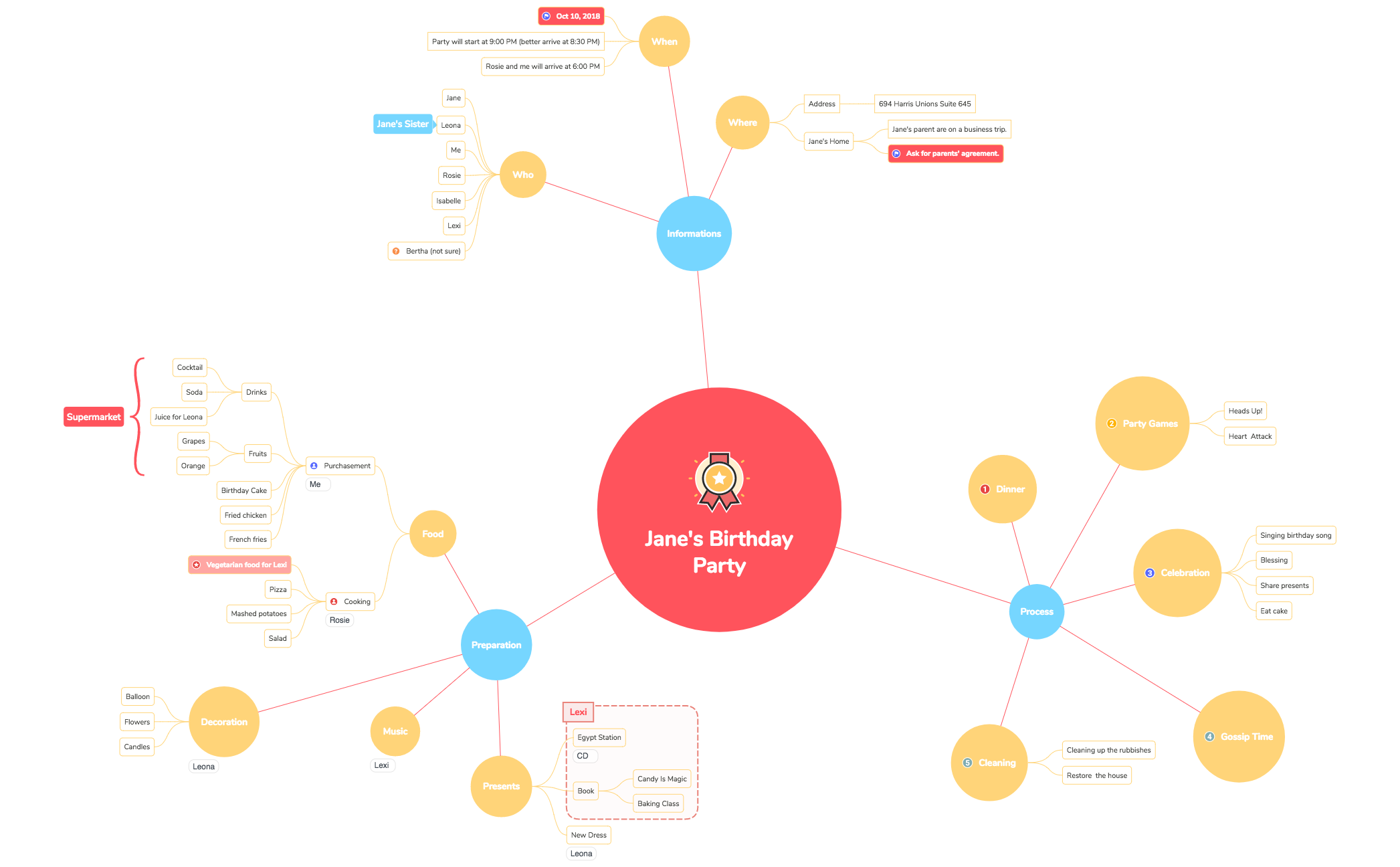
Jane's Birthday Party mind map template organizes a 64-node party planning workflow across 16 branches including Process, Dinner, Cleaning, Where, When, Preparation, Food, Decoration, Music, Presents, Informations, Who, Party Games, Celebration, and Gossip Time. This template serves as a comprehensive checklist and brainstorming tool for event planners, party hosts, or anyone organizing a birthday celebration. Key nodes like 'Purchasement' under Food detail drink and fruit selections (Cocktail, Soda, Grapes, Orange), while 'Cleaning' covers 'Cleaning up the rubbishes' and 'Restore the house'. The 'Where' branch specifies an address (694 Harris Unions Suite 645) and notes that Jane's parents are on a business trip, requiring permission. With specific timings (party at 9:00 PM, Rosie and me arrive at 6:00 PM) and guest list (Jane, Leona, Me, Rosie, Isabelle, Lexi, Bertha), this template offers a ready-to-use structure for detailed party logistics.
Terms and ConditionsPlanning a friend's birthday party from scratch, covering venue, food, and entertainment.
Coordinating a surprise party with multiple tasks like decoration, music, and guest communication.
Preparing a detailed timeline for a birthday celebration, including setup, activities, and cleanup.
Open the .xmind file in Xmind and expand the 16 main branches to understand the comprehensive party planning workflow.
Replace placeholder information like the address and guest list with your own data while adding or removing nodes to fit your specific celebration needs.
Utilize the Process branch to manage your timeline and export the completed mind map as a PDF or image to share with your co-hosts.
It covers 16 categories like Process, Dinner, Cleaning, Where, When, Preparation, Food, Decoration, Music, Presents, Informations, Who, Party Games, Celebration, and Gossip Time, with 64 nodes for detailed planning.
Open the .xmind file in Xmind, then replace the placeholder details (e.g., address, guest names, food items) with your own party information. Customize branches as needed.
Yes, the template is fully editable in Xmind (desktop, web, or mobile). You can export it as PDF, image, or outline for printing.
Use the 'Process' branch as a timeline, check off items under 'Preparation' and 'Purchasement', and assign responsibilities using the 'Who' list.
Absolutely. In Xmind, you can add new sibling or child nodes to any branch, such as adding more names under 'Who' or new games under 'Party Games'.
Share your mind map templates with creators around the world and start earning from your work.

