




HR coordinators and IT administrators
Onboarding a new employee in the first week to ensure all accounts and access are set up.
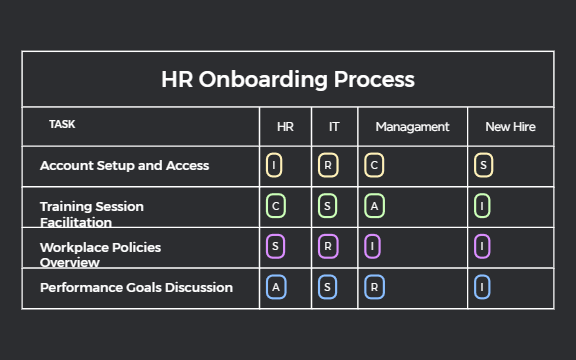
The HR Onboarding Process mind map template provides a structured framework for managing new hire onboarding, covering 22 nodes across five key areas: Account Setup and Access, Training Session Facilitation, Workplace Policies Overview, Performance Goals Discussion, and a dedicated TASK section. Designed for HR professionals, IT teams, and managers, this template clarifies roles and responsibilities by assigning tasks to specific stakeholders (e.g., I, R, C, S, A) within each branch. For instance, the 'Account Setup and Access' branch includes nodes for I, R, C, and S, while 'Performance Goals Discussion' assigns I, R, S, and A. This Xmind template streamlines the onboarding experience, ensuring no critical step is missed and reducing time-to-productivity for new hires.
Terms and ConditionsOnboarding a new employee in the first week to ensure all accounts and access are set up.
Planning training sessions for a cohort of new hires to align on company policies and tools.
Conducting a performance goal discussion during the first 30 days to set expectations.
Open the .xmind file in Xmind (desktop, web, or mobile).
Review the five main branches: Account Setup and Access, Training Session Facilitation, Workplace Policies Overview, Performance Goals Discussion, and TASK.
Replace the role codes (I, R, C, S, A) with actual team member names or departments.
Add due dates or checkboxes to each node to track progress.
Export the completed mind map as a PDF or image to share with stakeholders.
The template covers 5 main branches: Account Setup and Access, Training Session Facilitation, Workplace Policies Overview, Performance Goals Discussion, and TASK. Each branch includes role-specific nodes (I, R, C, S, A) to assign responsibilities.
Open the .xmind file in Xmind, then review each branch to assign tasks to the appropriate team members (HR, IT, manager). Customize the node labels to match your organization's roles and deadlines.
Yes, the template is fully editable in Xmind. You can add, remove, or rename nodes, and export it as an image or PDF for printing.
These are role codes: I (Informed), R (Responsible), C (Consulted), S (Support), A (Accountable). They define each stakeholder's involvement in onboarding tasks.
Absolutely. You can change the role letters or add new role categories to fit your team structure. Simply edit the node text in Xmind.
Share your mind map templates with creators around the world and start earning from your work.

