


'%3e%3cpath%20d='M6%2019.2002H26M8.6%2019.2002L10.2%2028.2002H21.8L23.4%2019.2002'%20stroke='%2352AA6F'%20stroke-width='2.25'%20stroke-linecap='round'%20stroke-linejoin='round'/%3e%3cpath%20d='M16%2019.2002V11.2002'%20stroke='%2352AA6F'%20stroke-width='2.25'%20stroke-linecap='round'/%3e%3cpath%20d='M16%2016C8%2013.8564%208%2010.2%208%207C11.2%207%2014.4%208.6%2016%2013.4'%20stroke='%2352AA6F'%20stroke-width='1.92'%20stroke-linejoin='round'/%3e%3cpath%20d='M16%2012.5C20.5%2012.5%2024%208.2%2024%205C20%205.00016%2016.5%207%2016%2012.5Z'%20stroke='%2352AA6F'%20stroke-width='1.92'%20stroke-linejoin='round'/%3e%3c/g%3e%3cdefs%3e%3cclipPath%20id='clip0_11502_53598'%3e%3crect%20width='32'%20height='32'%20fill='white'/%3e%3c/clipPath%3e%3c/defs%3e%3c/svg%3e)

Individuals and families who want to secure their devices from the start
Setting up a new computer or smartphone for the first time
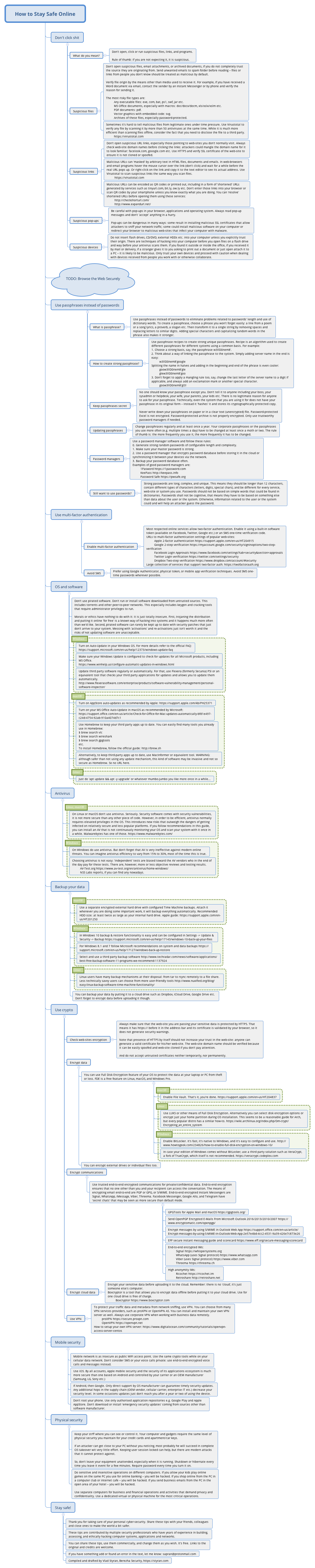
The 'How to Stay Safe Online' mind map template provides a comprehensive personal cybersecurity framework with 91 nodes covering 11 major areas. It includes actionable advice on avoiding suspicious links and files, creating strong passphrases, enabling multi-factor authentication, securing operating systems and software, antivirus protection, data backup, cryptocurrency safety, mobile security, and physical security. Key nodes like 'Don't click shit' and 'Use passphrases instead of passwords' offer practical, no-nonsense guidance. This template serves as a cheat sheet for anyone looking to improve their online safety habits, from beginners to advanced users.
Terms and ConditionsSetting up a new computer or smartphone for the first time
After experiencing a phishing attempt or malware infection
Creating a company-wide cybersecurity awareness training
Download the .xmind file and open it to explore the eleven major cybersecurity areas including passphrase creation and link safety.
Expand the ninety-one nodes to read specific advice and use the editing tools to add your personal software lists or backup schedules.
Save your customized mind map as a PDF or image to keep as a handy offline cheat sheet for your digital security habits.
The template covers 11 key areas: avoiding malicious clicks, secure browsing, passphrases, multi-factor authentication, OS/software updates, antivirus, backups, cryptocurrency, mobile security, physical security, and general safety tips.
Open the .xmind file in Xmind, then review each branch. Customize the nodes by adding your own passwords, software list, backup schedule, and security tools. Use it as a checklist to implement each recommendation.
Yes, the template is free to use and fully editable in Xmind. You can add, remove, or modify nodes to fit your specific security needs.
A passphrase is a sequence of random words (e.g., 'correct horse battery staple') that is longer and easier to remember than a complex password. It offers stronger security against brute-force attacks.
Yes, the 'Mobile security' branch includes tips for securing smartphones and tablets, such as app permissions, updates, and avoiding untrusted apps.
Share your mind map templates with creators around the world and start earning from your work.

