


'%3e%3cpath%20d='M3.2002%2016.6001H28.8002'%20stroke='%2352AA6F'%20stroke-width='2.25'%20stroke-linecap='round'/%3e%3cpath%20d='M5%2017.6001C5%2022.4001%208.8%2027.5%2016%2027.5C23.2%2027.5%2027%2022.4536%2027%2017.6536'%20stroke='%2352AA6F'%20stroke-width='2.25'%20stroke-linecap='round'%20stroke-linejoin='round'/%3e%3cpath%20d='M11.2002%2012.7998C11.2002%209.5998%2012.8002%208.7%2012.8002%205.5M16.0002%2012.7998C16.0002%209.5998%2017.6002%208.7%2017.6002%205.5M20.8002%2012.7998C20.8002%209.5998%2022.4002%208.7%2022.4002%205.5'%20stroke='%2352AA6F'%20stroke-width='2.25'%20stroke-linecap='round'/%3e%3c/g%3e%3cdefs%3e%3cclipPath%20id='clip0_11502_53637'%3e%3crect%20width='32'%20height='32'%20fill='white'/%3e%3c/clipPath%3e%3c/defs%3e%3c/svg%3e)

Home bakers and cooking enthusiasts
Planning a weekend baking session and need a step-by-step guide for making bread dough from scratch.
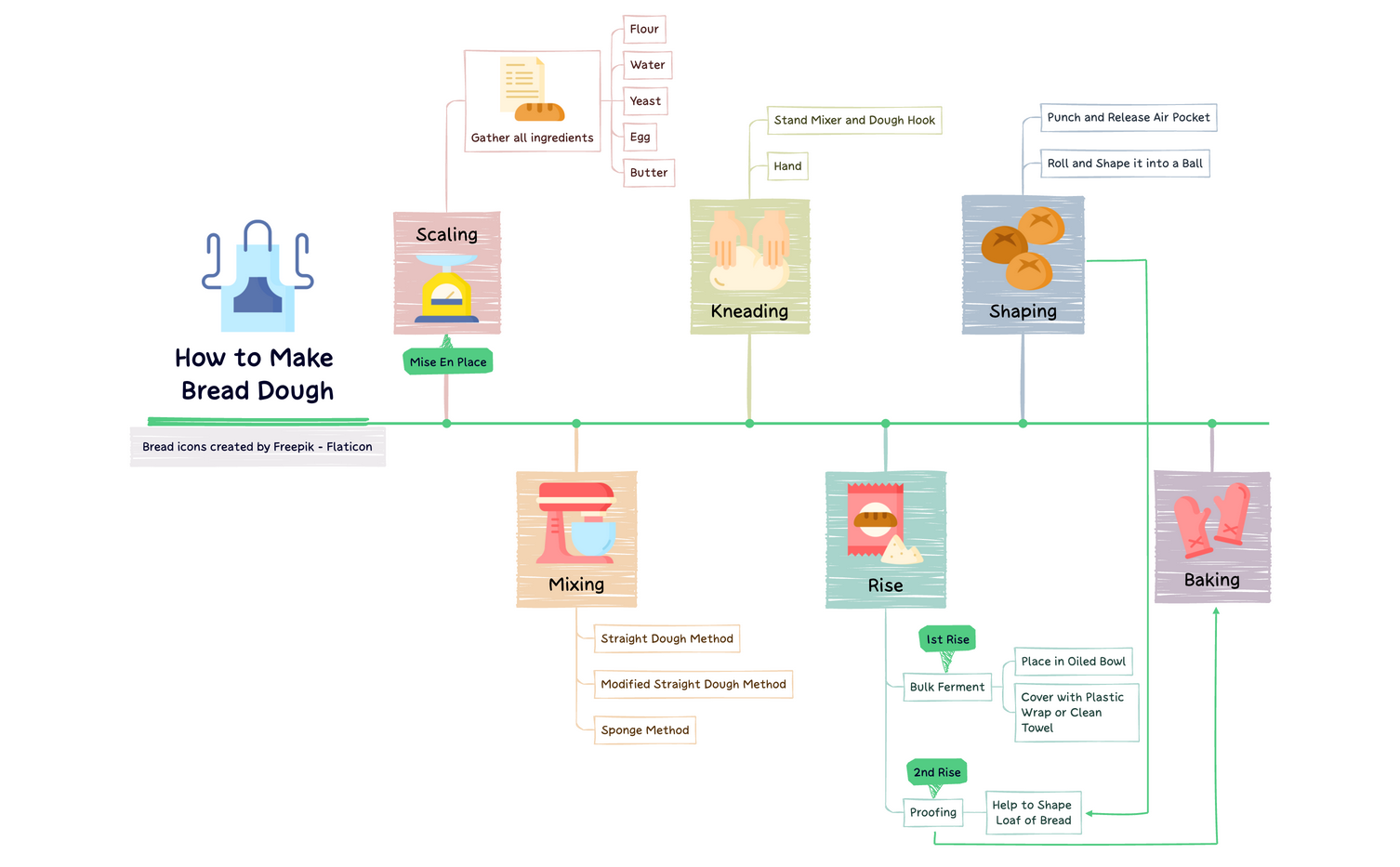
The 'How to Make Bread Dough' mind map template breaks down the bread-making process into 6 core stages—Scaling, Mixing, Kneading, Rise, Shaping, and Baking—with 26 total nodes. It covers essential ingredients like Flour, Water, Yeast, Egg, and Butter, and details three mixing methods: Straight Dough Method, Modified Straight Dough Method, and Sponge Method. The template also includes specific techniques such as Bulk Ferment and Proofing, making it a practical cheat sheet for both beginners and experienced bakers. Whether you use a Stand Mixer and Dough Hook or knead by Hand, this template guides you through each step from gathering ingredients to baking.
Terms and ConditionsPlanning a weekend baking session and need a step-by-step guide for making bread dough from scratch.
Teaching a beginner bread-making class and want a visual outline of the entire process.
Experimenting with different mixing methods (e.g., sponge vs. straight dough) to compare results.
Launch the template in Xmind to explore the six core branches covering everything from scaling ingredients to the final baking process.
Expand the sub-nodes to study specific mixing methods and techniques like bulk fermentation or proofing to understand the bread-making science.
Input your specific recipe quantities into the notes and use progress markers to monitor your journey from kneading to the oven.
The template includes 26 nodes covering 6 stages: Scaling, Mixing, Kneading, Rise, Shaping, and Baking. It lists ingredients like Flour, Water, Yeast, Egg, and Butter, and explains mixing methods and kneading techniques.
Open the .xmind file in Xmind, then follow each branch step-by-step: scale ingredients, choose a mixing method, knead, let the dough rise, shape it, and bake. Customize notes or add timers as needed.
Yes, the template is free to use and fully editable in Xmind. You can add your own notes, adjust ingredient quantities, or insert images to personalize your bread-making process.
Use the Bulk Ferment node to let the dough rise after kneading—place it in an oiled bowl and cover with plastic wrap. The Proofing node helps shape the loaf before the final rise.
Absolutely. You can expand each mixing method (Straight Dough, Modified Straight Dough, Sponge) with your own step-by-step instructions or swap them based on your recipe.
Share your mind map templates with creators around the world and start earning from your work.

