


'%3e%3cpath%20d='M6%2019.2002H26M8.6%2019.2002L10.2%2028.2002H21.8L23.4%2019.2002'%20stroke='%2352AA6F'%20stroke-width='2.25'%20stroke-linecap='round'%20stroke-linejoin='round'/%3e%3cpath%20d='M16%2019.2002V11.2002'%20stroke='%2352AA6F'%20stroke-width='2.25'%20stroke-linecap='round'/%3e%3cpath%20d='M16%2016C8%2013.8564%208%2010.2%208%207C11.2%207%2014.4%208.6%2016%2013.4'%20stroke='%2352AA6F'%20stroke-width='1.92'%20stroke-linejoin='round'/%3e%3cpath%20d='M16%2012.5C20.5%2012.5%2024%208.2%2024%205C20%205.00016%2016.5%207%2016%2012.5Z'%20stroke='%2352AA6F'%20stroke-width='1.92'%20stroke-linejoin='round'/%3e%3c/g%3e%3cdefs%3e%3cclipPath%20id='clip0_11502_53598'%3e%3crect%20width='32'%20height='32'%20fill='white'/%3e%3c/clipPath%3e%3c/defs%3e%3c/svg%3e)

Freelancers, students, and remote workers
When you're facing a deadline but feel completely unmotivated to start
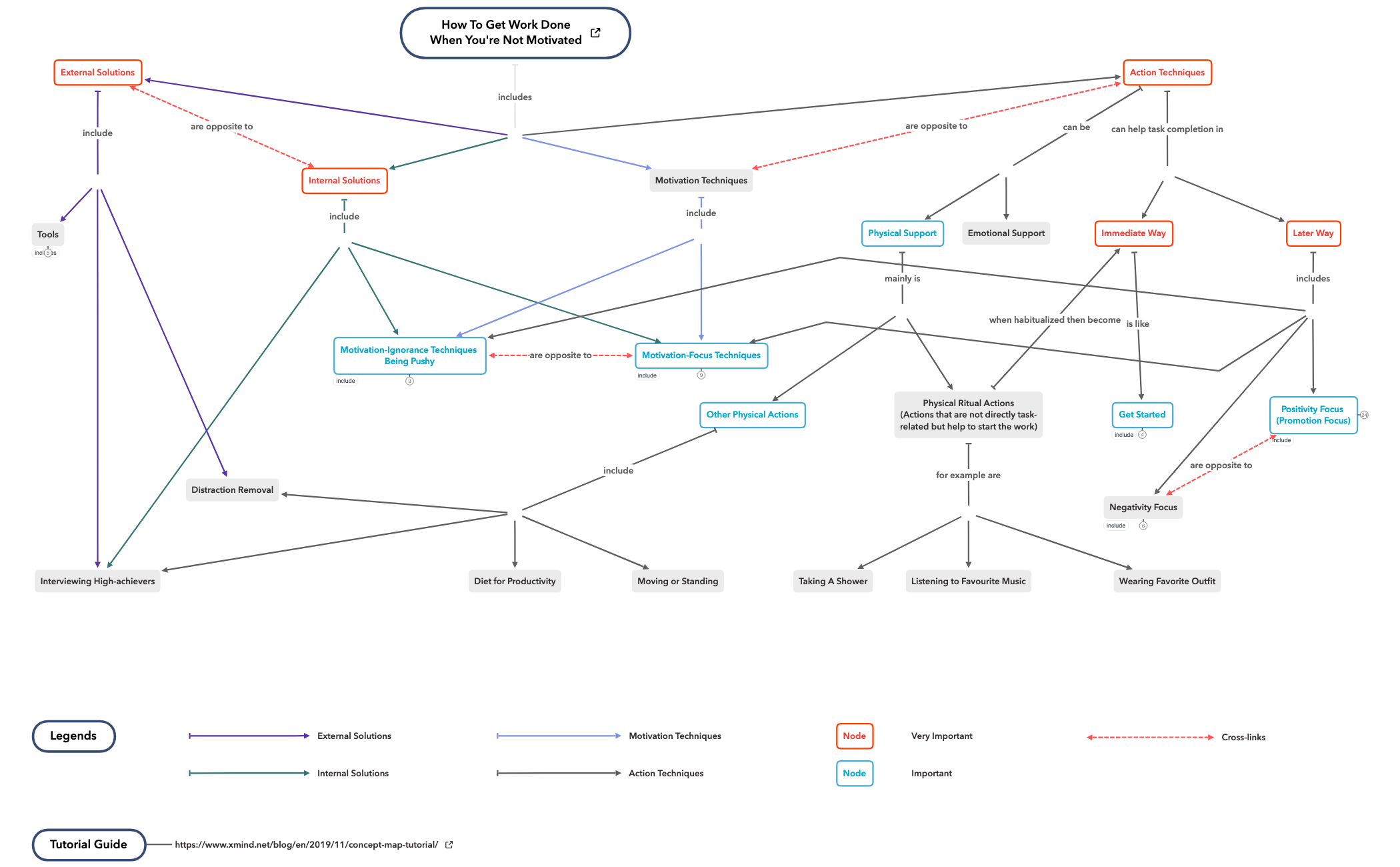
This concept map template, 'How to Get Work Done When You're Not Motivated', provides a comprehensive framework of over 100 actionable techniques and strategies for overcoming procrastination and boosting productivity. It covers 15 major branches including 'Motivation-Focus Techniques', 'Motivation-Ignorance Techniques Being Pushy', and 'Physical Ritual Actions', with specific nodes like '20-second Rule' and 'AccountabiliBuddy'. Designed for professionals, students, and anyone struggling with motivation, this Xmind template serves as a practical cheat sheet for getting work done. The map is organized as a radial mind map with color-coded branches and legends for priority levels, making it easy to navigate and customize.
Terms and ConditionsWhen you're facing a deadline but feel completely unmotivated to start
During a mid-afternoon slump when energy and focus dip
When planning a weekly schedule and need to incorporate productivity rituals
Open the template in Xmind to browse the 15 major branches and discover actionable techniques like the 20-second Rule for overcoming procrastination.
Click on specific nodes to read descriptions and use the color-coded legends to prioritize strategies that fit your personal workflow.
Tailor the framework by reorganizing nodes to suit your needs and export the final result as a PDF or image for easy reference.
The template includes over 100 nodes across 15 major branches covering motivation techniques, action techniques, external solutions, tools, and more. It features specific strategies like the '20-second Rule', 'If-then Planning', and 'AccountabiliBuddy', along with legends for priority levels.
Start by exploring the 'Immediate Way' or 'Get Started' branches for quick actions like 'Just Start Something' or 'Brainless Work'. Then dive into 'Motivation-Focus Techniques' or 'Physical Ritual Actions' to build momentum. Customize the map by adding your own techniques or prioritizing nodes.
Yes, the template is free to download and fully editable in Xmind. You can add, remove, or rearrange nodes, change colors, and attach notes or links to tailor it to your personal workflow.
The 'Tools' branch includes 'Time Tracking', 'Commitment Platform' (e.g., Stickk.com), 'Phone Screen Control', and 'Noise Filtering'. Use these to implement external accountability and reduce distractions. You can link to specific apps or websites for quick access.
Absolutely. The 'Negativity Focus' branch includes nodes like 'Overwhelming' and 'Calculating Loss Of Money'. You can edit these to match your personal triggers, add new negative emotions, or connect them to specific action items using cross-links.
Share your mind map templates with creators around the world and start earning from your work.

