


'%3e%3cpath%20d='M5.8002%2011.6C5%2011.8144%204.2002%2012.32%204.2002%2013.2V15.8C4.2002%2016.68%205%2017.1856%205.8002%2017.4L21.8002%2021.2C22.6802%2021.456%2023.4002%2020.832%2023.4002%2019.92V8.08001C23.4002%207.16801%2022.6802%206.54401%2021.8002%206.80001L5.8002%2011.6Z'%20stroke='%234FA49A'%20stroke-width='1.92'%20stroke-linejoin='round'/%3e%3cpath%20d='M8%2018V25.25C8%2026.7625%208.75%2028%209.66667%2028H11.3333C12.25%2028%2013%2026.7625%2013%2025.25V19.5'%20stroke='%234FA49A'%20stroke-width='1.92'%20stroke-linecap='round'%20stroke-linejoin='round'/%3e%3cpath%20d='M26.5996%2010C28.1996%2011.92%2028.1996%2016.08%2026.5996%2018'%20stroke='%234FA49A'%20stroke-width='1.92'%20stroke-linecap='round'/%3e%3c/g%3e%3cdefs%3e%3cclipPath%20id='clip0_11502_53007'%3e%3crect%20width='32'%20height='32'%20fill='white'/%3e%3c/clipPath%3e%3c/defs%3e%3c/svg%3e)

Digital marketing beginners and small business owners
Setting up a new Google Ads account for the first time
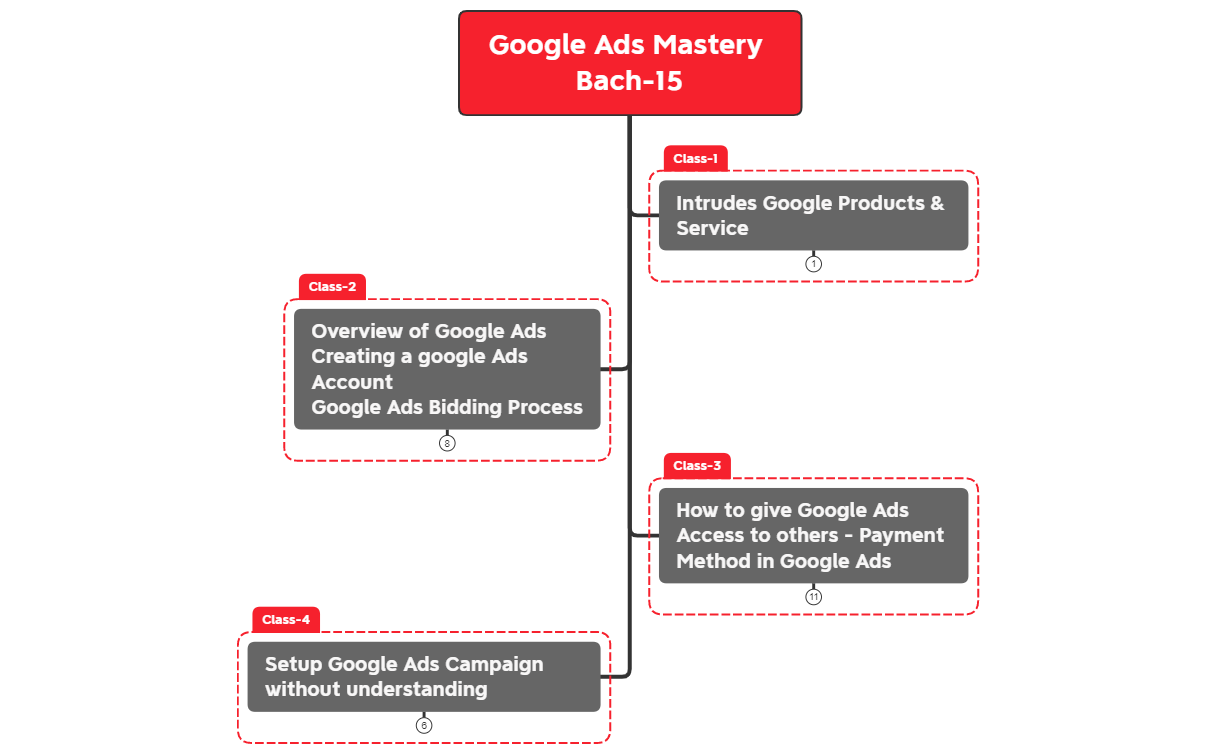
The Google Ads Mastery Bach-15 mind map template breaks down the entire Google Ads workflow into 31 nodes across four core branches: account creation, bidding, payment setup, and campaign launch. It covers step-by-step processes such as 'Signup Google Ads Accounts Step by Step', 'Google Ads Bidding Process', and 'Invite others to access', making it a practical cheat sheet for marketers and business owners. The template is organized as a vertical tree with four main branches, each detailing a critical phase of Google Ads management. It includes concrete steps like 'Card add & Payments Setup' and 'Camping ready to Publish', offering a complete roadmap from account signup to campaign go-live.
Điều khoản sử dụngSetting up a new Google Ads account for the first time
Granting team members access to a Google Ads account
Launching a new campaign without prior experience
Launch the template in Xmind to visualize the four core branches covering account creation, bidding, and campaign setup.
Expand each branch to replace placeholder text with your specific Google Ads settings and attach relevant screenshots for reference.
Complete your campaign roadmap and export the mind map as an image or PDF to share with your marketing team.
The template covers account setup, bidding process, payment methods, user access, and campaign creation. It includes 31 nodes with step-by-step instructions for each phase.
Follow the 'Signup Google Ads Accounts Step by Step' branch. It guides you from the second step through submission, confirmation, and accessing the campaign page.
Yes, the .xmind file is fully editable. You can customize node text, add notes, or rearrange branches to match your workflow.
Use the 'How to give Google Ads Access to others' branch. It covers inviting users, sending welcome mail, and confirming admin access.
The template focuses on setup and launch. For optimization, you would need to extend the 'Camping Settings' and 'keywords settings' nodes with your own data.
Chia sẻ mẫu sơ đồ tư duy của bạn với người sáng tạo trên khắp thế giới và bắt đầu kiếm tiền từ tác phẩm của mình.

