




Project managers and development teams
Kicking off a new mobile order entry project for a distribution network
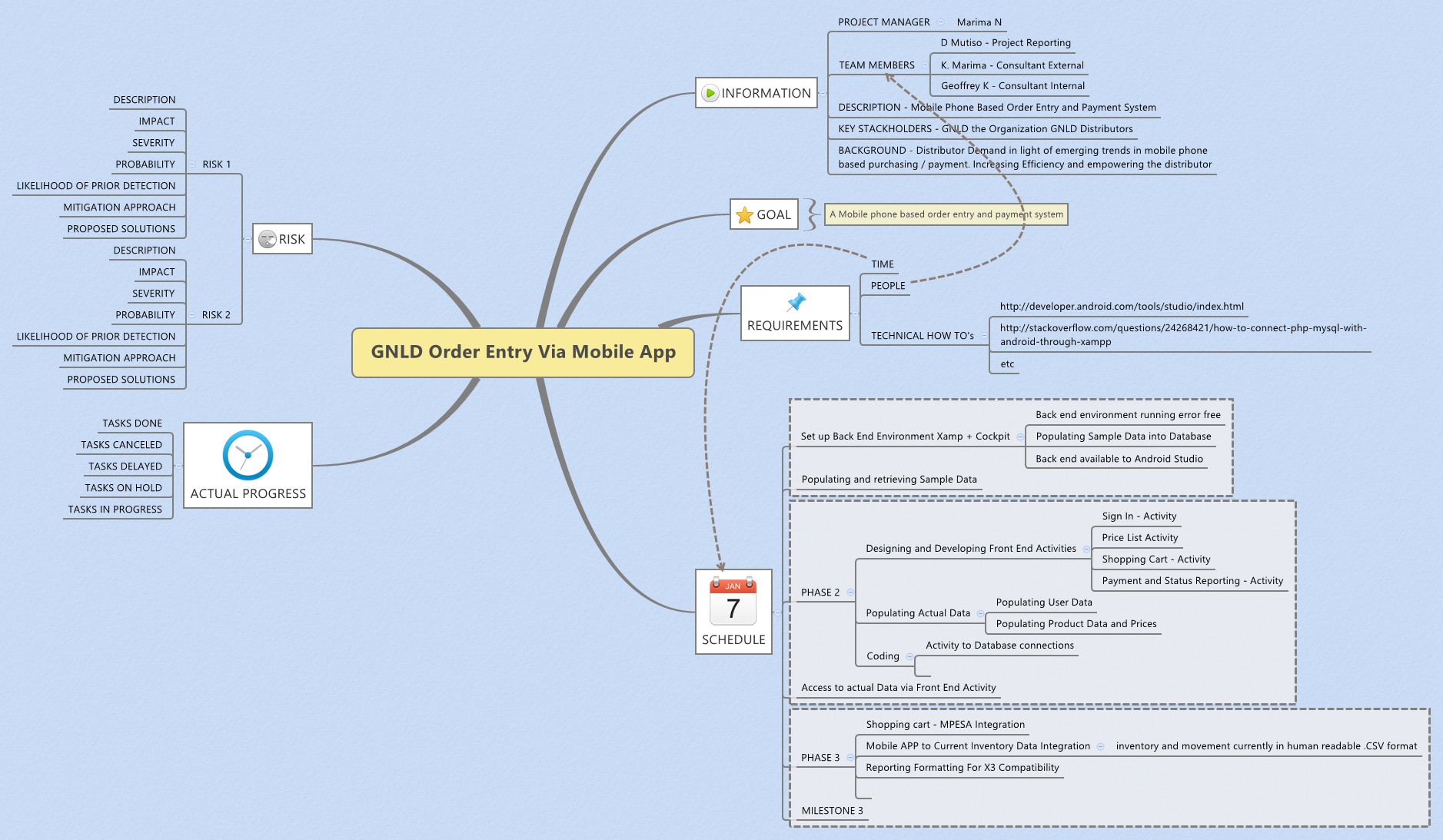
The GNLD Order Entry Via Mobile App mind map template is a project management tool used by teams like Marima N (Project Manager), D Mutiso (Project Reporting), and consultants K. Marima and Geoffrey K to plan and track a mobile-based order entry and payment system. It covers 6 major branches—INFORMATION, GOAL, REQUIREMENTS, SCHEDULE, ACTUAL PROGRESS, and RISK—with 69 nodes detailing project scope, technical setup, phased development milestones, and risk assessment. The template includes specific nodes such as 'Set up Back End Environment Xamp + Cockpit' and 'Shopping cart - MPESA Integration', making it a comprehensive GNLD order entry cheat sheet for mobile app projects. This GNLD Order Entry Via Mobile App template helps teams align on deliverables, timelines, and risk mitigation from kickoff to deployment.
Условия использованияKicking off a new mobile order entry project for a distribution network
Tracking phased development milestones and actual progress against schedule
Identifying and mitigating technical and integration risks early in the project
Open the .xmind file and update the INFORMATION branch with your specific project manager, consultants, and team members.
Customize the REQUIREMENTS and SCHEDULE branches by adjusting technical setup tasks like backend environment and MPESA integration to fit your timeline.
Update the ACTUAL PROGRESS branch regularly while using the RISK branch to document and manage potential project impacts and mitigation strategies.
The template includes 69 nodes across 6 main branches: INFORMATION, GOAL, REQUIREMENTS, SCHEDULE, ACTUAL PROGRESS, and RISK. It covers project roles, technical setup, phased milestones, progress tracking, and risk analysis.
Open the .xmind file in Xmind, then populate each branch with your project details. Start with INFORMATION to define roles and background, then move to SCHEDULE to outline phases, and use RISK to document potential issues.
Yes, the template is fully editable in Xmind (desktop or web). You can customize nodes, add attachments, and export as PDF or image for printing.
The SCHEDULE branch organizes development into phases like 'Set up Back End Environment Xamp + Cockpit' and 'Designing and Developing Front End Activities', with specific activities and milestones to track progress.
Yes, each risk node includes fields for DESCRIPTION, IMPACT, SEVERITY, PROBABILITY, LIKELIHOOD OF PRIOR DETECTION, MITIGATION APPROACH, and PROPOSED SOLUTIONS. You can edit or add more risks as needed.
Поделитесь своими шаблонами интеллект-карт с авторами по всему миру и начните зарабатывать на своих работах.

