


'%3e%3cpath%20d='M7%2010C8.65685%2010%2010%208.65685%2010%207C10%205.34315%208.65685%204%207%204C5.34315%204%204%205.34315%204%207C4%208.65685%205.34315%2010%207%2010Z'%20stroke='%234FA49A'%20stroke-width='1.92'/%3e%3cpath%20d='M10.5%207.2002H19.2C21.856%207.2002%2024%209.3442%2024%2012.0002C24%2014.6562%2021.856%2016.8002%2019.2%2016.8002H12.8C10.144%2016.8002%208%2018.9442%208%2021.6002C8%2024.2562%2010.144%2026.4002%2012.8%2026.4002H20.8'%20stroke='%234FA49A'%20stroke-width='2.2'%20stroke-linecap='round'%20stroke-linejoin='round'/%3e%3cpath%20d='M22.3882%2029.4343C22.1221%2029.6265%2021.8905%2029.7226%2021.6933%2029.7226C21.511%2029.7226%2021.3681%2029.6437%2021.2646%2029.486C21.1611%2029.3283%2021.1094%2029.0992%2021.1094%2028.7986V24.0159C21.1094%2023.7153%2021.1611%2023.4837%2021.2646%2023.3211C21.3681%2023.1585%2021.511%2023.0771%2021.6933%2023.0771C21.8905%2023.0771%2022.1196%2023.1683%2022.3808%2023.3507L25.6481%2025.6939C25.9437%2025.9058%2026.0916%2026.1399%2026.0916%2026.3962C26.0916%2026.6426%2025.9487%2026.8692%2025.6628%2027.0762L22.3882%2029.4343Z'%20fill='%234FA49A'/%3e%3c/g%3e%3cdefs%3e%3cclipPath%20id='clip0_11502_53067'%3e%3crect%20width='32'%20height='32'%20fill='white'/%3e%3c/clipPath%3e%3c/defs%3e%3c/svg%3e)

UX researchers and product managers
Planning a usability test for a new mobile app prototype
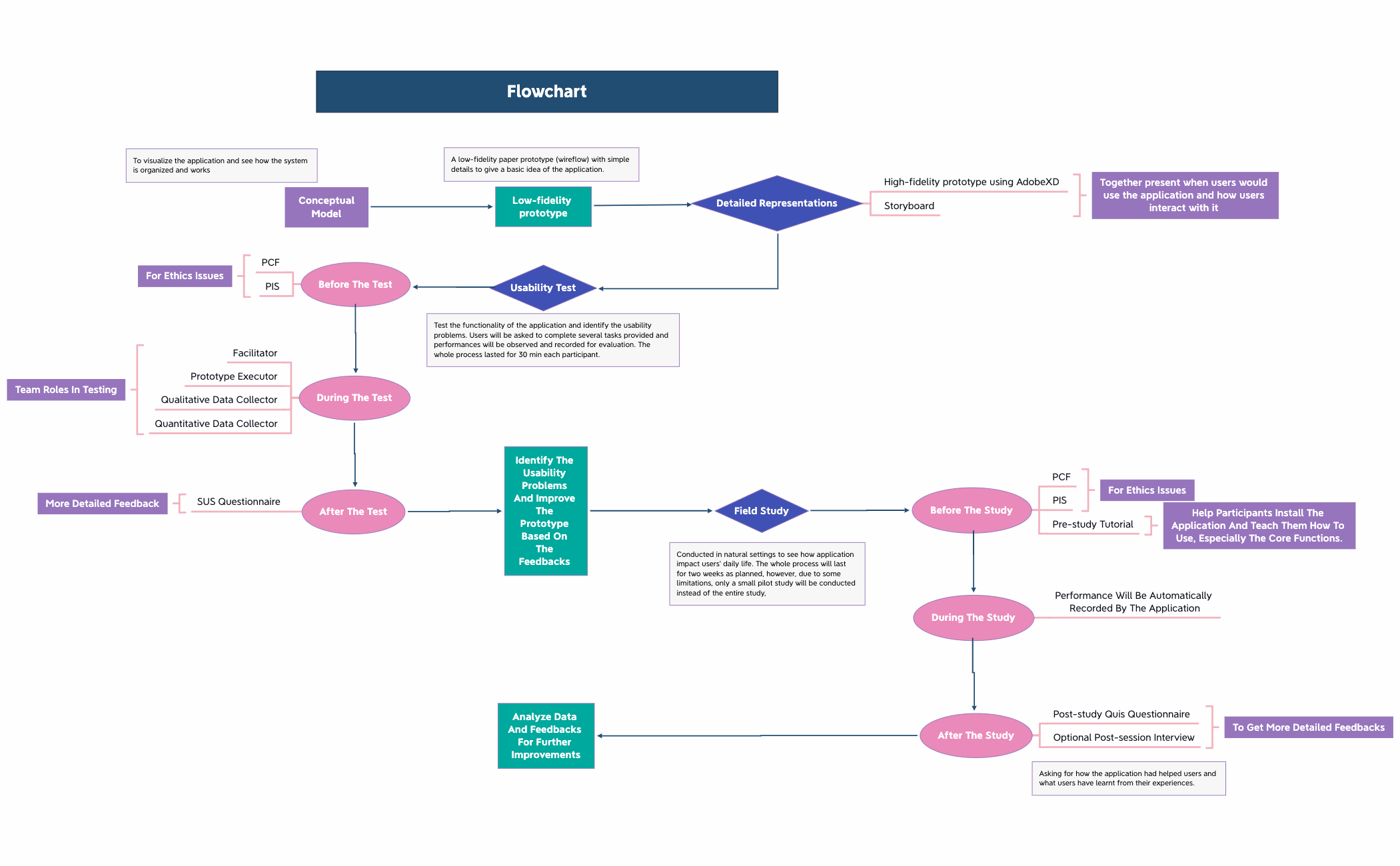
The Flowchart template for Xmind provides a structured 41-node framework for planning and executing usability testing and field studies for digital applications. It covers the full lifecycle from low-fidelity paper prototypes (wireflow) to high-fidelity prototypes using AdobeXD, including storyboards. The template organizes key phases such as 'Before the test', 'During the Test', and 'After the test', with specific team roles like 'Facilitator', 'Prototype Executor', and 'Qualitative data collector'. It also details a 'Field Study' phase with pre-study tutorials and post-study QUIS questionnaires. This Flowchart mind map template serves as a comprehensive cheat sheet for UX researchers and product teams to systematically identify usability problems and improve prototypes based on feedback.
Conditions d'utilisationPlanning a usability test for a new mobile app prototype
Conducting a field study to observe how users interact with an application in their daily environment
Reviewing and iterating on a prototype based on quantitative and qualitative feedback
Open the .xmind file and replace placeholder nodes like low-fidelity prototypes with your specific project descriptions and wireflow details.
Modify the branches for test phases and field studies to align with your team roles and specific data collection methods.
Complete the pre-study tutorials and post-study questionnaires before exporting your flowchart as an image or PDF for stakeholder review.
The template includes 41 nodes covering low-fidelity prototypes, high-fidelity prototypes, usability testing roles, field study phases, and feedback analysis. It provides a complete workflow for UX testing.
Open the .xmind file, then follow the branches from 'Before the test' (prepare PCF and PIS) through 'During the Test' (assign roles like Facilitator) to 'After the test' (collect SUS questionnaires). Customize each node with your project details.
Yes, the template is fully editable in Xmind. You can add, remove, or modify nodes. Export as PDF or image for printing or sharing.
The 'Field Study' section guides natural-setting evaluations over two weeks, including pre-study tutorials, automatic performance recording, and post-study interviews to gather detailed feedback.
Absolutely. The 'Team roles in testing' node lists roles like Facilitator and Prototype Executor. You can rename or add roles to match your team structure.
Partagez vos modèles de cartes mentales avec des créateurs du monde entier et commencez à gagner avec votre travail.

