




Potential buyers or users comparing mind mapping tools
Evaluating whether XMind 2020 meets your diagramming needs before purchasing or upgrading.
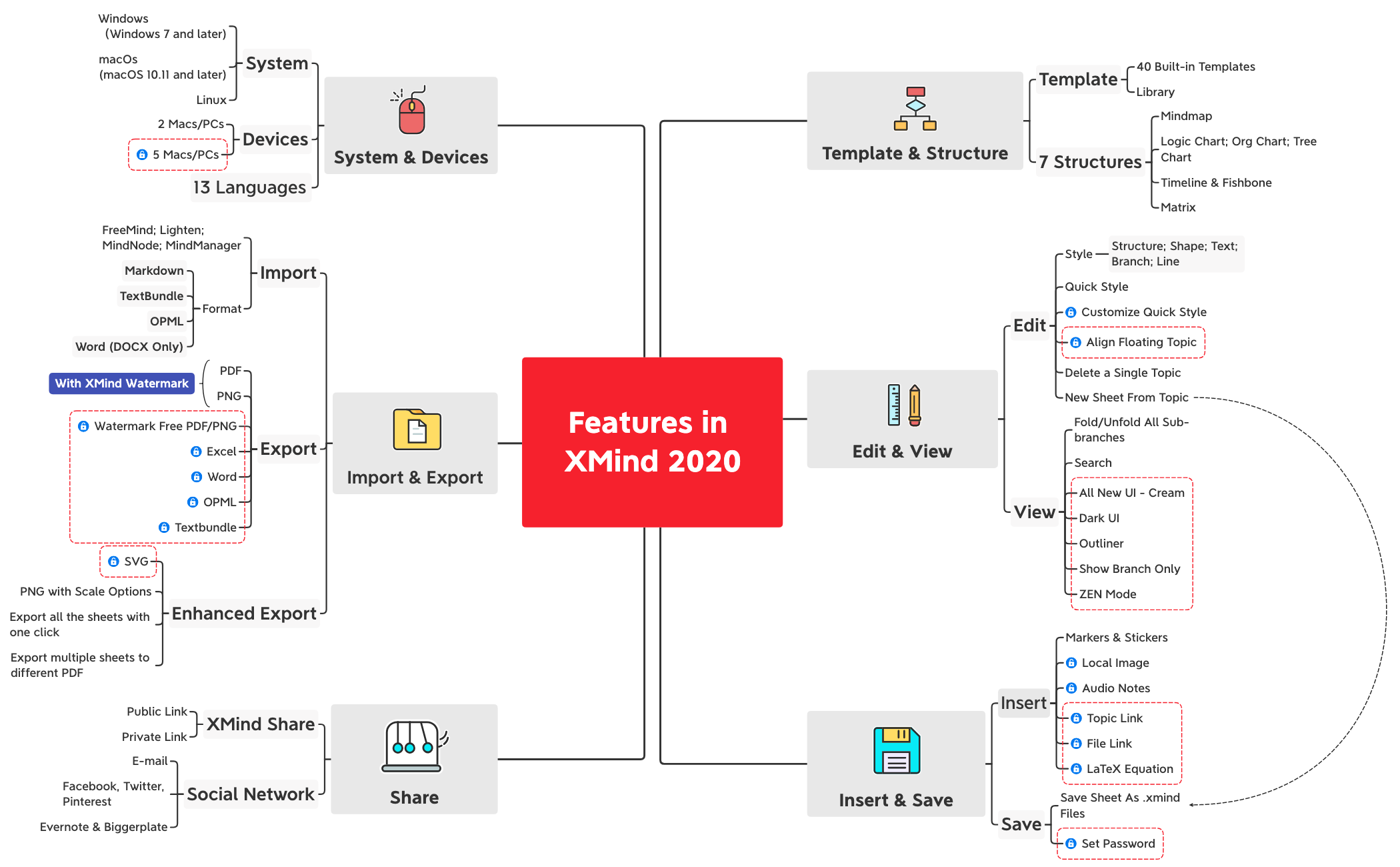
The Features in XMind 2020 mind map is a comprehensive overview of the capabilities offered by XMind 2020, covering over 77 nodes across six major categories: Template & Structure, Edit & View, Insert & Save, Share, Import & Export, and System & Devices. It details 40 built-in templates, 7 structures including Mindmap, Logic Chart, Org Chart, Tree Chart, Timeline, Fishbone, and Matrix, as well as features like ZEN Mode, Dark UI, LaTeX Equation support, and password protection. This template serves as a cheat sheet for users to quickly understand XMind's full feature set, with specific nodes such as 'All New UI - Cream' and 'Export all the sheets with one click' highlighting key enhancements.
Условия использованияEvaluating whether XMind 2020 meets your diagramming needs before purchasing or upgrading.
Training new team members on XMind's capabilities and available features.
Quickly referencing a specific feature, such as LaTeX Equation or ZEN Mode, during active use.
Download the .xmind file and open it in XMind 2020 (desktop or web).
Explore the six main branches by clicking on each to expand sub-nodes and discover features.
Use the Search function (Ctrl+F) to quickly find a specific feature like 'ZEN Mode' or 'LaTeX Equation'.
Customize the template by adding your own notes, markers, or reorganizing branches to create a personalized feature guide.
Export the map as PDF or PNG to share as a reference document with your team.
The template covers all major features of XMind 2020, including 40 built-in templates, 7 structures, editing tools, import/export formats, sharing options, and system compatibility across Windows, macOS, and Linux.
Open the .xmind file in XMind, then navigate through the six main branches: Template & Structure, Edit & View, Insert & Save, Share, Import & Export, and System & Devices. Click on any node to see its sub-features.
Yes, the template is free to download and fully editable in XMind. You can customize it by adding notes, markers, or reorganizing branches to match your own feature exploration.
The template lists export to PDF, PNG, Excel, Word, OPML, Textbundle, and SVG, with options for watermark-free exports and exporting all sheets at once.
Yes, XMind 2020 imports from FreeMind, Lighten, MindNode, MindManager, and formats like Markdown, TextBundle, OPML, and Word (DOCX only).
Поделитесь своими шаблонами интеллект-карт с авторами по всему миру и начните зарабатывать на своих работах.

