



Event coordinators and volunteer organizers
Planning a community workshop or seminar with multiple sessions and speakers.
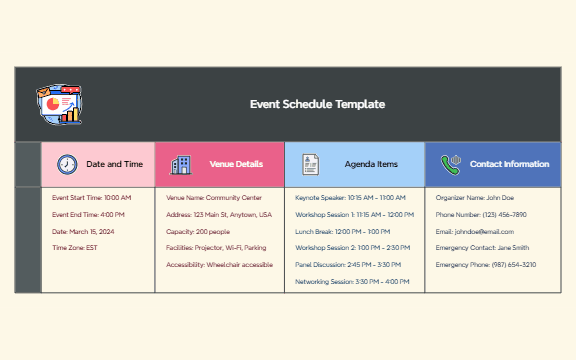
The Event Schedule Template is a structured mind map designed for event planners and coordinators to organize all key details of an event in one place. It covers 25 nodes across four main branches: Date and Time, Venue Details, Agenda Items, and Contact Information. The template includes specific nodes such as 'Event Start Time: 10:00 AM', 'Venue Name: Community Center', and 'Keynote Speaker: 10:15 AM - 11:00 AM', ensuring no logistical detail is overlooked. This Event Schedule mind map template provides a clear, visual overview that simplifies event management and communication with stakeholders.
Условия использованияPlanning a community workshop or seminar with multiple sessions and speakers.
Organizing a corporate conference or team offsite requiring detailed logistics and agenda.
Coordinating a wedding or social gathering where timing and vendor contacts are critical.
Open the .xmind file in Xmind (desktop, web, or mobile app).
Review the four main branches: Date and Time, Venue Details, Agenda Items, and Contact Information.
Replace the placeholder values (e.g., 'March 15, 2024') with your actual event data.
Add or remove agenda items by creating new child nodes under 'Agenda Items'.
Export the completed mind map as an image, PDF, or share it via Xmind Cloud.
The template includes four main sections: Date and Time, Venue Details, Agenda Items, and Contact Information. It covers event timing, venue logistics, a detailed agenda with time slots, and key contacts.
Open the .xmind file in Xmind, then customize the Date and Time, Venue Details, and Agenda Items branches with your conference specifics. Add or remove agenda items as needed.
Yes, it's fully editable in Xmind. You can modify any node, add new branches, and export the mind map as an image or PDF for printing.
Absolutely. You can duplicate the 'Date and Time' and 'Agenda Items' branches for each day, or create separate sheets for multi-day events.
After customizing, you can share the .xmind file directly or export it as a PDF or image. Xmind also supports cloud sharing for real-time collaboration.
Поделитесь своими шаблонами интеллект-карт с авторами по всему миру и начните зарабатывать на своих работах.

