



Wedding planners and couples
Planning a wedding reception with multiple vendors and a guest list of 100+
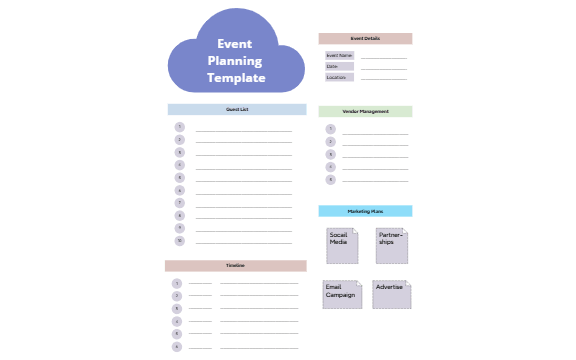
The Event Planning mind map template from Xmind provides a structured framework for organizing events, covering 68 nodes across key areas like guest lists, vendor management, and marketing strategies. It includes branches for Event Details (name, date, location), Guest List (numbered slots for up to 10 attendees), Vendor Management (5 vendor slots), Timeline (6 milestones), and Marketing Plans with sub-branches for Social Media, Email Campaign, Partnerships, and Advertise. This template helps event planners track essential logistics and promotions in one visual layout.
NutzungsbedingungenPlanning a wedding reception with multiple vendors and a guest list of 100+
Organizing a corporate conference with sessions, speakers, and marketing campaigns
Coordinating a community fundraiser with a timeline and promotional activities
Open the .xmind file in Xmind Desktop or Xmind Web.
Replace the placeholder text in Event Details with your event name, date, and location.
Populate the Guest List by renaming numbered nodes with attendee names and adding RSVP status as notes.
Fill in Vendor Management with supplier names and contact details, then adjust the Timeline with your key milestones.
Customize Marketing Plans by adding specific social media platforms, email lists, or partnership details under each sub-branch.
The template includes branches for Event Details, Guest List, Vendor Management, Timeline, and Marketing Plans, with sub-branches like Social Media, Email Campaign, Partnerships, and Advertise.
Open the .xmind file in Xmind, then customize the Event Details with your event name and date. Use the Guest List to add attendees, Vendor Management for suppliers, and Timeline for milestones.
Yes, it is fully editable in Xmind. You can add or remove nodes, and export it as an image or PDF for printing.
The template focuses on logistics and marketing. For budget tracking, you can add custom nodes under Vendor Management or create a new branch for expenses.
Use the numbered Guest List nodes to assign each guest a slot. You can rename nodes with guest names and add checkboxes for RSVP status.
Teilen Sie Ihre Mindmap-Vorlagen mit Erstellern weltweit und verdienen Sie mit Ihrer Arbeit.

