


'%3e%3cpath%20d='M5.8002%2011.6C5%2011.8144%204.2002%2012.32%204.2002%2013.2V15.8C4.2002%2016.68%205%2017.1856%205.8002%2017.4L21.8002%2021.2C22.6802%2021.456%2023.4002%2020.832%2023.4002%2019.92V8.08001C23.4002%207.16801%2022.6802%206.54401%2021.8002%206.80001L5.8002%2011.6Z'%20stroke='%234FA49A'%20stroke-width='1.92'%20stroke-linejoin='round'/%3e%3cpath%20d='M8%2018V25.25C8%2026.7625%208.75%2028%209.66667%2028H11.3333C12.25%2028%2013%2026.7625%2013%2025.25V19.5'%20stroke='%234FA49A'%20stroke-width='1.92'%20stroke-linecap='round'%20stroke-linejoin='round'/%3e%3cpath%20d='M26.5996%2010C28.1996%2011.92%2028.1996%2016.08%2026.5996%2018'%20stroke='%234FA49A'%20stroke-width='1.92'%20stroke-linecap='round'/%3e%3c/g%3e%3cdefs%3e%3cclipPath%20id='clip0_11502_53007'%3e%3crect%20width='32'%20height='32'%20fill='white'/%3e%3c/clipPath%3e%3c/defs%3e%3c/svg%3e)

Event coordinators and corporate event planners
Planning a large corporate gala or annual awards ceremony
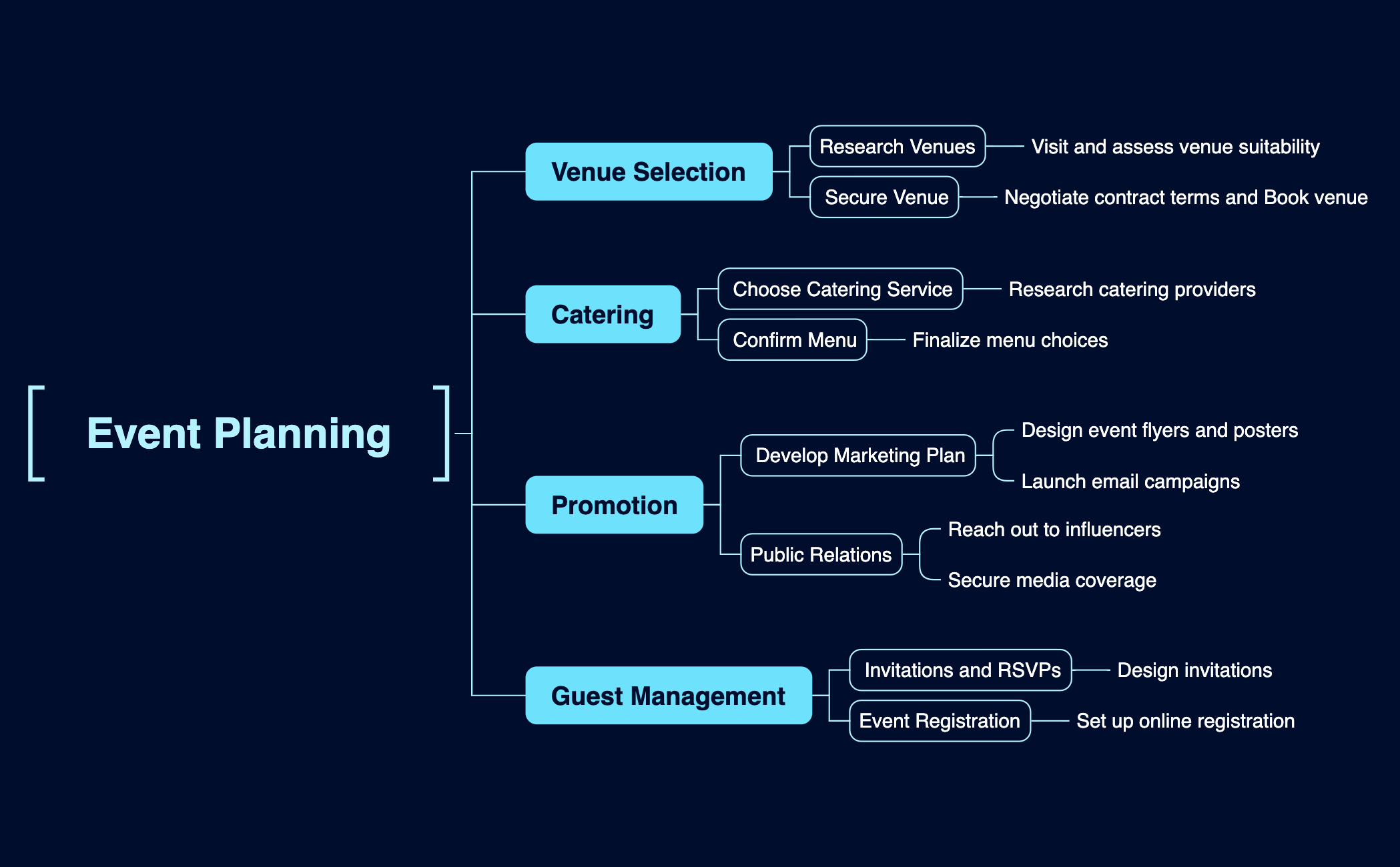
The Event Planning mind map template provides a structured framework for organizing events, covering venue selection, catering, promotion, and guest management. With 23 nodes across these four main branches, it guides users through key tasks such as 'Research Venues', 'Confirm Menu', 'Launch email campaigns', and 'Set up online registration'. This template is ideal for event planners, coordinators, and anyone looking to streamline their event planning process. It offers a clear, actionable checklist that can be customized for any event type, from corporate conferences to social gatherings.
Terms and ConditionsPlanning a large corporate gala or annual awards ceremony
Organizing a community fundraiser or charity event
Coordinating a wedding or personal celebration
Open the template in Xmind to explore the four main branches covering venue selection, catering, promotion, and guest management.
Edit the existing twenty-three nodes or add new child nodes to tailor the specific tasks and checklists to your unique event requirements.
Complete your event framework and export the mind map as a PDF or image to coordinate effectively with your planning team.
The template includes four main branches: Venue Selection, Catering, Promotion, and Guest Management, with 23 nodes covering tasks like researching venues, confirming menus, launching email campaigns, and setting up online registration.
Open the .xmind file in Xmind, then customize each branch: list potential venues under 'Research Venues', choose a caterer under 'Choose Catering Service', design conference-specific flyers under 'Design event flyers and posters', and manage attendee registration under 'Set up online registration'.
Yes, the template is fully editable in Xmind. You can add or remove nodes, change text, and export as PDF or image for printing.
Use the 'Invitations and RSVPs' node to design invitations, then link to a spreadsheet or tool for tracking responses. You can also add sub-nodes for guest lists and dietary preferences.
Absolutely. Under 'Develop Marketing Plan', you can add nodes for social media posts, paid ads, and influencer collaborations. The 'Public Relations' node can be expanded for media outreach.
Share your mind map templates with creators around the world and start earning from your work.

