


'%3e%3cpath%20d='M9.59961%204H22.3996'%20stroke='%23FF9334'%20stroke-width='1.92'%20stroke-linecap='round'/%3e%3cpath%20d='M12.0001%204V12.8L7.20006%2025.6C6.72006%2026.928%207.68006%2028%209.12006%2028H22.8801C24.3201%2028%2025.2801%2026.928%2024.8001%2025.6L20.0001%2012.8V4'%20stroke='%23FF9334'%20stroke-width='1.92'%20stroke-linecap='round'%20stroke-linejoin='round'/%3e%3cpath%20d='M9.12012%2019.2002H22.8801'%20stroke='%23FF9334'%20stroke-width='1.92'/%3e%3cpath%20d='M12%2024C12.5523%2024%2013%2023.5523%2013%2023C13%2022.4477%2012.5523%2022%2012%2022C11.4477%2022%2011%2022.4477%2011%2023C11%2023.5523%2011.4477%2024%2012%2024Z'%20fill='%23FF9334'/%3e%3cpath%20d='M19.5%2024C20.3284%2024%2021%2023.3284%2021%2022.5C21%2021.6716%2020.3284%2021%2019.5%2021C18.6716%2021%2018%2021.6716%2018%2022.5C18%2023.3284%2018.6716%2024%2019.5%2024Z'%20fill='%23FF9334'/%3e%3cpath%20d='M16%2026C16.5523%2026%2017%2025.5523%2017%2025C17%2024.4477%2016.5523%2024%2016%2024C15.4477%2024%2015%2024.4477%2015%2025C15%2025.5523%2015.4477%2026%2016%2026Z'%20fill='%23FF9334'/%3e%3c/g%3e%3cdefs%3e%3cclipPath%20id='clip0_11502_53328'%3e%3crect%20width='32'%20height='32'%20fill='white'/%3e%3c/clipPath%3e%3c/defs%3e%3c/svg%3e)

Researchers and academics in STEM fields
Writing a research paper with complex multi-line equations that need precise alignment.
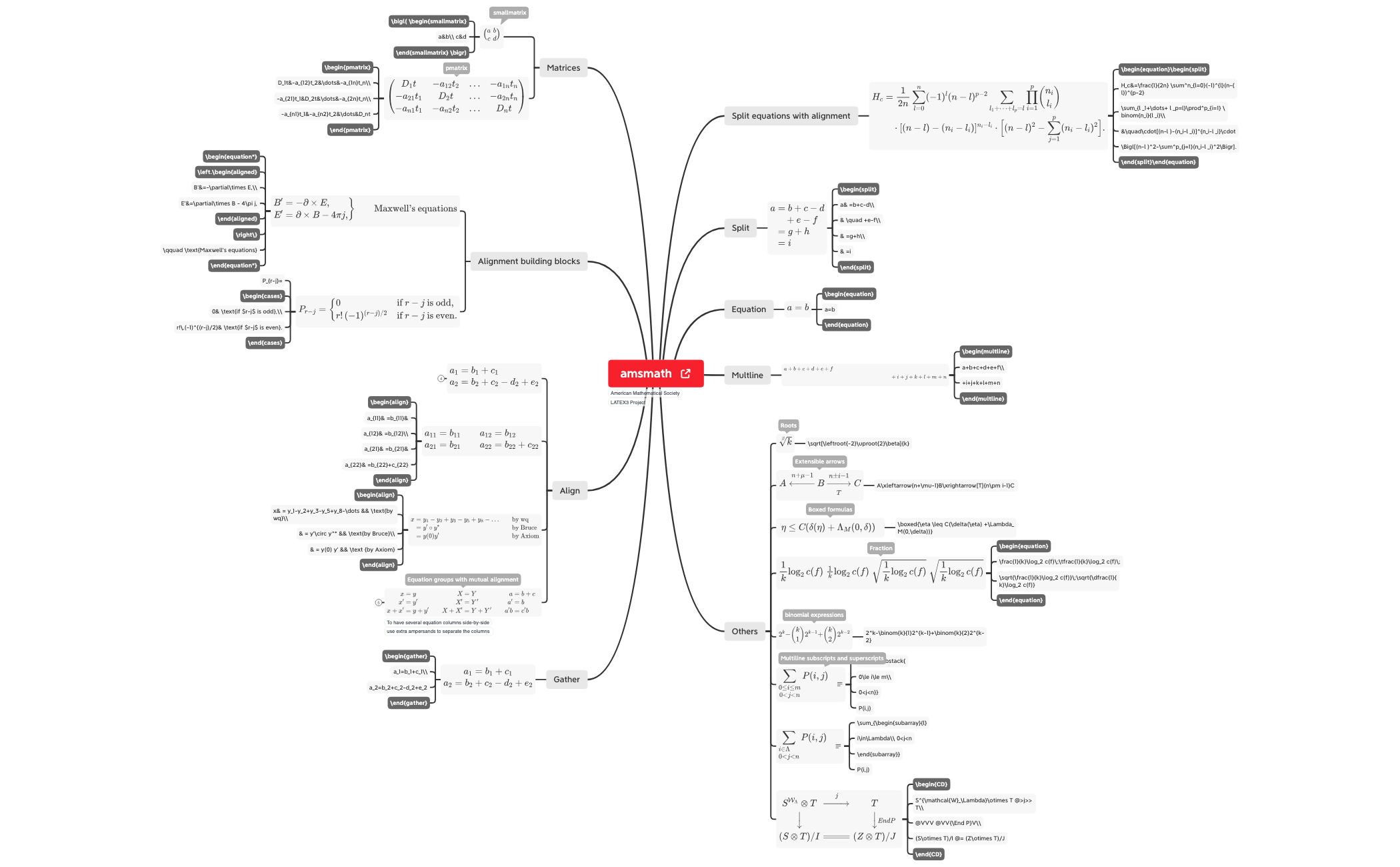
The amsmath mind map template is a comprehensive visual reference for LaTeX equation typesetting, covering over 116 nodes across 8 major branches including Split, Equation, Multline, Gather, Align, and Matrices. This cheat sheet organizes the amsmath package's alignment environments, building blocks, and matrix commands into a structured diagram, making it ideal for students, researchers, and technical writers who need quick access to syntax and usage. Key nodes like 'Split equations with alignment' and 'Alignment building blocks' provide step-by-step guidance on multi-line equation formatting. The template also includes specialized environments such as 'Multline' for long equations and 'Matrices' for array structures, ensuring a complete reference for mathematical document preparation.
利用規約Writing a research paper with complex multi-line equations that need precise alignment.
Preparing lecture notes or textbooks that require consistent LaTeX formatting for mathematical expressions.
Learning LaTeX for the first time and needing a visual reference for amsmath environments.
Download the .xmind file and open it to browse the eight major branches covering amsmath environments like Split, Align, and Matrices.
Click on specific nodes to view detailed LaTeX syntax examples and use Xmind's editing tools to add your own mathematical notes or equations.
Save your customized cheat sheet as an image or PDF to serve as a handy visual guide while you are writing technical LaTeX documents.
The template covers all major amsmath environments: Split, Equation, Multline, Gather, Align, and Matrices, plus alignment building blocks and other utilities, with over 116 nodes.
Open the .xmind file in Xmind, navigate to the 'Align' branch, and refer to the subnodes for align, alignat, and flalign syntax. Copy the examples into your LaTeX document.
Yes, you can customize the template by adding your own equation examples, notes, or color coding to match your workflow.
The Multline environment is for single equations that span multiple lines, with the first line left-aligned and the last line right-aligned.
Yes, the 'Matrices' branch includes nodes for pmatrix, bmatrix, Bmatrix, vmatrix, Vmatrix, and smallmatrix environments.
あなたのマインドマップ テンプレートを世界中のクリエイターと共有して、作品から収入を得ましょう。

