



Curriculum designers and instructional coaches
Designing a new guided note-taking template for a course to improve student engagement and retention.
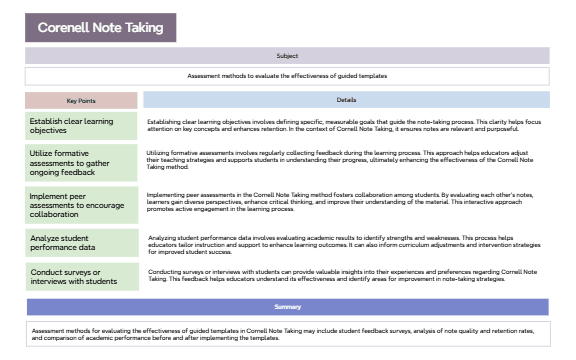
The 'Educators Creating Guided Templates For Active Learning' mind map template, structured around the Cornell Note Taking method, provides a systematic framework for educators to design guided templates that enhance active learning. It covers 5 key assessment methods—including 'Utilize formative assessments to gather ongoing feedback' and 'Implement peer assessments to encourage collaboration'—and details how to establish clear learning objectives, analyze student performance data, and conduct surveys. This template serves as a practical cheat sheet for teachers seeking to improve note-taking effectiveness and student engagement through structured evaluation.
利用規約Designing a new guided note-taking template for a course to improve student engagement and retention.
Evaluating the effectiveness of existing guided templates through student feedback and performance data.
Training new educators on active learning strategies and formative assessment techniques.
Open the .xmind file in Xmind (desktop, web, or mobile).
Replace the 'Subject' node with your specific topic or course name.
Populate 'Key Points' with your learning objectives and 'Details' with explanatory notes.
Use the 'Assessment methods' branch to plan evaluations—add dates or criteria as sub-nodes.
Customize colors, icons, or add attachments to tailor the template to your classroom needs.
The template includes a Cornell Note Taking structure with branches for Subject, Key Points, Details, and Summary, plus five assessment methods like formative assessments and peer assessments.
Open the .xmind file in Xmind, then fill in the Subject, Key Points, and Details sections. Use the assessment methods branch to plan evaluations like surveys or performance data analysis.
Yes, the template is fully editable in Xmind. You can customize nodes, add icons, and export as PDF or image for printing.
The template covers five methods: establish clear learning objectives, utilize formative assessments, implement peer assessments, analyze student performance data, and conduct surveys or interviews.
Absolutely. The structure is adaptable—replace the Subject node with any topic, and adjust the assessment methods to fit your context.
あなたのマインドマップ テンプレートを世界中のクリエイターと共有して、作品から収入を得ましょう。

