




K-12 teachers and curriculum designers
Planning a new unit or lesson from scratch
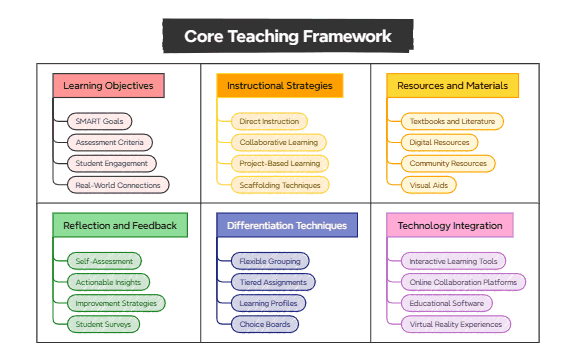
The Core Teaching Framework mind map template provides educators with a structured overview of 31 essential components for effective lesson planning and classroom instruction. Covering six major branches—Learning Objectives, Instructional Strategies, Resources and Materials, Reflection and Feedback, Differentiation Techniques, and Technology Integration—this template helps teachers align their lessons with SMART Goals and incorporate diverse approaches like Project-Based Learning and Scaffolding Techniques. It also includes practical tools such as Choice Boards and Virtual Reality Experiences to enhance student engagement. Designed as a comprehensive cheat sheet for modern teaching, this Xmind template enables educators to systematically plan, deliver, and assess their lessons while integrating technology and differentiation strategies.
이용약관Planning a new unit or lesson from scratch
Reviewing and improving existing lesson plans to increase student engagement
Preparing for a professional development workshop on modern teaching strategies
Open the .xmind file in Xmind desktop (Windows/Mac/Linux) or Xmind Web (browser).
Review the six main branches and expand each to see detailed subtopics like SMART Goals or Project-Based Learning.
Replace placeholder text with your own lesson content: edit node titles, add notes, or attach files.
Customize the template by adding new branches or deleting irrelevant nodes to fit your specific lesson.
Export the completed mind map as PDF, image, or outline for sharing or printing.
The template includes 31 nodes across six branches: Learning Objectives, Instructional Strategies, Resources and Materials, Reflection and Feedback, Differentiation Techniques, and Technology Integration. Each branch contains specific subtopics like SMART Goals, Project-Based Learning, and Virtual Reality Experiences.
Start by defining your Learning Objectives using SMART Goals. Then select appropriate Instructional Strategies (e.g., Collaborative Learning) and gather Resources and Materials. Use the Reflection and Feedback section to plan assessments and gather Student Surveys.
Yes, the .xmind file is fully editable in Xmind desktop or web. You can customize each node, add notes, and export as PDF or image for printing.
This branch helps teachers tailor instruction to diverse learners through Flexible Grouping, Tiered Assignments, Learning Profiles, and Choice Boards, ensuring all students can access the curriculum.
Absolutely. The Technology Integration branch provides ideas for Interactive Learning Tools, Online Collaboration Platforms, Educational Software, and Virtual Reality Experiences to enhance lessons.
전 세계 크리에이터와 마인드맵 템플릿을 공유하고 작품으로 수익을 창출하세요.
