



Project managers and site supervisors
Kicking off a new construction project and need a comprehensive task checklist for the initial phases.
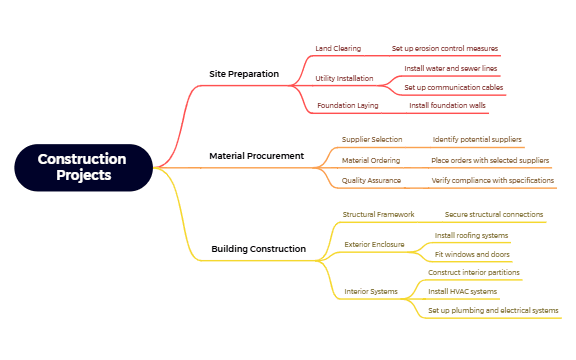
The Construction Projects mind map template provides a structured overview of 26 nodes across three essential phases: Site Preparation, Material Procurement, and Building Construction. It covers tasks from land clearing and utility installation to structural framework and interior systems. This template is ideal for project managers, contractors, and construction teams who need a clear checklist for project execution. Key nodes include 'Set up erosion control measures', 'Verify compliance with specifications', and 'Install HVAC systems'. The template is organized as a hierarchical tree with three main branches, each breaking down into actionable sub-tasks. It serves as both a planning tool and a progress tracker for construction workflows.
使用條款Kicking off a new construction project and need a comprehensive task checklist for the initial phases.
Preparing a bid or proposal and want to outline the scope of work clearly for stakeholders.
Conducting a pre-construction meeting to align the team on responsibilities and timelines.
Open the .xmind file in Xmind (desktop or web).
Review the three main branches: Site Preparation, Material Procurement, and Building Construction.
Click on any node to edit its text, add notes, or attach files for reference.
Add sub-nodes for project-specific tasks, and use markers or labels to indicate priority and status.
Export the mind map as an image or PDF to share with your team.
The template covers 26 nodes across three main phases: Site Preparation, Material Procurement, and Building Construction. It includes detailed sub-tasks like land clearing, utility installation, supplier selection, structural framework, and interior systems.
Open the .xmind file in Xmind, then expand each branch to review tasks. Customize node names and add deadlines or assignees using Xmind's notes and labels features. Use it as a checklist during project meetings.
Yes, the template is fully editable in Xmind. You can add, remove, or reorder nodes. To print, export the mind map as a PDF or image from Xmind.
Absolutely. The Material Procurement branch includes a 'Quality Assurance' node with 'Verify compliance with specifications'. You can add sub-nodes for specific inspection criteria or testing protocols.
Use Xmind's task tracking features: assign priority markers, set completion percentages, or add due dates to each node. Review the map weekly to update status.
把你的心智圖範本分享給全球創作者,從你的作品中獲得收益。

