




Product managers and project leads
Kicking off a new product launch and needing to assign clear roles across departments
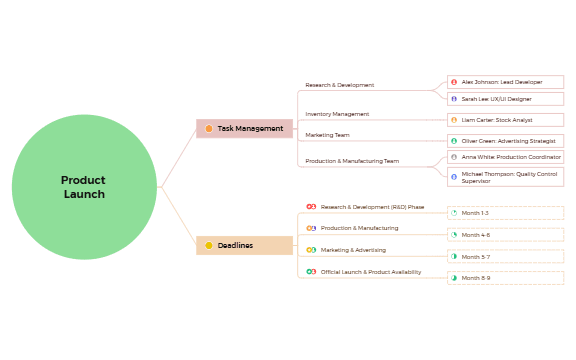
The Product Launch mind map template provides a structured overview of roles and responsibilities across four key teams—Research & Development, Inventory Management, Marketing, and Production & Manufacturing—with specific assignees such as 'Alex Johnson: Lead Developer' and 'Sarah Lee: UX/UI Designer'. It also outlines a clear timeline with deadlines spanning Month 1-3 for R&D through Month 8-9 for the Official Launch. This template helps project managers and team leads clarify task distribution and ensure a smooth launch process. The layout is organized as a central 'Product Launch' root with two main branches: 'Task Management' and 'Deadlines', making it easy to track who does what and when.
使用條款Kicking off a new product launch and needing to assign clear roles across departments
Planning a cross-functional timeline with multiple phases and dependencies
Onboarding new team members to a launch project and providing a clear overview of responsibilities
Open the .xmind file in Xmind (desktop or web version).
Review the two main branches: Task Management and Deadlines.
Replace the placeholder names (e.g., 'Alex Johnson') with your actual team members.
Adjust the deadline months to fit your project's timeline.
Add or remove sub-nodes as needed to reflect your specific launch plan.
The template includes two main sections: Task Management (with roles for R&D, Inventory, Marketing, and Production teams) and Deadlines (with a timeline from Month 1-3 to Month 8-9). It lists specific assignees like 'Oliver Green: Advertising Strategist' and 'Anna White: Production Coordinator'.
Open the .xmind file in Xmind, then replace the placeholder names and dates with your actual team members and deadlines. Customize the task branches to match your project's specific roles and phases.
Yes, the template is fully editable in Xmind (desktop or web). You can add, remove, or rearrange nodes. It can also be exported as an image or PDF for printing.
The template covers Research & Development, Inventory Management, Marketing, and Production & Manufacturing teams, with specific roles like 'Michael Thompson: Quality Control Supervisor'.
Absolutely. The 'Deadlines' branch shows placeholder months (e.g., Month 1-3). You can edit these to match your actual project timeline, and even add sub-tasks or milestones.
把你的心智圖範本分享給全球創作者,從你的作品中獲得收益。

