


'%3e%3cpath%20d='M7%2010C8.65685%2010%2010%208.65685%2010%207C10%205.34315%208.65685%204%207%204C5.34315%204%204%205.34315%204%207C4%208.65685%205.34315%2010%207%2010Z'%20stroke='%234FA49A'%20stroke-width='1.92'/%3e%3cpath%20d='M10.5%207.2002H19.2C21.856%207.2002%2024%209.3442%2024%2012.0002C24%2014.6562%2021.856%2016.8002%2019.2%2016.8002H12.8C10.144%2016.8002%208%2018.9442%208%2021.6002C8%2024.2562%2010.144%2026.4002%2012.8%2026.4002H20.8'%20stroke='%234FA49A'%20stroke-width='2.2'%20stroke-linecap='round'%20stroke-linejoin='round'/%3e%3cpath%20d='M22.3882%2029.4343C22.1221%2029.6265%2021.8905%2029.7226%2021.6933%2029.7226C21.511%2029.7226%2021.3681%2029.6437%2021.2646%2029.486C21.1611%2029.3283%2021.1094%2029.0992%2021.1094%2028.7986V24.0159C21.1094%2023.7153%2021.1611%2023.4837%2021.2646%2023.3211C21.3681%2023.1585%2021.511%2023.0771%2021.6933%2023.0771C21.8905%2023.0771%2022.1196%2023.1683%2022.3808%2023.3507L25.6481%2025.6939C25.9437%2025.9058%2026.0916%2026.1399%2026.0916%2026.3962C26.0916%2026.6426%2025.9487%2026.8692%2025.6628%2027.0762L22.3882%2029.4343Z'%20fill='%234FA49A'/%3e%3c/g%3e%3cdefs%3e%3cclipPath%20id='clip0_11502_53077'%3e%3crect%20width='32'%20height='32'%20fill='white'/%3e%3c/clipPath%3e%3c/defs%3e%3c/svg%3e)

Marketing automation specialists and CRM managers
Designing a new automated lead nurturing workflow for a SaaS product launch
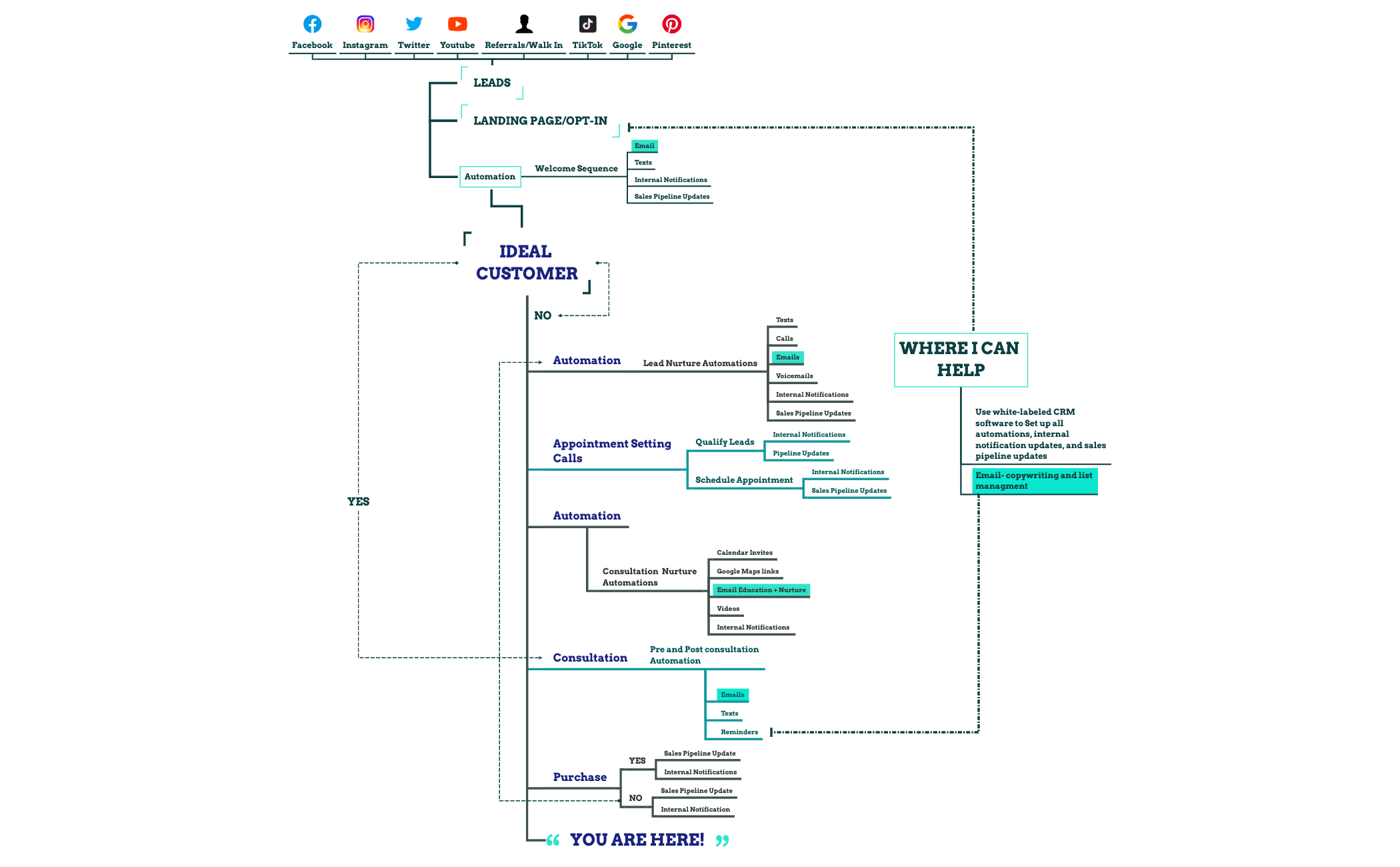
The 'Ideal Customer Journey' mind map template maps a 56-node customer lifecycle from lead acquisition through purchase and beyond, covering channels like Facebook, Instagram, TikTok, and Google. It details key automation touchpoints such as 'Lead Nurture Automations', 'Consultation Nurture Automations', and 'Welcome Sequence', and includes decision nodes like 'YES' and 'NO' after purchase. This template serves as a visual cheat sheet for sales and marketing teams to design and optimize automated customer journeys.
使用条款Designing a new automated lead nurturing workflow for a SaaS product launch
Mapping out the ideal sales process during a quarterly planning session
Onboarding new sales or marketing hires to understand the customer lifecycle
Open the template in Xmind and customize the 'LEADS' branch by replacing the default social media channels with your specific acquisition sources.
Adjust the qualification criteria and automation triggers within the 'Appointment Setting' branches while refining the 'Purchase' decision nodes to match your sales cycle.
Utilize the 'WHERE I CAN HELP' branch to document external tool integrations and finalize the visual flow of your automated customer journey.
The template includes 56 nodes covering lead sources, appointment setting, automation sequences, consultation nurture, purchase decisions, and post-purchase actions. It maps the full customer lifecycle from opt-in to retention.
Open the .xmind file in Xmind, then customize each branch: replace lead channels with your own, adjust automation triggers, and add your CRM integration details. Use it as a blueprint for your automated customer journey.
Yes, the template is free to download and fully editable in Xmind (desktop, web, or mobile). You can add, remove, or rearrange nodes to match your specific sales process.
Absolutely. The structure—lead sources, qualification, appointment setting, consultation, purchase—works for B2B as well. Adjust the 'Consultation' and 'Automation' branches to fit longer B2B cycles.
It marks the current stage in the customer journey, helping teams visualize where prospects are in the funnel. You can move it along the timeline as the customer progresses.
把你的思维导图模板分享给全球创作者,从你的作品中获得收益。

