




Project managers and construction supervisors
Kicking off a new commercial construction project and need a clear roadmap from start to finish.
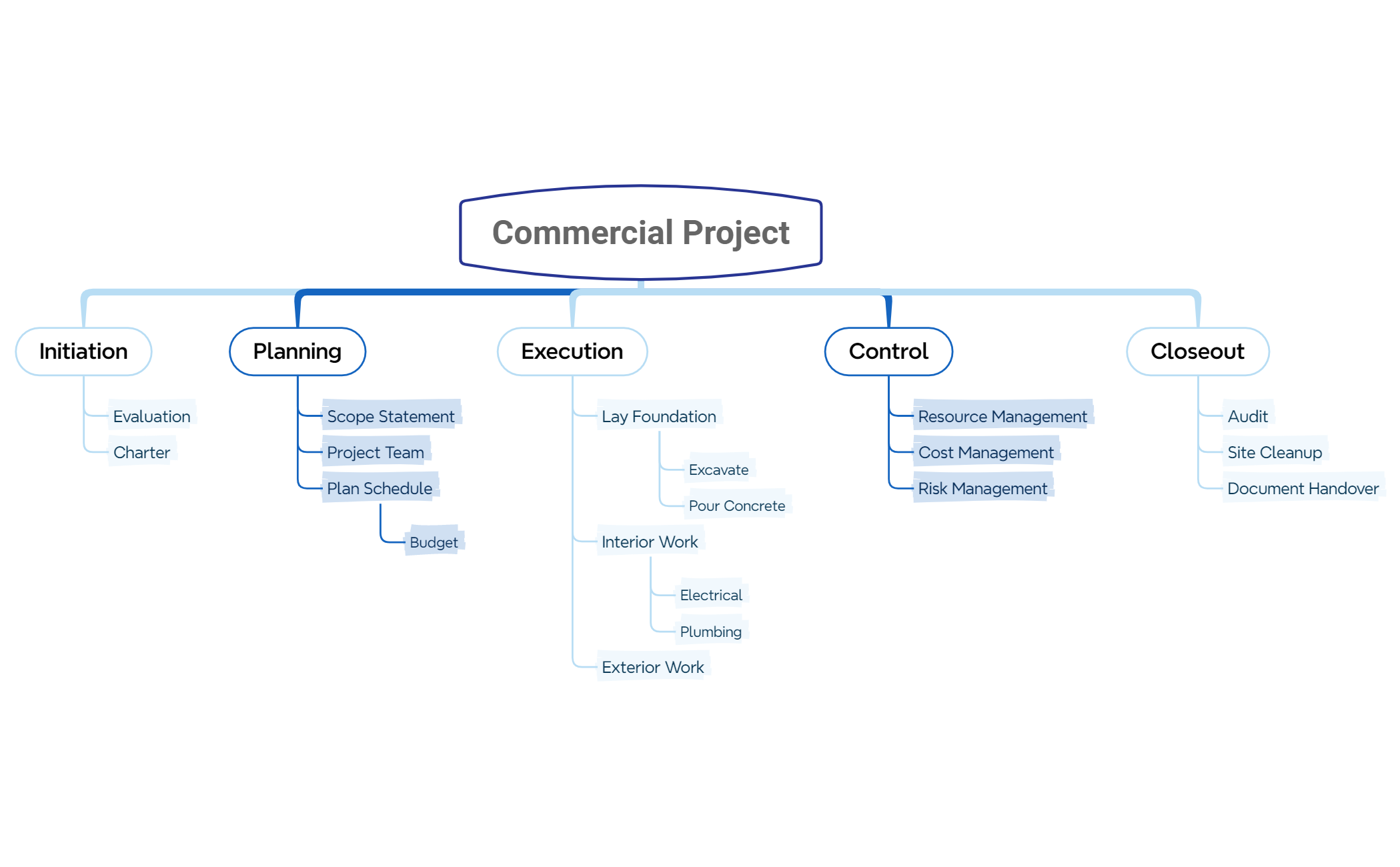
The Commercial Project mind map template provides a structured framework for managing construction projects, covering 5 key phases with 25 nodes. It guides users through Initiation (Evaluation, Charter), Planning (Scope Statement, Project Team, Plan Schedule with Budget), Execution (Lay Foundation with Excavate and Pour Concrete, Interior Work with Electrical and Plumbing, Exterior Work), Control (Resource Management, Cost Management, Risk Management), and Closeout (Audit, Site Cleanup, Document Handover). This template is ideal for project managers and construction teams seeking a clear, actionable roadmap for commercial builds. The layout follows a top-down flowchart style, making it easy to track progress from start to finish.
Conditions d'utilisationKicking off a new commercial construction project and need a clear roadmap from start to finish.
During the planning phase to define scope, assemble the team, and set a budget with milestones.
When monitoring project progress and need to track resources, costs, and risks in one place.
Open the .xmind file in Xmind (desktop, web, or mobile).
Review the five main branches: Initiation, Planning, Execution, Control, Closeout.
Replace placeholder text in each node with your project-specific details (e.g., project name, team members, budget figures).
Add sub-nodes by right-clicking a topic and selecting 'Add Subtopic' to expand sections like Interior Work or Risk Management.
Use Xmind's export feature to share the mind map as an image, PDF, or editable file with stakeholders.
The template includes 25 nodes across 5 phases: Initiation, Planning, Execution, Control, and Closeout. Key nodes include Evaluation, Charter, Scope Statement, Budget, Excavate, Pour Concrete, Electrical, Plumbing, Resource Management, Cost Management, Risk Management, Audit, Site Cleanup, and Document Handover.
Open the .xmind file in Xmind. Start by filling in the Initiation phase with your project's Evaluation and Charter details. Then move to Planning to define Scope, Team, and Budget. Use Execution to track construction tasks, Control to monitor resources and risks, and Closeout for final audits and handover.
Yes, the template is free to download and fully editable in Xmind. You can add, remove, or rename nodes to match your specific project requirements. It's also printable for offline use.
Use the Control branch to regularly update Resource Management, Cost Management, and Risk Management nodes. Add sub-nodes for specific metrics or issues. This helps you maintain oversight and make data-driven decisions throughout the project lifecycle.
Absolutely. The Execution branch includes Lay Foundation, Interior Work (Electrical, Plumbing), and Exterior Work. You can add sub-nodes for other trades like HVAC, roofing, or landscaping by right-clicking and adding new topics in Xmind.
Partagez vos modèles de cartes mentales avec des créateurs du monde entier et commencez à gagner avec votre travail.

