




College students who also work side gigs like Door Dash
Planning a new semester with fixed class times and a part-time job
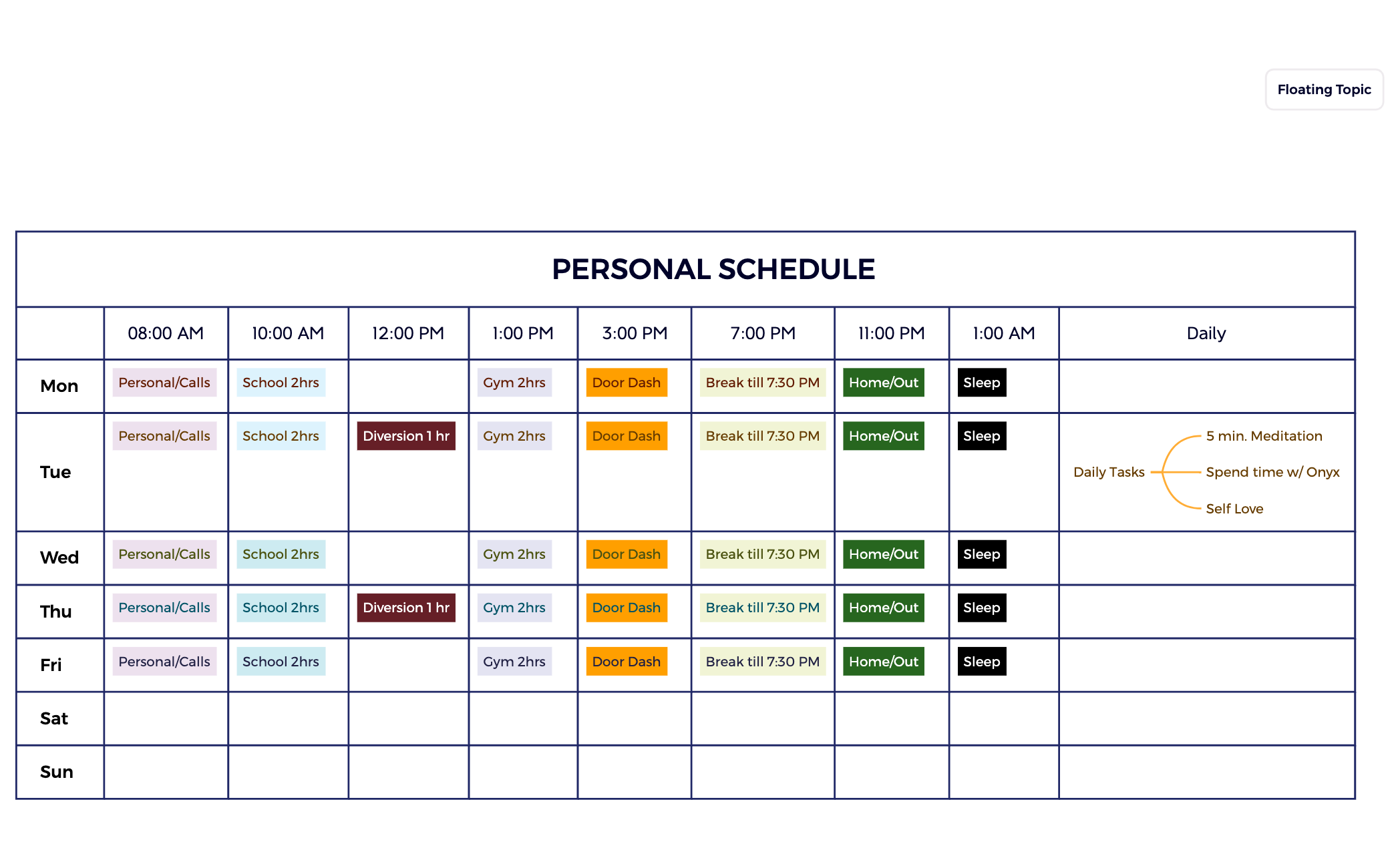
The Class Schedule mind map template from Xmind organizes a full week of activities across 50 nodes, covering sleep, school, gym, work (Door Dash), personal time, and breaks. It is designed for students or busy individuals who need to balance academic commitments with fitness, side gigs, and self-care. The template includes daily blocks such as 'School 2hrs', 'Gym 2hrs', and 'Break till 7:30 PM', plus a 'Floating Topic' for flexible items. A dedicated 'Daily Tasks' branch under Tuesday features '5 min. Meditation', 'Spend time w/ Onyx', and 'Self Love', making this more than a simple timetable—it's a holistic weekly planner. This Class Schedule template helps users visualize their week at a glance and ensure no area is neglected.
Terms and ConditionsPlanning a new semester with fixed class times and a part-time job
Establishing a consistent fitness routine alongside academic deadlines
Reviewing weekly time allocation to identify overcommitment or gaps
Launch the .xmind file to explore the predefined weekly structure covering school, fitness, and personal tasks.
Click on existing nodes like 'School' or 'Gym' to rename them and adjust the time blocks to match your specific schedule.
Insert subtopics for additional daily tasks and utilize the floating topic node to manage flexible or ad-hoc items anywhere on the canvas.
The template includes a weekly layout with days Monday to Sunday, each containing nodes for Sleep, Personal/Calls, School, Gym, Door Dash, and breaks. Tuesday also has a Daily Tasks branch with meditation and self-love reminders. A Floating Topic allows extra items.
Open the .xmind file in Xmind, then edit each day's nodes to match your own activities. You can add, remove, or rename branches like 'School 2hrs' to fit your classes or work hours. The Floating Topic is great for one-off tasks.
Yes, the template is free to use and fully editable in Xmind (desktop or web). You can change any node text, add new branches, or adjust the layout to suit your personal schedule.
Absolutely. The 'Daily Tasks' branch includes '5 min. Meditation', 'Spend time w/ Onyx', and 'Self Love' as examples. You can rename or replace these with your own daily habits or goals.
The template already allocates fixed blocks for 'School 2hrs', 'Gym 2hrs', and 'Door Dash' each weekday. Use the 'Break till 7:30 PM' node to ensure rest. Adjust the durations or add extra study slots as needed.
Share your mind map templates with creators around the world and start earning from your work.

