




Busy parents or individuals managing multiple recipients
Planning Christmas gifts for family and friends in early December
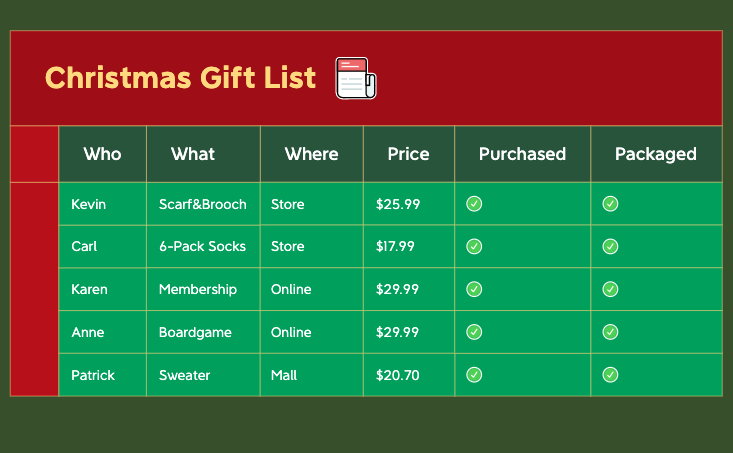
The Christmas Gift List mind map template helps you organize holiday gift planning across 5 recipients with 6 tracking categories. This 37-node template covers Who (Kevin, Carl, Karen, Anne, Patrick), What (Scarf&Brooch, 6-Pack Socks, Membership, Boardgame, Sweater), Where (Store, Online, Mall), Price ($25.99, $17.99, $29.99, $20.70), Purchased, and Packaged. It's a practical Christmas Gift List cheat sheet for tracking gifts from selection to wrapping. The layout uses a radial structure with color-coded branches for quick scanning.
使用条款Planning Christmas gifts for family and friends in early December
Organizing a Secret Santa exchange with colleagues or friends
Tracking holiday shopping budget and purchase status before Christmas Eve
Open the template in Xmind and replace the sample names under the Who branch with your actual gift recipients.
Update the What, Where, and Price branches to brainstorm specific gift items and track where to buy them.
Use the Purchased and Packaged categories along with Xmind task markers to track your progress from store to gift wrap.
It includes 6 main branches: Who, What, Where, Price, Purchased, and Packaged. You'll find 5 recipients, 5 gift ideas, 3 purchase locations, and 4 price points, plus checkboxes for Purchased and Packaged status.
Open the .xmind file in Xmind, then fill in the 'Who' branch with your recipients, 'What' with gift ideas, 'Where' with stores or online sources, and 'Price' with costs. Check 'Purchased' and 'Packaged' as you complete each step.
Yes, it's fully editable in Xmind (desktop, web, or mobile). You can add or remove nodes, change colors, and print the mind map or export it as an image or PDF for offline use.
Absolutely. The 'Price' branch contains sample values like $25.99 and $17.99. You can edit these to match your actual budget or add new price nodes for additional gifts.
Use the 'Purchased' and 'Packaged' branches as checklists. In Xmind, you can add task markers or checkboxes to each recipient's node to mark items as done. This gives you a visual overview of progress.
把你的思维导图模板分享给全球创作者,从你的作品中获得收益。

