




Data scientists and project managers
Kicking off a new data analytics project that involves multiple data sources and machine learning pipelines.
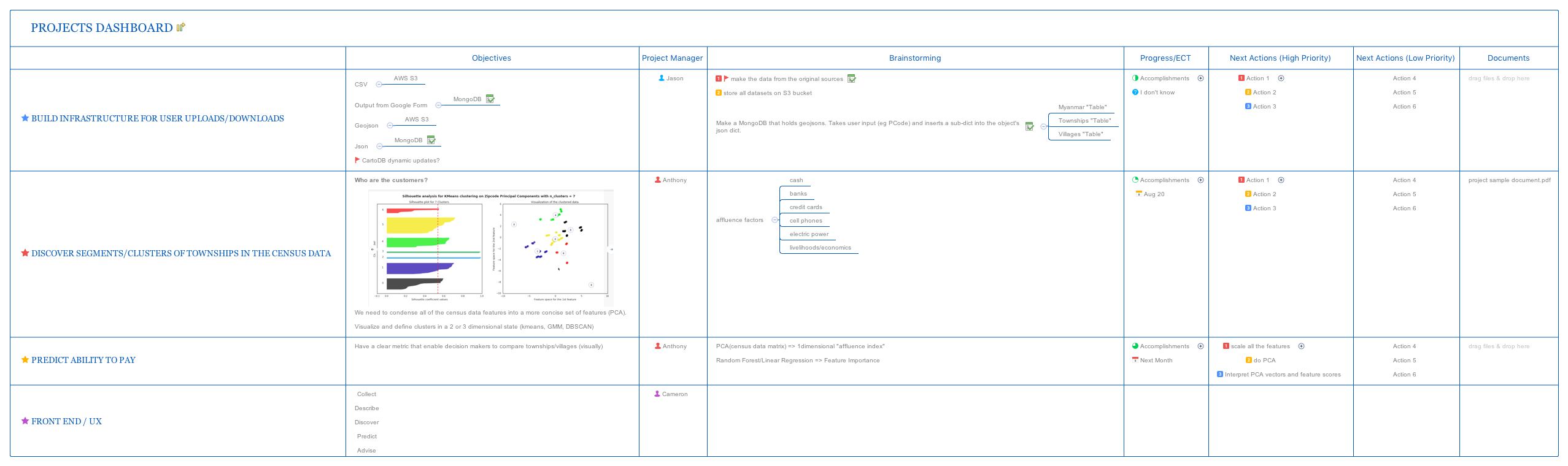
The Cartesisan Projects Dashboard mind map template organizes 84 nodes across four major workstreams for a data-intensive analytics project. It covers infrastructure for user uploads/downloads, census data clustering, affordability prediction, and front-end UX design. Key branches include 'Build infrastructure for user uploads/downloads' with specific data storage solutions like 'AWS S3' and 'MongoDB', and 'Discover segments/clusters of townships in the census data' which references 'affluence factors' such as 'cash', 'banks', and 'credit cards'. This template serves as a project management and planning tool for teams handling geospatial and demographic data analysis.
Terms and ConditionsKicking off a new data analytics project that involves multiple data sources and machine learning pipelines.
Planning the infrastructure for user uploads and storage of geospatial data in a web application.
Designing a front-end dashboard that guides users through data collection, discovery, and prediction workflows.
Open the template in Xmind to explore the four pre-structured workstreams covering infrastructure, census data, affordability prediction, and UX design.
Replace placeholder data sources like AWS S3 or MongoDB with your specific technical requirements and demographic analysis parameters.
Adjust the node structure to match your project milestones and use the accomplishments sections to monitor your team's development progress.
It is a project planning template for data analytics teams working on geospatial and demographic projects, covering infrastructure, clustering, prediction, and UX design.
Navigate to the 'Discover segments/clusters of townships in the census data' branch, review the affluence factors, and follow the PCA and clustering steps outlined in the actions.
Yes, you can replace the example storage solutions like 'AWS S3' and 'MongoDB' with your own infrastructure choices directly in Xmind.
The template references PCA, kmeans, GMM, DBSCAN for clustering, and Random Forest/Linear Regression for feature importance.
Yes, each major branch includes 'Accomplishments' and action items, making it useful for tracking completed and pending tasks.
Share your mind map templates with creators around the world and start earning from your work.

